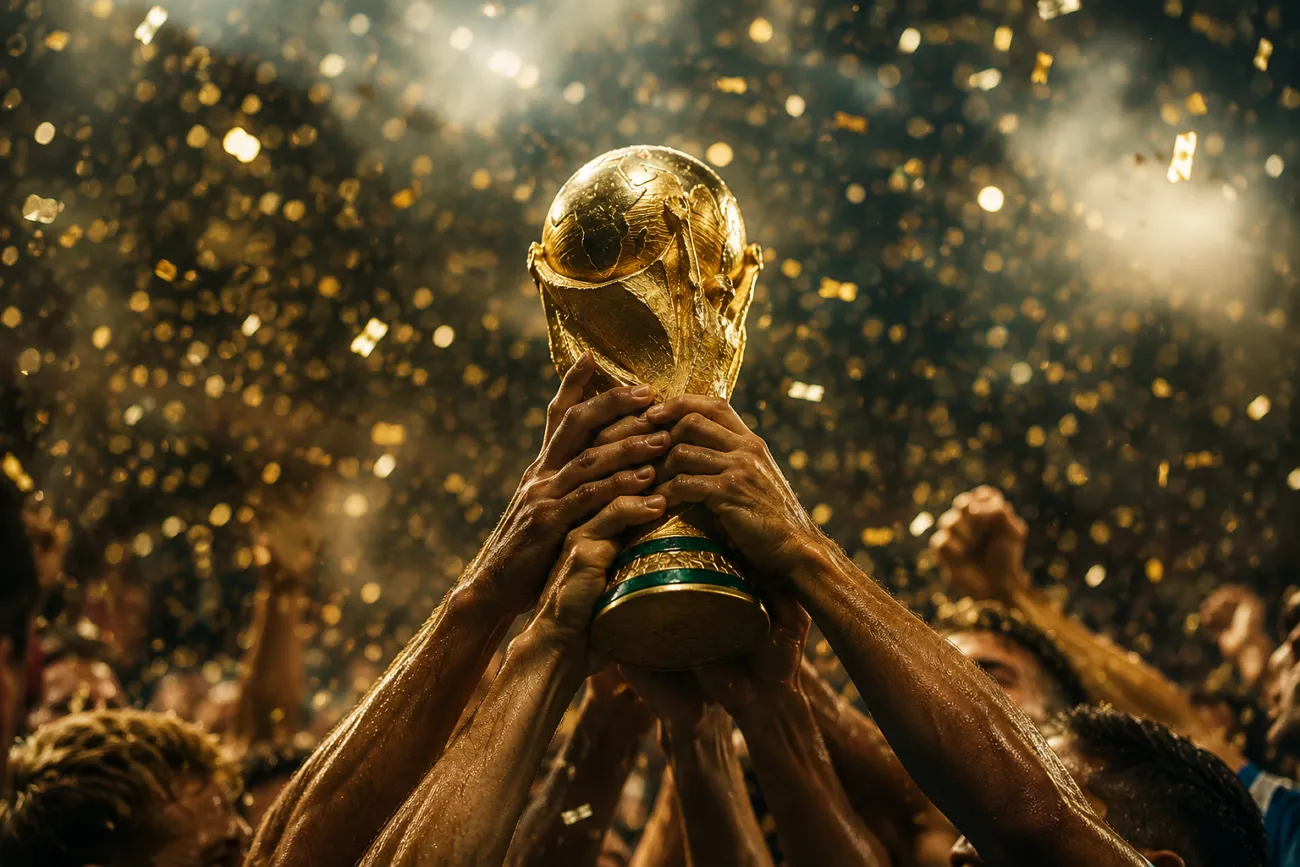
축구 경기를 보다가 종료 휘슬이 울리고, 응원하는 팀이 환호 속에서 월드컵 트로피를 들어 올려요. 그 순간을 프로 스포츠 중계처럼 보이는 시네마틱 영상으로 만든다고 상상해 보세요. 간단한 아이디어를 멋진 화면으로 바꾸는 도구 덕분에 이제 훨씬 쉬워졌어요.
이런 영상을 만들고 싶지만 도구에 어떤 명령을 줘야 할지 모르는 사람이 많아요. 필요한 걸 정의하는 프롬프트 작성에서 막혀요. 이 글에서 바로 영상을 만들 수 있는 월드컵 우승 영상 프롬프트 15개를 배워요.
1부. 결승전 승리를 위한 FIFA 월드컵 우승 영상 프롬프트 5개
아이디어를 잘 구조화하면 평범한 하이라이트도 퍼지기 쉬운 영상이 돼요. 아래는 결승전 승리 영상을 만드는 상위 5개 프롬프트예요. 이 월드컵 우승 영상 프롬프트로 원하는 비주얼을 만들어 보세요.
1. 극적인 막판 결승골 장면
아래 영어 프롬프트를 그대로 붙여넣으세요: “Create a cinematic World Cup final moment where a striker scores a decisive goal in the dying seconds of the match. The stadium erupts instantly as fans wave flags and celebrate wildly. Confetti explodes into the air as players rush toward the scorer in emotional celebration.”
2. 슬로모션 트로피 세리머니
아래 영어 프롬프트를 그대로 붙여넣으세요: “Craft a powerful slow-motion scene showing the winning captain lifting the World Cup trophy above his head. Golden lights reflect across the stadium while teammates gather around in joy. The moment feels emotional, grand, and unforgettable.”
3. 종료 휘슬 뒤 경기장 폭발
아래 영어 프롬프트를 그대로 붙여넣으세요: “Generate a high-energy post-match scene immediately after the referee blows the final whistle. Players drop to their knees in disbelief and joy as fireworks light up the night sky. The entire stadium becomes a wave of celebration and sound.”
4. 선수의 감정적인 우승 리액션
아래 영어 프롬프트를 그대로 붙여넣으세요: “Create a close-up emotional shot of a footballer crying tears of joy after winning the World Cup. Teammates quickly surround him with hugs and cheers. The scene captures raw emotion, relief, and pure happiness.”
5. 국가대표 퍼레이드 세리머니
아래 영어 프롬프트를 그대로 붙여넣으세요: “Craft a vibrant victory parade featuring the winning team riding through streets on an open-top bus. Crowds line the roads, waving flags and chanting their names. The entire city is filled with music and celebration.”
2부. 팀 세리머니를 위한 FIFA 월드컵 우승 영상 프롬프트 5개
진짜 마법은 승리 후 하나 됨을 담는 팀 세리머니에서 시작해요. 선수들이 승리를 나누는 장면이라 시네마틱 스토리에 잘 맞아요. 아래 프롬프트는 팀 세리머니에 초점을 둔 월드컵 우승 영상을 만드는 데 쓰세요.
1. 라커룸 우승 세리머니
아래 영어 프롬프트를 그대로 붙여넣으세요: “Create a cinematic locker room scene where the winning team celebrates their World Cup victory with loud cheers and music. Players spray water, hug each other, and dance in pure joy. The atmosphere is energetic, emotional, and full of unforgettable excitement.”
2. 감독과 팀의 포옹
아래 영어 프롬프트를 그대로 붙여넣으세요: “Craft a heartfelt moment where the coach embraces every player after winning the final match. Tears of pride and relief are visible as the entire squad gathers around him. The scene reflects leadership, teamwork, and emotional connection.”
3. 그라운드에서 국기를 두른 세리머니
아래 영어 프롬프트를 그대로 붙여넣으세요: “Generate a powerful on-field celebration where players wrap themselves in their national flag after victory. They walk together around the stadium waving to fans. The moment feels patriotic, proud, and deeply emotional.”
4. 승리의 원형 댄스
아래 영어 프롬프트를 그대로 붙여넣으세요: “Create a joyful scene where players form a circle and perform a spontaneous victory dance on the pitch. The stadium echoes with cheers while teammates laugh and celebrate together. The energy feels vibrant, fun, and unforgettable.”
5. 월드컵 트로피와 팀 사진
아래 영어 프롬프트를 그대로 붙여넣으세요: “Craft a cinematic team photo moment where all players gather around the World Cup trophy on the field. Cameras flash as they pose with smiles, hugs, and raised hands. The scene captures unity, pride, and historic achievement.”
3부. 선수 포커스를 위한 FIFA 월드컵 우승 영상 프롬프트 5개
개인 선수 순간이 월드컵 우승에서 가장 기억에 남는 하이라이트가 되곤 해요. 수년간 노력한 선수의 감정과 리액션을 담아요. 아래는 선수 중심의 월드컵 우승 영상 프롬프트예요.
1. 스타 선수가 홀로 트로피를 드는 장면
아래 영어 프롬프트를 그대로 붙여넣으세요: “Create a cinematic scene of the tournament's star player standing alone on the pitch while holding the World Cup trophy. Stadium lights shine brightly as confetti slowly falls around him.”
2. 우승의 눈물
아래 영어 프롬프트를 그대로 붙여넣으세요: “Craft a close-up shot of a player shedding tears of joy after securing the World Cup title. His face reflects years of hard work, sacrifice, and determination.”
3. 주장의 영감을 주는 세리머니
아래 영어 프롬프트를 그대로 붙여넣으세요: “Generate a powerful scene featuring the team captain celebrating with raised arms in front of thousands of supporters. The crowd chants his name as he proudly displays the trophy.”
4. 골든볼 수상 순간
아래 영어 프롬프트를 그대로 붙여넣으세요: “Create a dramatic award ceremony where the tournament's best player receives the Golden Ball trophy. Bright lights illuminate the stage while photographers capture the historic moment.”
5. 경기장 한 바퀴 빅토리 랩
아래 영어 프롬프트를 그대로 붙여넣으세요: “Craft a cinematic sequence showing a player carrying the World Cup trophy while jogging around the stadium. Fans reach out and wave flags as he acknowledges their support.”
4부. MagicLight AI로 FIFA 월드컵 우승 영상 만들기
MagicLight AI는 간단한 아이디어와 스크립트를 몇 분 만에 시네마틱 영상으로 바꾸는 AI 영상 플랫폼이에요. FIFA 월드컵 우승처럼 스토리가 서야 하는 스포츠 콘텐츠에 특히 잘 맞아요. Story-to-Video 기능으로 축구 경기 서사를 역동적인 비주얼 스토리로 바꿀 수 있어요.
또한 11개 언어를 지원해 글로벌 시청자용 콘텐츠를 만들 수 있어요. 내장 배경 음악은 경기장의 감정 강도를 되살려 줘요. 텍스트 스크립트나 프롬프트만 넣으면 장면이 있는 완전한 영상 시퀀스를 자동 생성해요.
핵심 기능
- Multiple Generation Models: Gemini 3와 Veo 4 같은 생성 모델을 고를 수 있어요. 모델마다 비주얼을 다르게 살려 순간을 더 임팩트 있게 만들어요.
- Caption Generation: 중요한 축구 순간에 텍스트 오버레이를 더해요. 월드컵 우승 영상이 더 몰입되고, 글로벌 시청자도 따라가기 쉬워져요.
- Character Generation and Customization: 세부 옵션으로 선수를 디자인할 수 있어요. 표정과 다른 속성을 취향대로 조절해요.
- AI Voiceover: 스크립트를 에너지 넘치는 축구 해설로 바꿔 줘요. 생중계의 흥분이나 경기 후 감정 나레이션을 꽤 정확하게 흉내 내요.
- Aspect Ratio Selection: 원하는 방향으로 화면비를 고를 수 있어요. 월드컵 우승 영상이 각 플랫폼에 맞게 들어가게 해요.
FIFA 월드컵 우승 영상을 만드는 전체 단계
MagicLight AI는 사진과 텍스트 프롬프트로 영상을 만들 수 있어요. 아래 단계로 현실적인 장면과 캐릭터 영상을 만들어 보세요.
1단계. Create로 새 프로젝트 시작
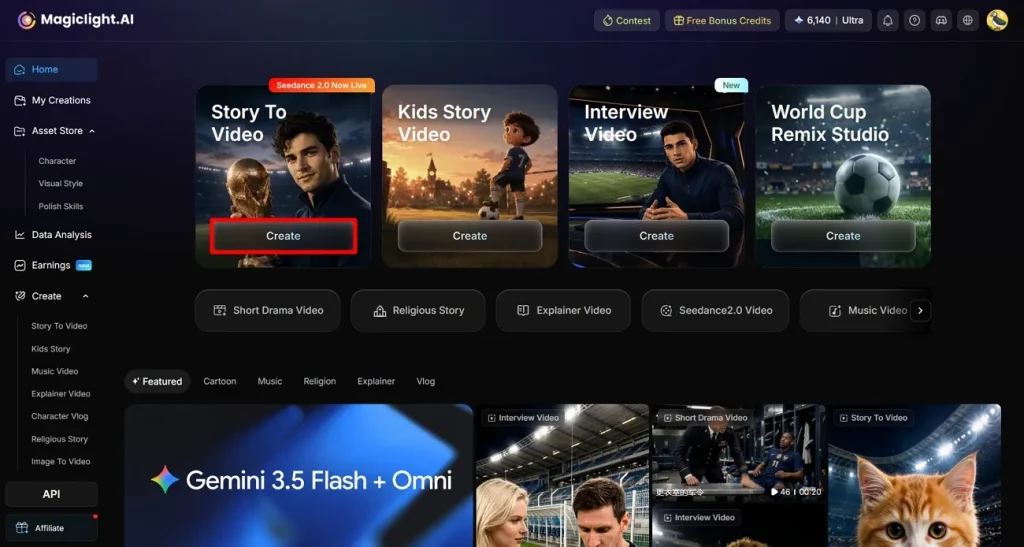
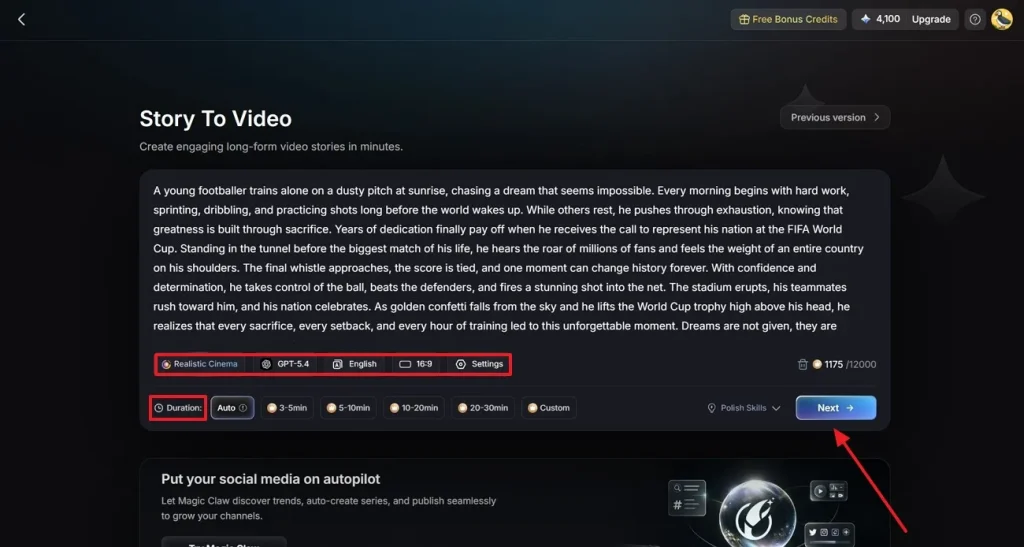
브라우저에서 MagicLight AI를 열고 메인 대시보드의 Story to Video로 들어가세요. Create를 눌러 새 프로젝트를 시작하세요.
2단계. FIFA 영상 설정하기
FIFA 월드컵 스크립트를 텍스트 입력란에 넣으세요. 영상 스타일에 맞는 콘텐츠 유형을 고르세요. AI 생성 모델을 선택하고 화면비를 맞춘 뒤, 길이를 정하고 설정이 끝나면 Next를 누르세요.
3단계. 생성된 스토리 장면 검토하고 다듬기
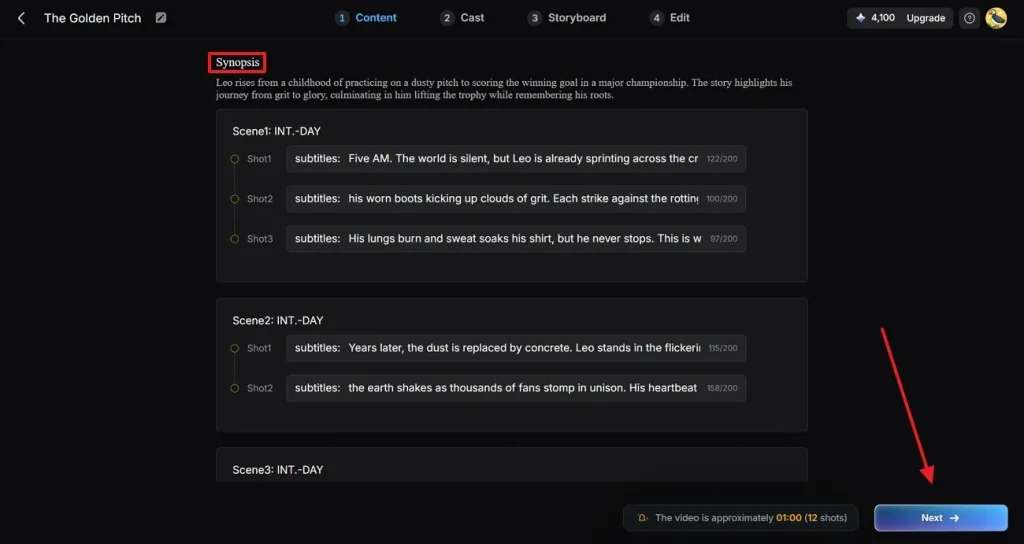
도구가 스크립트를 여러 장면으로 나누고 전체 이야기의 비주얼 분해를 만들어요. 각 장면을 살펴 흐름이 맞는지 확인하세요. 스토리라인이 자연스러우면 Next를 클릭하세요.
4단계. 축구 캐릭터 선택하고 추가
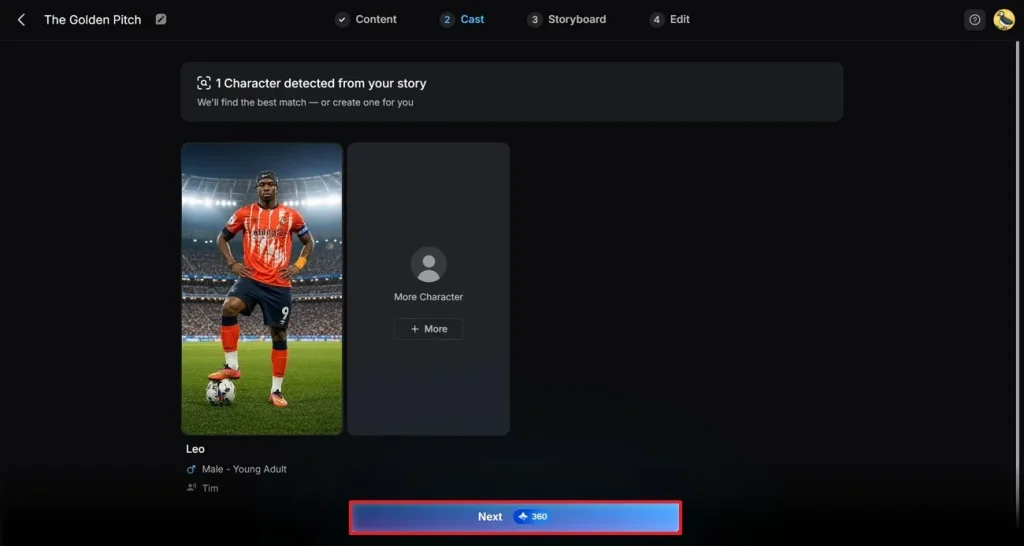
라이브러리에서 FIFA 영상 콘셉트에 맞는 축구 캐릭터를 고르세요. My Character에서 저장한 캐릭터를 열거나 편집해 더 개인화된 룩을 만들 수도 있어요. 여러 선수나 관중 장면이 필요하면 More Character로 캐릭터를 더하세요. 끝나면 Next로 이어가세요.
5단계. 캐릭터 외형과 움직임 수정
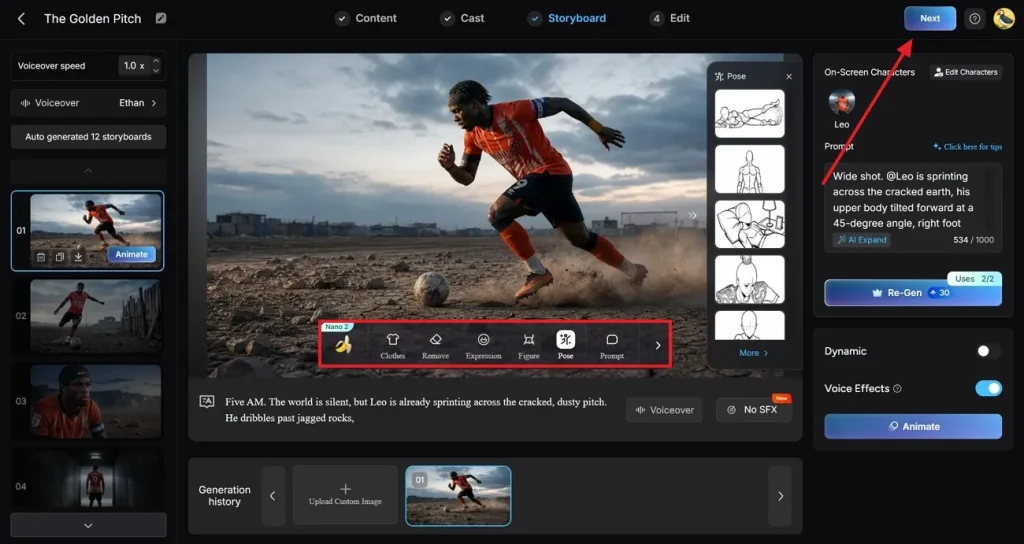
캐릭터 룩을 확인하고 취향에 맞게 옷을 바꾸거나 원치 않는 오브젝트를 제거하세요. 몰입을 위해 보이스 이펙트를 더할 수도 있어요. 모든 장면에서 캐릭터가 일관적인지 확인한 뒤, 만족하면 오른쪽 위 Next를 클릭하세요.
6단계. 캡션과 배경 음악 추가
다음 화면에서 영상의 대사에 캡션을 넣으세요. FIFA 월드컵 우승 영상의 톤에 맞는 캡션 스타일을 고르세요. 흥분을 끌어올릴 배경 음악을 고른 뒤 Generate를 눌러 작업을 실행하세요.
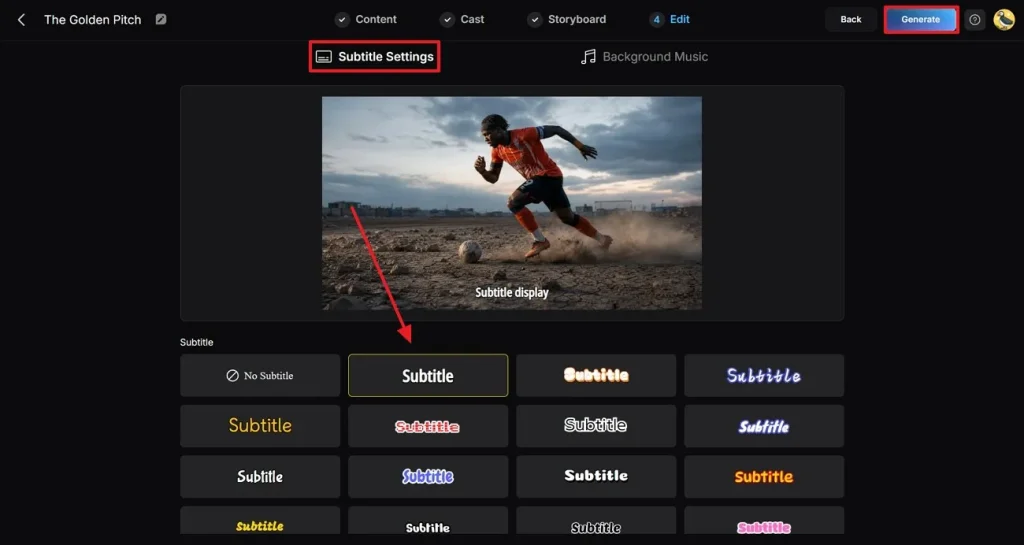
7단계. 최종 결과 확인하고 영상 다운로드
완성 영상을 미리 보고 비주얼과 오디오를 확인하세요. 만족하면 인터페이스 오른쪽 위의 Download를 누르세요.
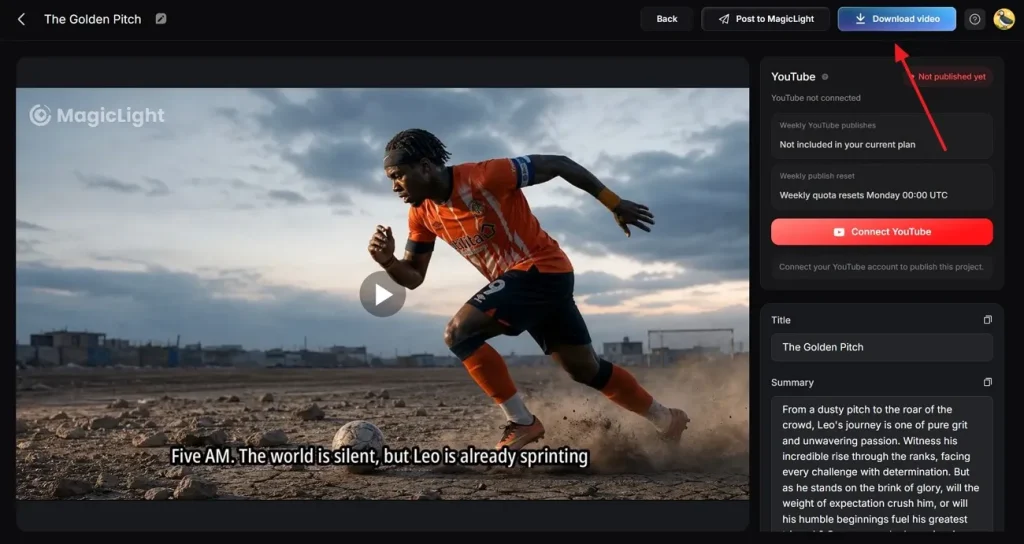
마무리
이 글에서는 영상을 만들 때 바로 쓸 수 있는 월드컵 우승 영상 프롬프트를 다뤘어요. 어디서부터 시작할지 모를 때 도움이 돼요. 이 프롬프트를 영상으로 바꿔 주는 도구 중 하나가 MagicLight AI예요. story-to-video 기능으로 텍스트 프롬프트를 설득력 있는 비주얼로 만들 수 있어요.
FIFA 월드컵 우승 영상 프롬프트 FAQ
1. 월드컵 영상 생성에 가장 좋은 도구는?
MagicLight AI는 스크립트를 시네마틱 축구 장면으로 바꿔, 월드컵 영상 콘텐츠를 만들기 좋은 도구예요. story-to-video 생성과 커스터마이즈 가능한 캐릭터로 현실적인 경기 스토리를 만들 수 있어요. 고품질 월드컵 우승 영상 편집을 빠르게 내기 좋아요.
2. MagicLight AI로 여러 장면의 우승 영상을 만들 수 있나요?
가능해요. 플랫폼이 스크립트를 구조화된 세그먼트로 나눠 멀티씬 영상을 쉽게 만들어요. 골과 트로피 장면이 있는 완전한 월드컵 세리머니 영상을 구성할 수 있어요.
3. 온라인에서 잘 되는 월드컵 우승 영상 유형은?
강한 스토리와 관중 리액션이 있는 영상이 가장 주목받아요. MagicLight AI 같은 도구로 비주얼이 풍부하고 공유하기 좋은 축구 콘텐츠를 만들 수 있어요. 플랫폼에 맞춰 화면비와 길이도 다르게 생성할 수 있어요.
4. AI 축구 세리머니 영상은 어떻게 만들나요?
축구 테마 스크립트를 써서 MagicLight AI에 넣으세요. 영상 스타일과 길이 같은 속성을 고르세요. 도구의 고급 기술로 캐릭터를 생성한 뒤 영상을 기기로 내보내세요.