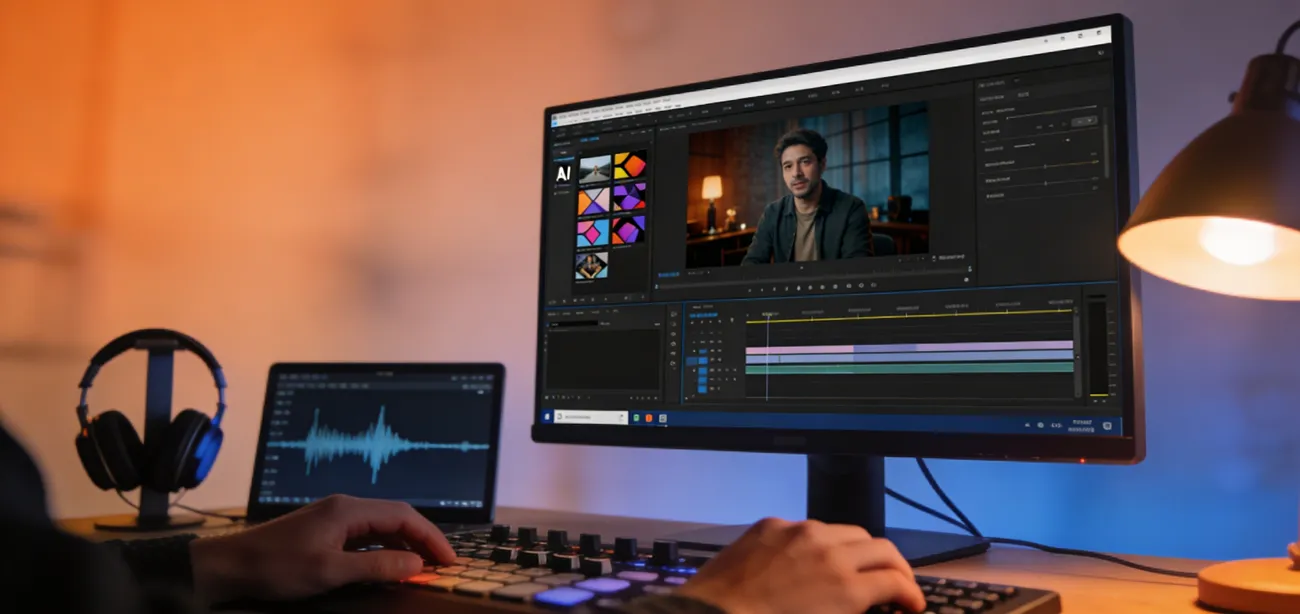
A tight content deadline pushes many creators to search for faster ways to produce engaging videos. Traditional editing often requires time, skills, and multiple tools, which can slow down the process. AI video generators are now transforming how content is created by simplifying production through automation. Artlist AI Video Generator is one such platform designed to help users turn ideas into videos quickly.
It combines AI technology with creative assets to support marketers, educators, and social media creators. Still, with several AI video tools available today, an important question remains: is it truly worth using? This review explores its features, advantages, and limitations in 2026.
Part 1. What is Artlist AI Video Generator
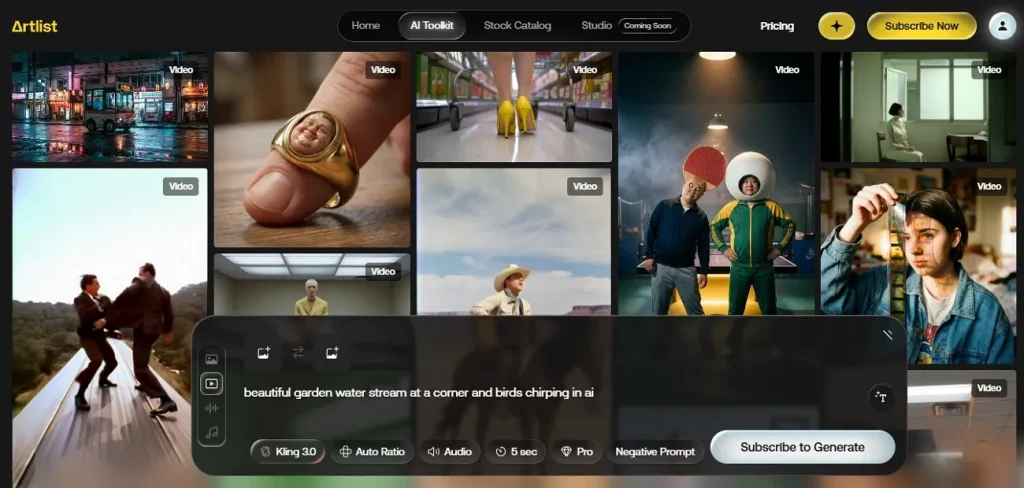
Artlist AI Video Generator is an AI-powered video creation tool available within the Artlist AI toolkit that allows users to generate short cinematic videos using text prompts, images, or existing visual references. The platform combines multiple advanced AI video models in one workspace, enabling creators to produce dynamic clips with realistic motion, detailed visuals, and automated camera movements.
Users can create content through text-to-video, image-to-video, or story-to-video workflows without complex editing skills. The tool aims to simplify video production while giving creators greater control over style, motion, and visual storytelling.
Key Features
- Start & End Frame Control: Allows users to define the beginning and ending frames of a video to guide the AI in generating smoother and more controlled visual transitions.
- AI Scene Refinement: Enables users to refine and improve specific scenes in an existing video, helping enhance visual quality, motion, or details without recreating the entire clip.
- AI Prompt Enhancement: Automatically improves and expands simple text prompts to generate more detailed, accurate, and visually compelling AI video results.
- Negative Prompt Input: Lets users specify elements they do not want in the generated video, helping the AI avoid unwanted objects, styles, or visual artifacts.
Pros
- Artlist AI Video Generator creates original background music automatically using AI, helping users match the mood and style of their videos.
- It generates custom visuals from text prompts, allowing creators to quickly produce unique images that can be used in video scenes or creative projects.
- Converts written scripts into natural-sounding voiceovers, making it easy to add narration to videos without recording audio manually.
Cons
- The AI video generator typically produces short clips, usually around 5–10 seconds, which may not be sufficient for longer storytelling.
- Although Artlist offers a trial, it provides a very limited number of generations, making it difficult for users to fully evaluate the platform.
- The platform supports only specific file formats for uploads, such as JPG or PNG images.
Part 2. Best Alternative to Artlist AI Video Generator
For creators looking to produce professional-quality videos quickly, Magiclight AI Video Generator offers a complete, AI-powered solution. This Artlist AI Video Generator alternative supports long-form videos up to 50 minutes and covers diverse formats, including stories, music videos, and explainer videos. Its Nano Storyboard feature enables detailed scene refinement with micro-step control over the camera. Users can generate videos from text, images, or existing clips, even with no prior technical skills.
Moreover, the tool has the ability to customize characters using AI prompts and handle scripts up to 12,000 words. Magiclight also provides AI-generated music, voiceovers, and subtitles, leveraging style models like MagicLight 2.0, 2.2, 3.0, and Midjourney V7. With one-click video creation, multilingual support, and a full editing workflow, Magiclight empowers marketers, educators, and storytellers to bring creative ideas to life effortlessly.
Step-by-step Guide to Create Engaging Videos With Magiclight
After learning about what this tool is capable of, let us have a look at how to use this tool for video generation:
Step 1. Start a New Project
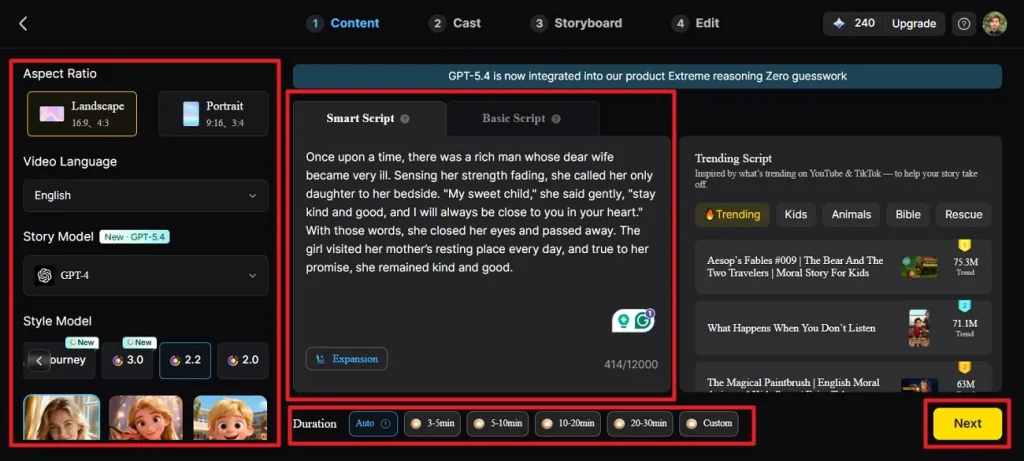
Open the Story to Video tool, select your Aspect Ratio and Duration, then pick a Video Language, Story Model, and Style Model. Use the Smart Script tab to write or paste your script, which the AI will optimize automatically, and click Next to continue.
Step 2. Review Scene Breakdown
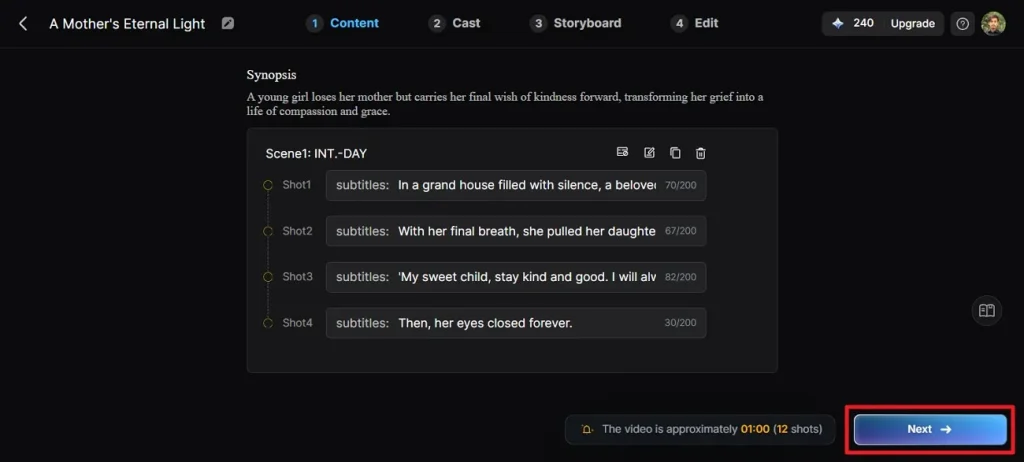
Check the AI-generated scene-by-scene synopsis and adjust if needed using the top control. Once the layout is finalized, press Next to continue.
Step 3. Select Characters
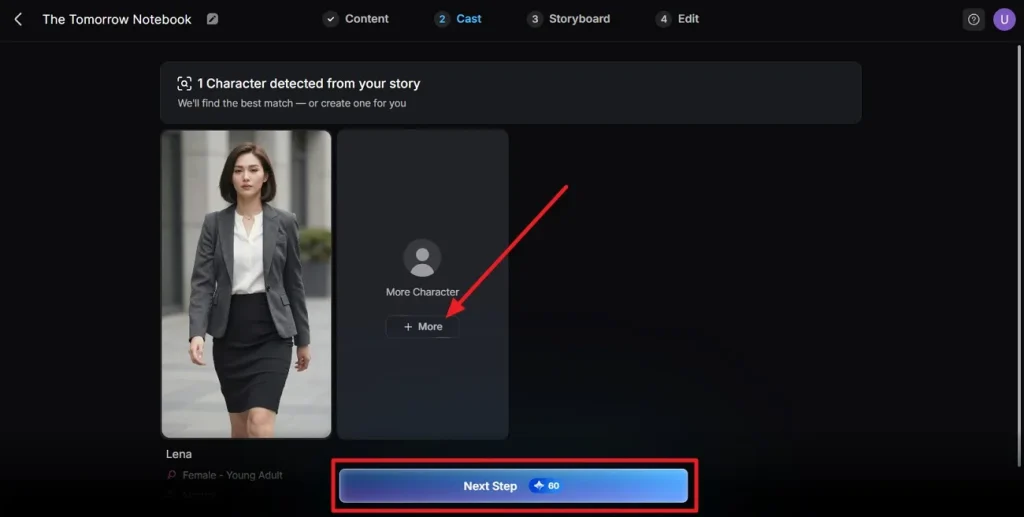
The tool will detect characters from your script in the following interface. Explore additional options if needed or confirm your selections and click Next Step.
Step 4. Refine the Storyboard
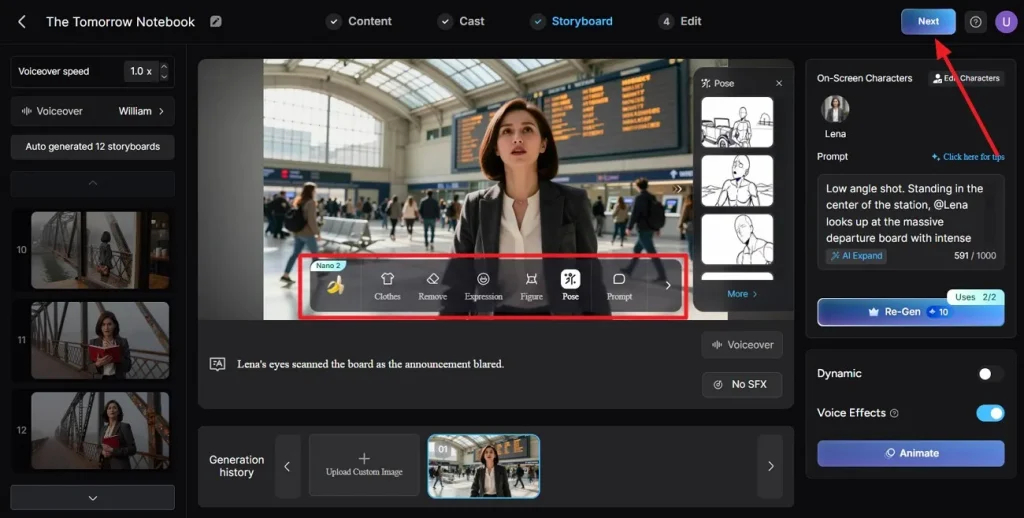
Preview all scenes in the storyboard and adjust clothing, expressions, or poses using the controls provided. You can also add a voiceover and change the speed of narration. Once you are satisfied with the results, press the Next button.
Step 5. Add Subtitles to the Video
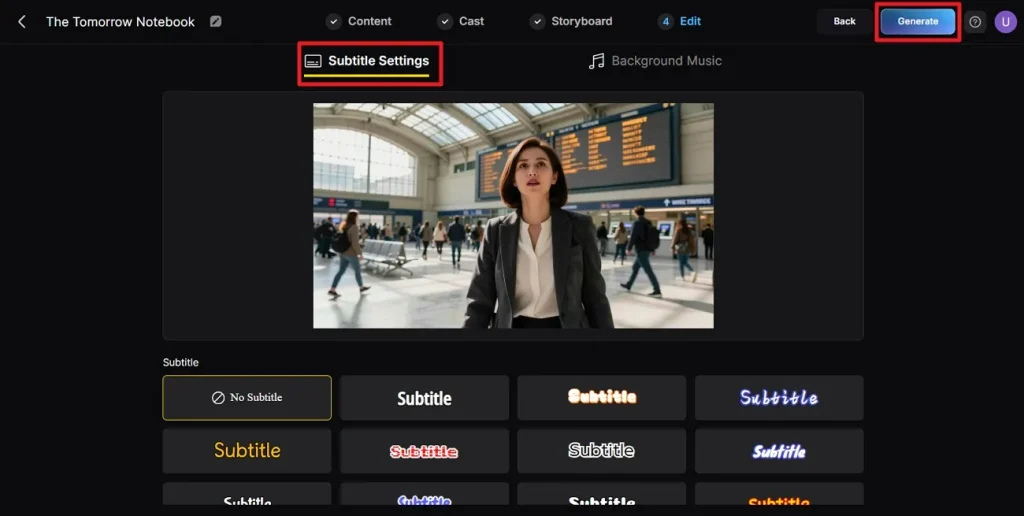
If your video contains dialogue, choose a subtitle style from the available options. You can also add background music according to your choice using the Background Music option. Finally, click the Generate button to let the tool start creating the video.
Step 6. Final Review and Download
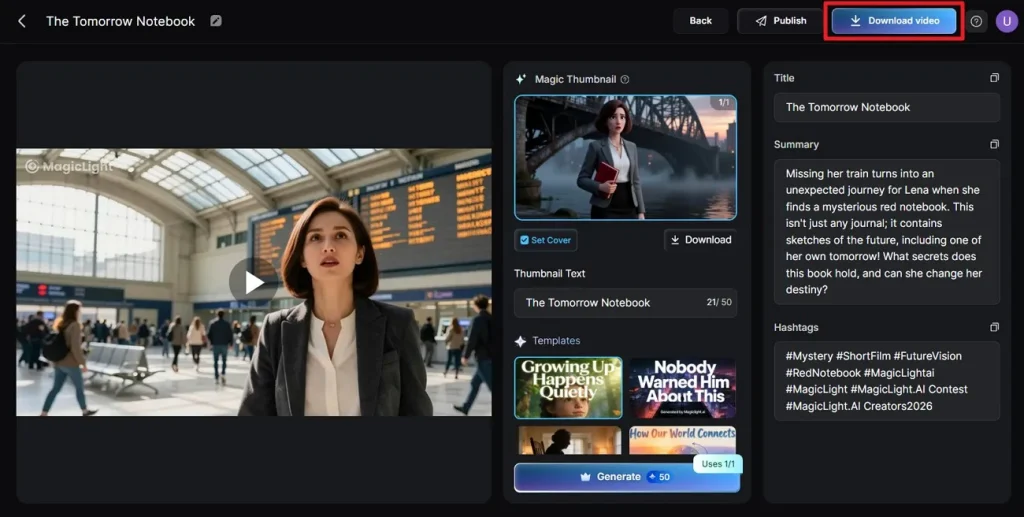
Play the finished video and review it within the tool’s interface. Click Download Video to save your project once you are satisfied with it.
Part 3. Comparison Table Between Artlist AI Video Generator and Magiclight.AI
When choosing an AI video generator, understanding the differences between platforms can help creators pick the tool that best fits their needs. Provided below is a side-by-side comparison between Artlist AI Video Generator and Magiclight to make it easier for you to choose:
| Feature | Artlist AI Video Generator | Magiclight.AI |
| Video Length | Short clips (5–10 sec) | Long-form videos up to 50 min |
| Storyboard Control | Basic storyboard | Nano Storyboard with micro-step scene refinement |
| Character Customization | Limited | Full AI character creation, voice cloning, and consistent characters across scenes |
| Templates & Styles | Fewer style models | Multiple style models (MagicLight 2.0, 2.2, 3.0, Midjourney V7) |
| Text-to-Video Script Limit | Up to 3,000 words | Up to 12,000 words |
Conclusion
To wrap it up, you learned a detailed review of Artlist AI Video Generator in this article. While Artlist offers basic AI video creation, Magiclight stands out with its long-form video support, Nano Storyboard for precise scene control, and extensive style models. For creators, marketers, and educators seeking a complete end-to-end video production solution, Magiclight provides more flexibility, advanced features, and professional-quality results.
FAQs on Artlist AI Video Generator
1. Is Artlist AI Video Generator free?
No, the Artlist AI Video Generator is not entirely free; it works on a credit‑based system that requires a paid subscription for full access. Free trials may offer limited credits, but serious use typically requires upgrading to a paid plan.
2. Is Artlist AI totally free?
No, Artlist AI tools are not completely free, users must subscribe and use credits to generate videos, music, or images. Free versions are restricted and intended mainly for testing before purchasing.
3. What is the best alternative to Artlist AI Video Generator?
One of the best alternatives is Magiclight, which supports long‑form videos, more creative controls, and advanced features like Nano Storyboard and extensive character customization. It offers richer end‑to‑end video production capabilities for creators and marketers.
4. How long are the AI videos on Artlist?
Artlist’s AI video generation typically produces short clips, usually around 5–10 seconds per generation. It is not designed for long‑form video creation like some other platforms, such as Magiclight.
![15 Top Cartoon Characters of All Time [New List]](https://blog-new.magiclight.ai/wp-2/wp-content/uploads/top-cartoon-characters-300x168.webp)
![9 Best AI Video Generation Models in 2026 [Easy Selection]](https://blog-new.magiclight.ai/wp-2/wp-content/uploads/best-ai-video-generation-models-300x168.webp)