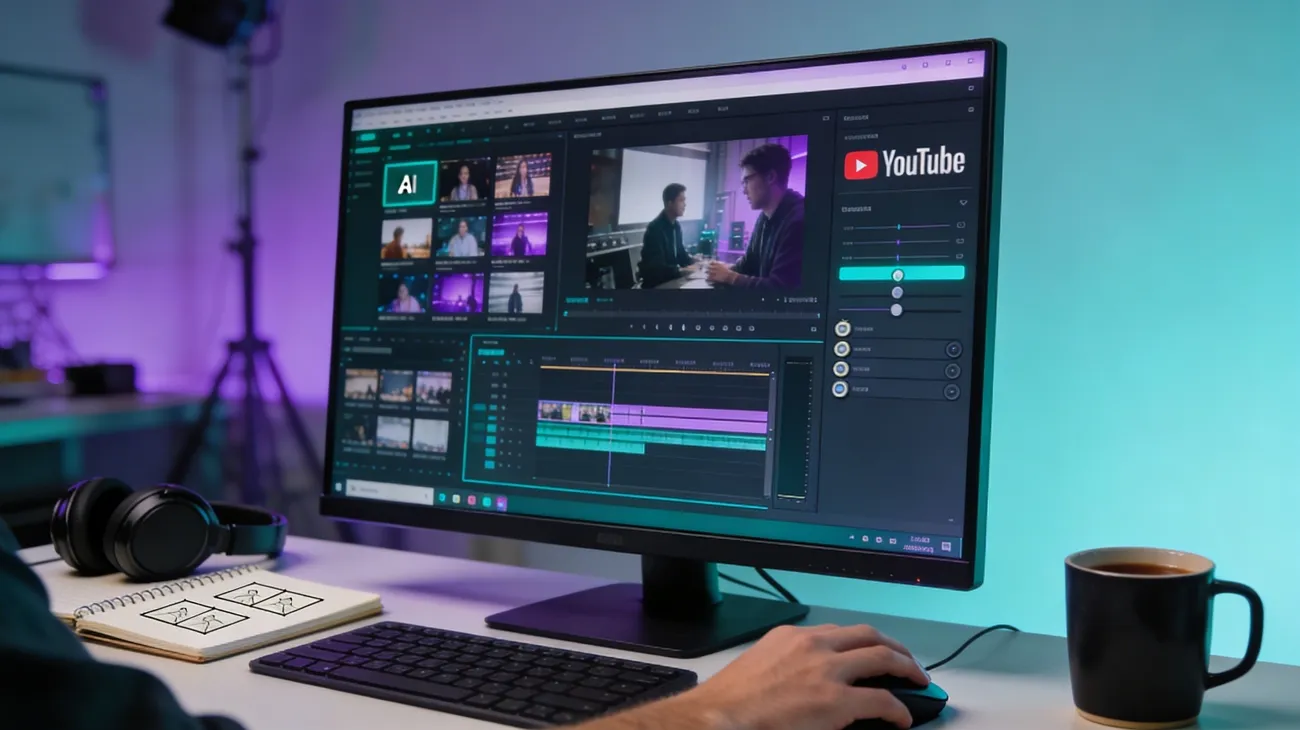
A content creator sits in front of a blank timeline, needing an engaging video but lacking time and editing skills. AI video generators are quickly becoming the go-to solution for turning ideas into polished visuals within minutes. Among the latest tools gaining attention is Digen AI, a platform designed to simplify video production through automated scripts, visuals, and editing.
By combining smart prompts with generative media technology, it aims to help marketers, educators, and creators produce professional videos effortlessly. This Digen AI review explores its key features and other aspects to help determine whether it’s truly worth trying in 2026.
Part 1. What is Digen AI Video Generator
Digen AI Video Generator is an AI-powered platform designed to help users create professional videos quickly without complex editing skills. By simply entering text, uploading images, or providing basic instructions, the tool automatically generates scenes, animations, transitions, and voice narration. It uses advanced AI models to turn ideas into ready-to-share videos within minutes.
Designed for creators, marketers, and educators, Digen AI simplifies video production and makes high-quality content accessible to anyone through a browser-based interface.
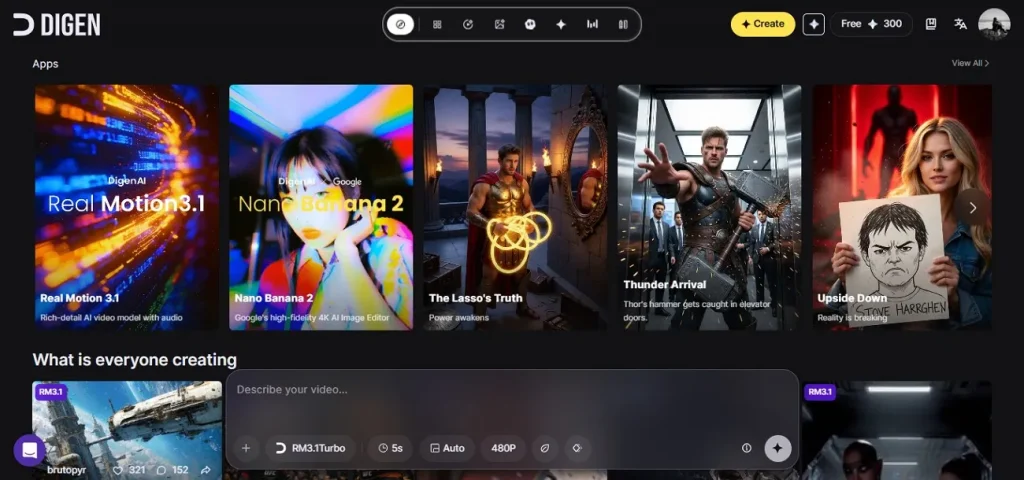
Key Features
- Select Duration: Digen AI allows users to set the exact video length, helping control pacing and match content with platform requirements.
- Choose Aspect Ratio: The tool offers multiple aspect ratio options, making it easy to create videos optimized for YouTube, TikTok, Instagram, or presentations.
- Add Background Music: Users can enhance their videos by adding background music that automatically fits the mood and flow of the generated scenes.
- Generate AI Sound Effects: Digen AI can create AI-generated sound effects that synchronize with actions in the video, making the final output more immersive and engaging.
Pros
- Digen AI free lets users choose the video resolution, ensuring the final output meets different quality needs for social media.
- The built-in AI prompt enhancer automatically refines user inputs, improving descriptions so the generated video scenes appear more detailed.
- It integrates multiple AI generation models, giving users the flexibility to create varied styles, animations, and visual outputs.
Cons
- Generated video clips are often limited to short durations, which may restrict longer storytelling.
- Advanced features usually require a paid subscription, limiting full access for free users.
- Video generation can sometimes take longer during peak usage times.
Part 2. How to Use Digen AI Video Generator
After learning about the Digen AI image-to-video tool in detail, let us have a look at how to use this tool to create videos:
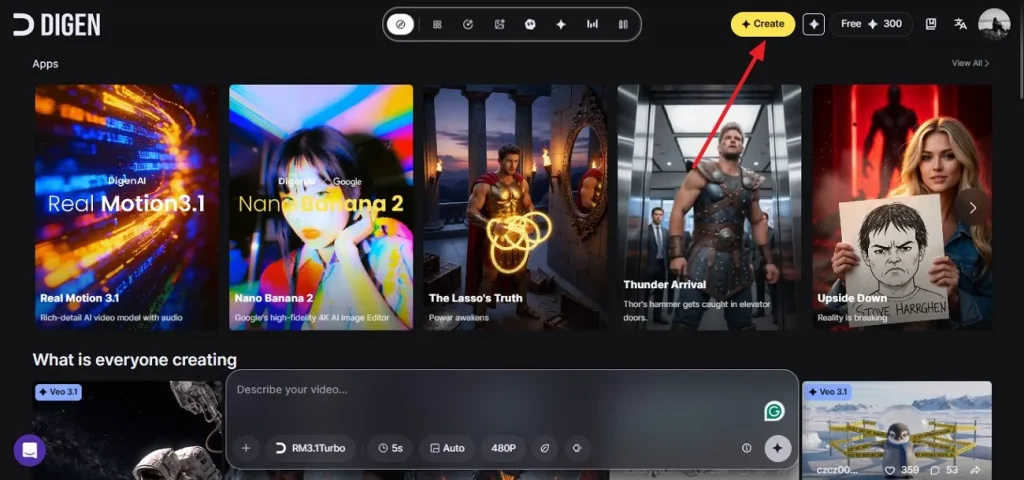
Step 1. Begin by accessing the tool on your web browser and pressing the Create option located on the homepage.
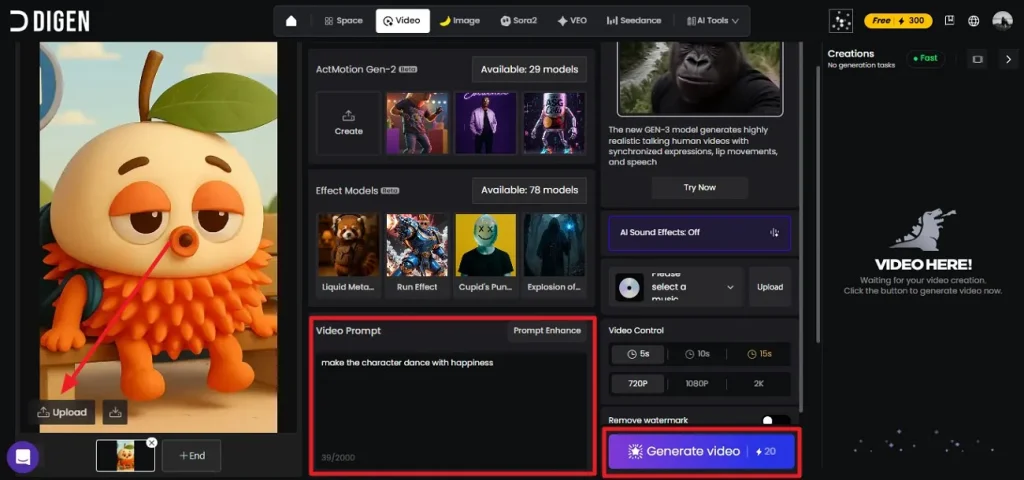
Step 2. Next, import the reference image in the designated field and enter a text prompt. Next, select the Resolution, Duration, and AI models according to your preferences from the options provided. Once all the settings are done, hit the Generate Video button to execute the process.
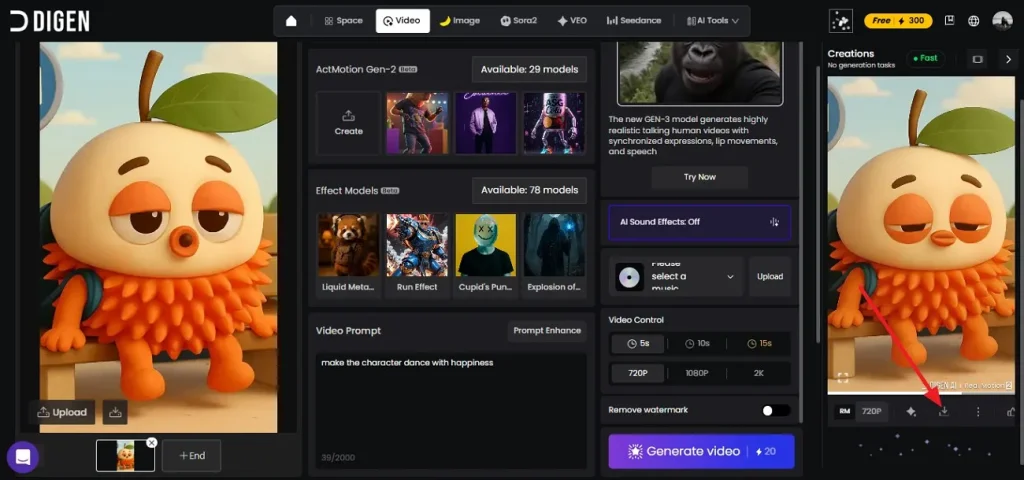
Step 3. After the completion of the process, the video will appear within the interface on the right. Preview it and press the Download icon to save the results to your device.
Part 3. Best Alternative to Digen AI Video Generator
One of the best alternatives to Digen AI is Magiclight.AI, a powerful AI video creation platform designed for creators who want to produce high-quality videos with minimal effort. Unlike many AI video generators that mainly create short clips, Magiclight focuses on transforming scripts or simple ideas into complete videos using automated storytelling technology. Magiclight.AI provides a complete AI video production workflow, making it a strong and practical alternative.
Magiclight.AI also supports text-to-video, story-to-video, and image-to-video workflows, making it suitable for marketing content, educational videos, and faceless YouTube channels. One of its major advantages is the ability to generate long-form videos of up to around 50 minutes, which is uncommon among AI video generators. In addition, the tool maintains character and visual consistency across scenes, helping creators produce more professional and cohesive videos.
Comprehensive Steps for Creating Videos Magiclight.AI
As discussed, Magiclight.AI provides an easy-to-use interface to generate videos in no time. Provided below is a step-by-step guide on how to create videos using this Digen AI Video Generator alternative:
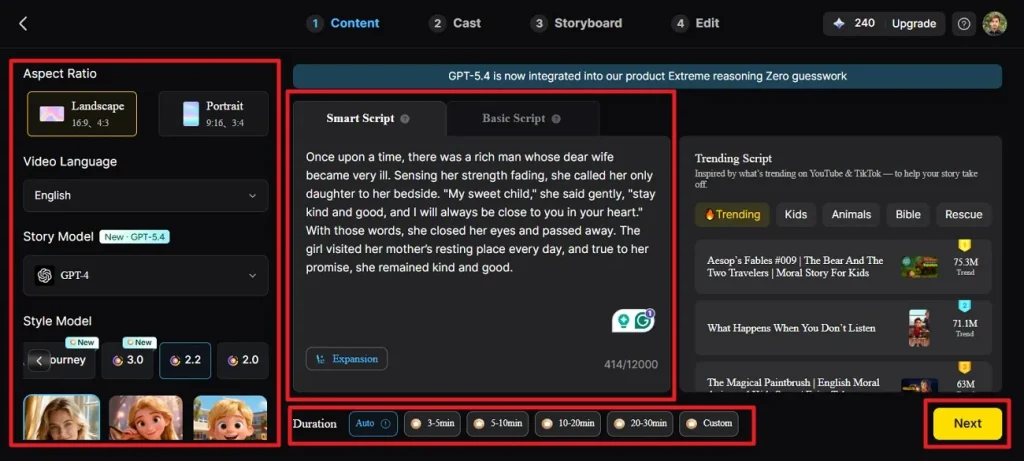
Step 1. Access Story to Video Feature
After accessing the tool on your browser choose the Story to Video feature from left by clicking on it. Now, choose an appropriate Aspect Ratio and Duration for your video. Choose the Video Language, Story Model, and Style Model. Then go to the Smart Script tab, write or paste your script, and let AI optimize it. Press the Next button to continue with the process.
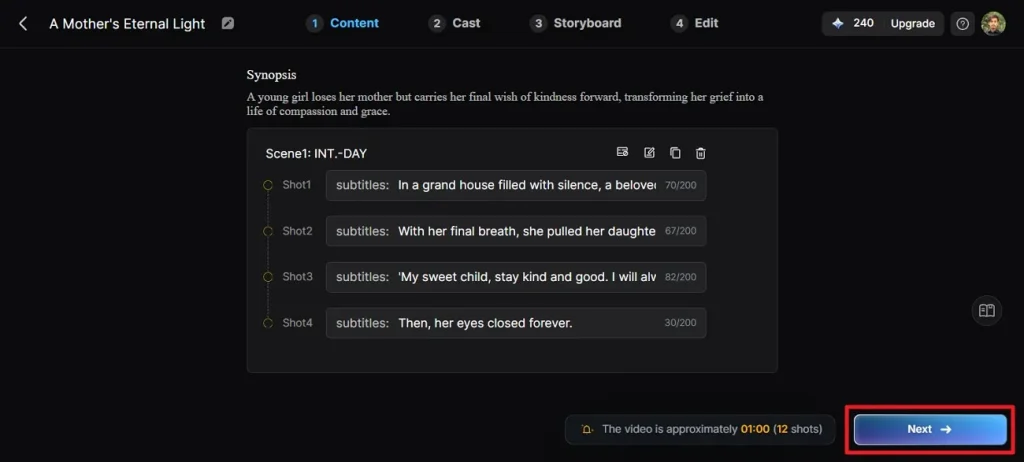
Step 2. Preview Script and Continue
Check the scene-by-scene breakdown and Synopsis generated by the AI. Adjust any sections using the top control if necessary and click Next.
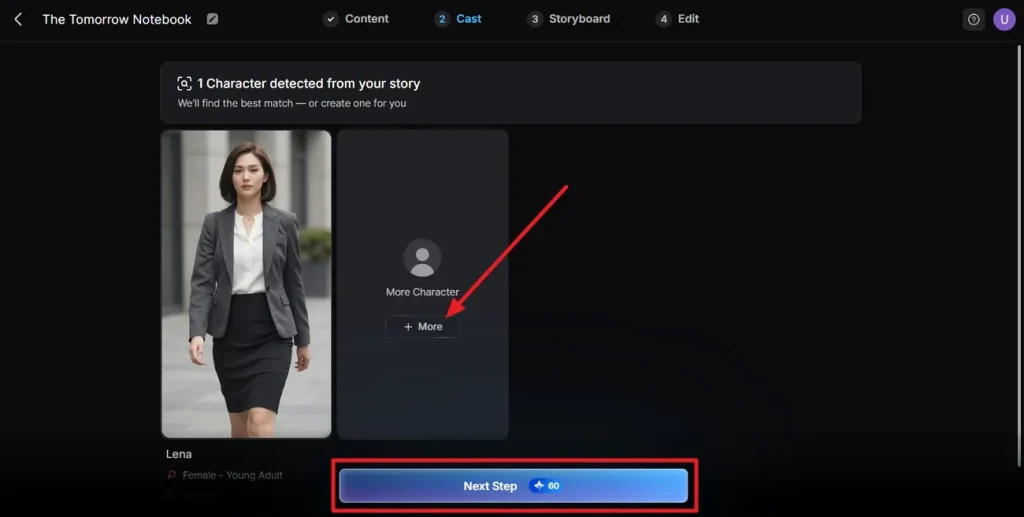
Step 3. Select and Edit Character
Once the tool analyzes your script, it will detect characters and show you the available options for the video. Press the More button to add characters to your video. When the characters are added, preview them and click on the Next Step button to let the tool start creating the video.
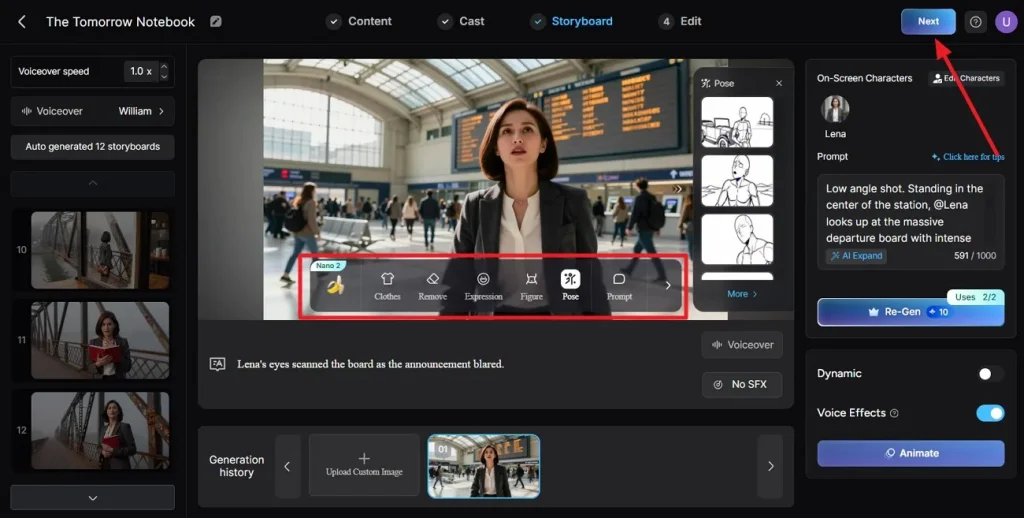
Step 4. Refine the Storyboard
Preview all scenes in the storyboard and adjust clothing, expressions, or poses using the controls below. Click Next once you are satisfied with the visuals.
Step 5. Add Subtitles for Video
If your video has dialogue, pick a subtitle style from the available options. Click Generate to let the tool execute the video generation process.
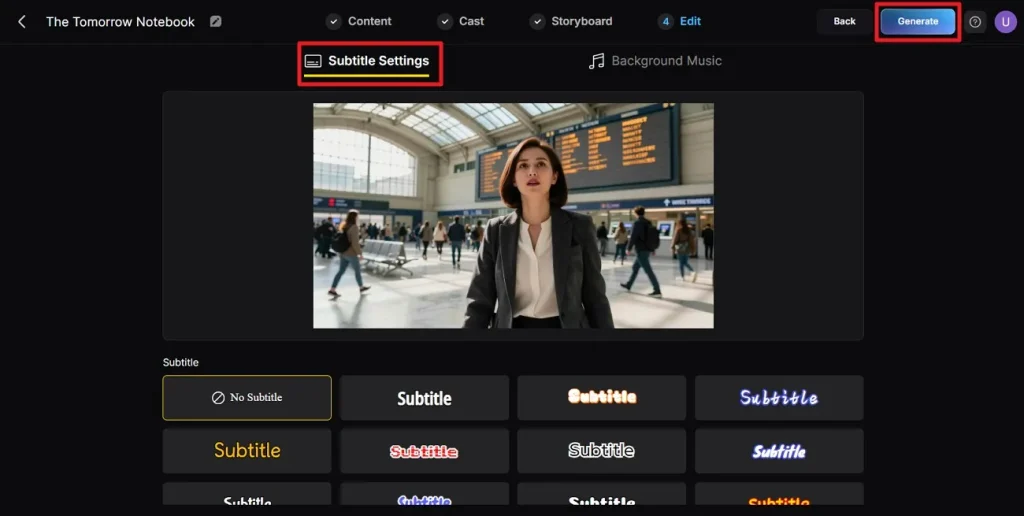
Step 6. Download Video
Preview the final video along with the cover, thumbnail, and hashtags. Click Download Video to save your creation successfully to your device.
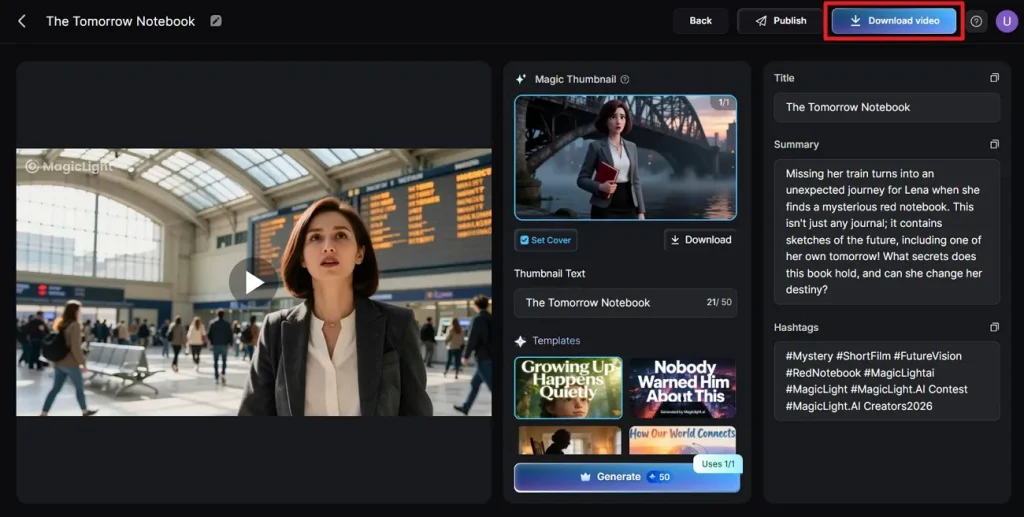
Part 4. Comparison Table Between Digen AI Video Generator and Magiclight.AI
When choosing the right AI video generator, it’s important to compare different aspects of the tools that you have shortlisted. Below is a detailed comparison between Digen AI Video Generator and Magiclight, helping you make the right decision:
| Feature | Digen AI Video Generator | Magiclight.AI |
| Ease of Use | A bit overwhelming interface, and some features require trial and error | Beginner-friendly with intuitive workflow |
| Video Length | Short clips only (5–10 seconds) | Supports long-form videos up to 50 minutes |
| Output Quality | Good, but sometimes inconsistent visuals | High-quality, consistent scenes and character appearance |
| Professional Use | Suitable for short marketing clips | Ideal for marketing, educational, and faceless YouTube videos |
| AI Models | Limited options | Multiple AI models with varied animation, including Sora 2 and Veo 3 |
Conclusion
To wrap it up, you learned about Digen AI in detail in this article, including its features, workflow, and limitations. While it offers a fast way to generate short clips, it falls short in video length, customization, and professional-grade consistency. For creators seeking longer videos, multiple AI models, and higher-quality outputs, Magiclight emerges as a more versatile and reliable alternative for marketing, educational content, and faceless YouTube videos.
FAQs on Digen AI Video Generator
1. Is Digen AI Video Generator free to use?
Digen AI offers a limited free plan that allows users to generate short clips, but many advanced features require a paid subscription.
2. Is Digen AI totally free?
No, Digen AI is not completely free; its free version comes with restrictions on video length, resolution, and AI model options.
3. What is the best alternative to Digen AI Video Generator?
The best alternative is Magiclight AI, which supports long-form videos, multiple AI models, and consistent high-quality output. It is especially suitable for marketers, educators, and faceless YouTube creators seeking professional results.
![15 Top Cartoon Characters of All Time [New List]](https://blog-new.magiclight.ai/wp-2/wp-content/uploads/top-cartoon-characters-300x168.webp)
![9 Best AI Video Generation Models in 2026 [Easy Selection]](https://blog-new.magiclight.ai/wp-2/wp-content/uploads/best-ai-video-generation-models-300x168.webp)