A content creator sits at their desk, trying to turn a simple idea into an engaging animated video for a marketing campaign. Choosing the right animation tool quickly becomes the biggest challenge. In 2026, platforms like Powtoon and Magiclight.AI are popular options for creating professional animations without complex software
Each platform offers unique features designed for different types of creators. This comparison of Powtoon and Magiclight.AI will explore their capabilities, strengths, and limitations to help determine which tool best suits modern animation creation.
Part 1. Powtoon: What It Is and Who Uses It
Powtoon is a cloud-based video and presentation platform designed to help users quickly create engaging animated videos. The Powtoon animation tool allows marketers, educators, and businesses to turn simple ideas into professional explainer videos, training content, and marketing presentations. With ready-made templates, animated characters, and drag-and-drop editing, the platform simplifies animation creation for beginners while still offering customization options for storytelling and branded communication.
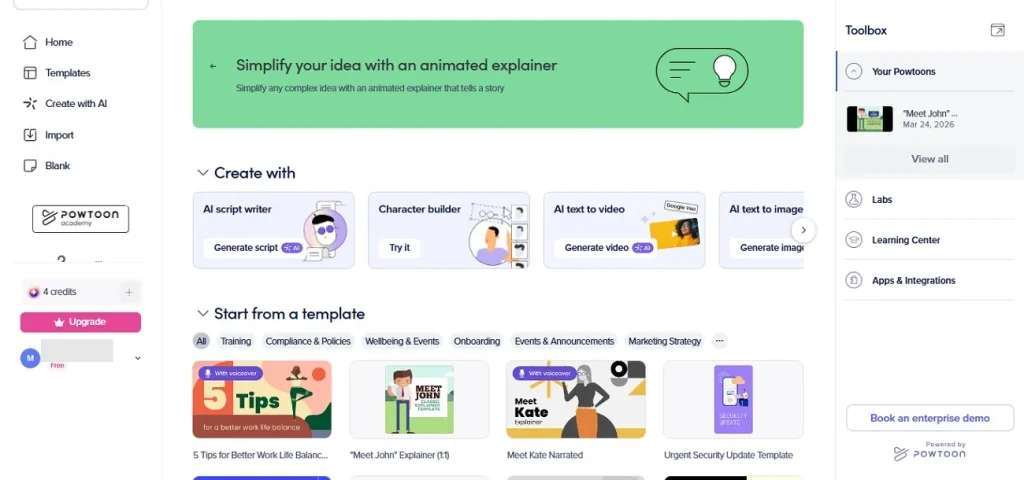
Key Features
- Ready-Made Animated Templates: The platform includes a wide range of customizable templates for explainer videos, training modules, marketing content, and educational presentations.
- Extensive Media Library: Users get access to a large collection of stock images, animated characters, icons, backgrounds, and music to enhance videos.
- Custom Character Builder: Powtoon allows users to design personalized animated characters that match their brand or storytelling style.
- Brand Customization Tools: Businesses can add logos, brand colors, fonts, and branded templates for consistent visual communication.
Part 2. Powtoon Create Video: Step-by-Step Process for Beginners
Having learned about this tool in detail, let us have a look at how to create animated videos using Powtoon video in the following section:
How to Use Powtoon to Create Engaging Videos - Step by Step
Provided below is a step-by-step guide on how to use Powtoon to create amazing videos:
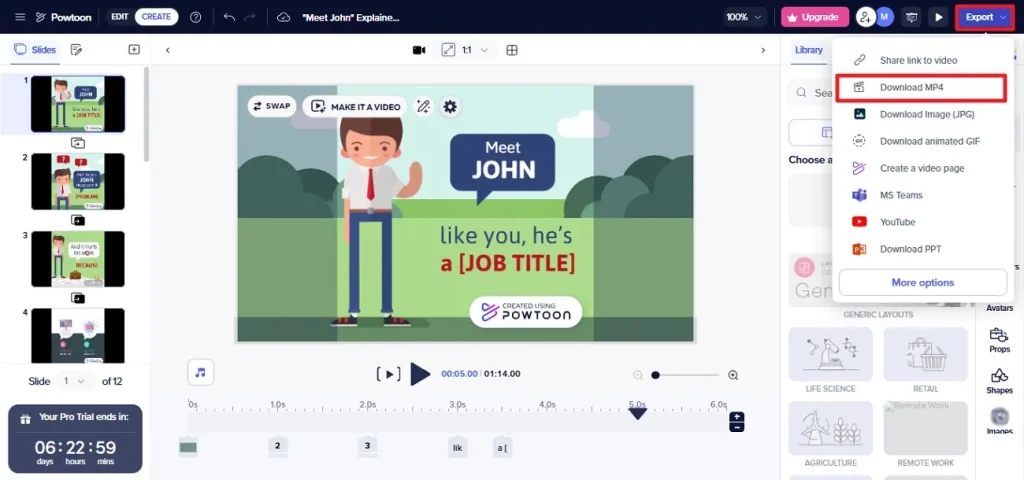
Step 1. Start by accessing the tool on your browser and choosing Templates from the options provided on the homepage. Click on the Edit in Studio option to begin the process.
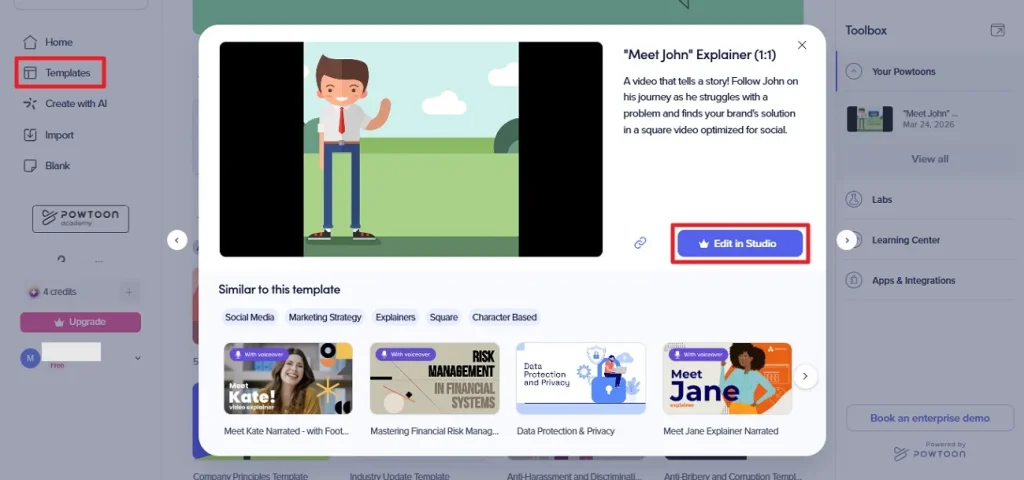
Step 2. Next, changes to the scenes using the editor available in the following interface. Once the editing is done, press the Export Video button to click the Download MP4 option and save the video to your device.
Powtoon Feature Limits: What You Can and Cannot Do
While the platform is beginner-friendly, some restrictions affect creative control, export options, and make Powtoon limited. Below are the key limitations users should know before choosing the tool:
- Limited Customization Options: Although templates and characters are available, deep customization and advanced animation control remain restricted.
- Not a Full Professional Animation Tool: Powtoon cannot produce complex, fully animated cartoon-style videos like advanced software.
- Limited Free Plan Features: Free accounts include only basic functionality and often add a watermark to exported videos.
- Not Ideal for Highly Complex Projects: Large-scale animation projects may become harder to manage due to simplified editing tools.
- Limited Content Library on Lower Plans: Access to characters, props, media assets, and stock content increases only with premium subscriptions.
Part 3. Why Magiclight.AI Outshines Powtoon as the Best Option for Animation
Unlike the Powtoon website, Magiclight.AI focuses on fully automated AI-driven video creation rather than manual template editing. The platform is designed to turn simple ideas into complete animated videos with characters and voiceovers generated automatically. One of the biggest advantages of Magiclight.AI is its all-in-one workflow. The tool combines script generation, animation, and video editing in a single platform, eliminating the need to switch between multiple tools.
It also supports advanced capabilities like image-to-video animation, making it ideal for storytelling and educational content. Additionally, Magiclight.AI can generate long-form animated videos and cinematic scenes with smooth motion and consistent visual styles. This allows creators to produce professional-quality content much faster than traditional animation platforms.
Key Features Offered by Magiclight
- Multiple AI Generation Models: Magiclight.AI supports advanced AI generation models such as Sora 2 and VEO 3, giving creators flexibility when generating animated content. These models allow users to produce different visual styles, motion quality, and storytelling results based on project needs.
- Flexible Resolution Selection: The platform allows users to choose video resolution before generating content. This helps creators optimize animations for different platforms.
- Adjustable Video Duration: Magiclight.AI lets creators select the video duration during the generation process. This feature makes it easier to produce short clips for social platforms or longer animations for storytelling.
- Multiple Image Format Support: Users can upload images in multiple formats when generating animations from visuals. This flexibility ensures that existing graphics, photos, or artwork can be easily converted into animated scenes.
- Extended Text Prompt Input: Magiclight.AI supports text prompts up to 1500 characters, allowing detailed instructions for animation generation.
Steps for Generating an Animated Video with Magiclight
As discussed, Magiclight allows users to create animated videos with text and image prompts in no time. Let us have a look at the steps for creating videos using this Powtoon alternative:
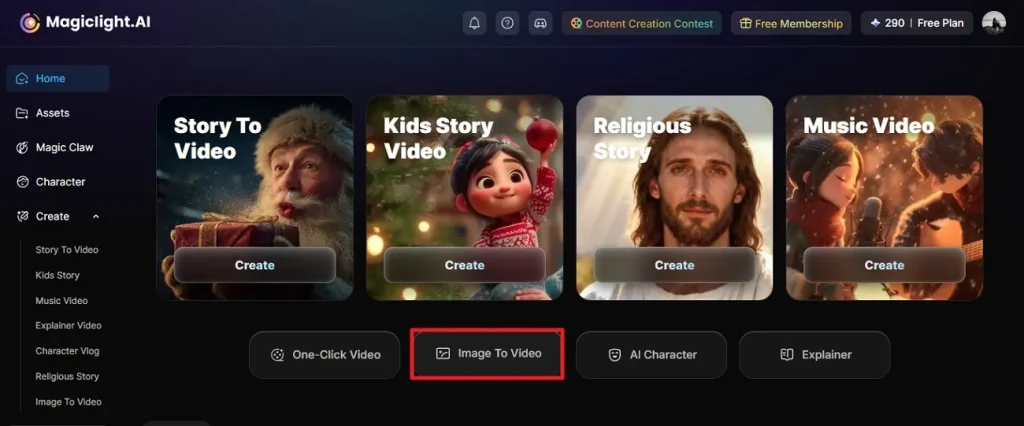
Step 1. Open the Image-to-Video Tool
Launch Magiclight.AI in your browser and navigate to the homepage. Select the Image to Video option to begin creating your animation.
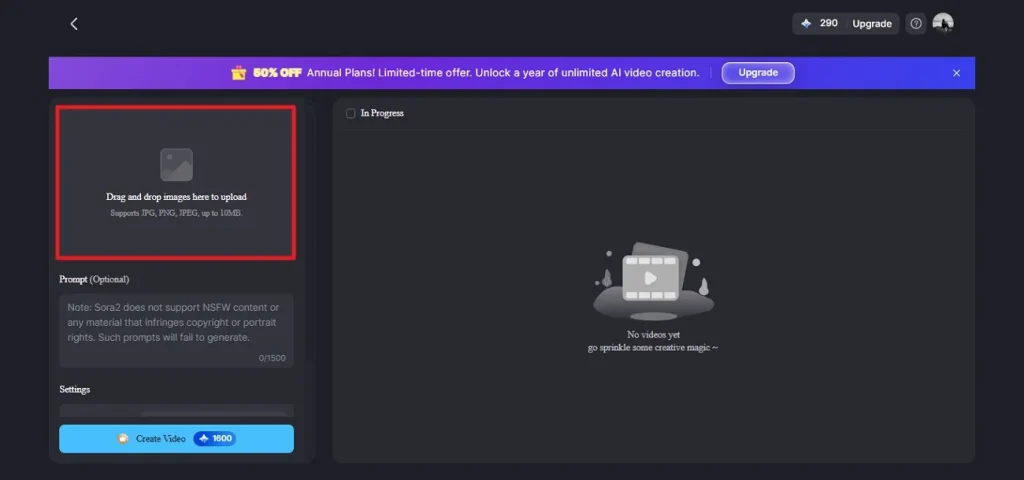
Step 2. Upload Your Image
Click on the Drag and Drop Image Here to Upload area, then choose the reference image you want to animate from your device.
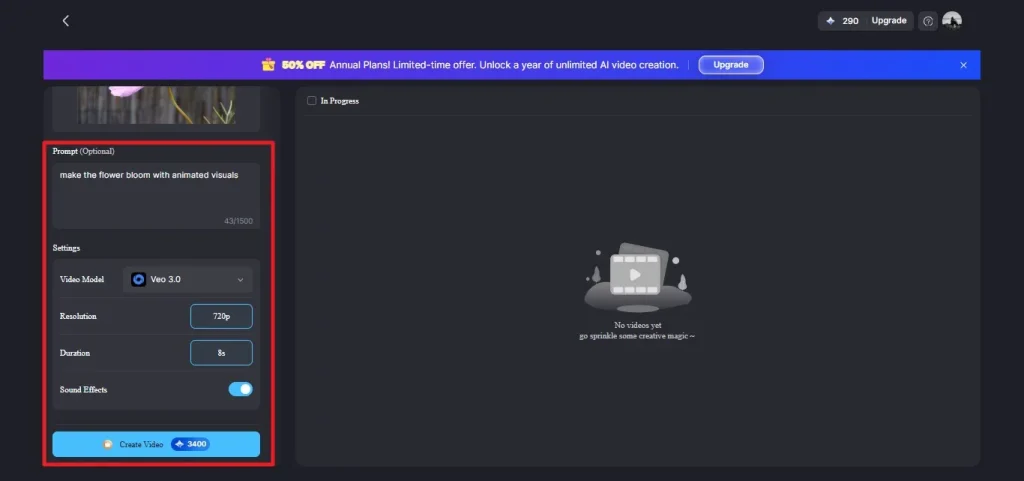
Step 3. Add Prompt and Configure Settings
Enter your text prompt in the provided field and pick the preferred AI generation model from the drop-down menu. Next, choose the desired video duration and resolution, then press Create Video to start generating your animation.
Part 4. Powtoon vs Magiclight.AI: Which Tool Is Best for Video and Animation
While Powtoon animation focuses on presentation videos, modern AI tools like Magiclight.AI emphasize automated video generation and more flexible creative control. The following comparison highlights the key differences to determine which platform is the better option for modern animation creation:
| Features | Powtoon | Magiclight.AI |
| Video Creation Speed | Requires manual scene creation and timeline editing. | Generates full video drafts automatically in minutes |
| Prompt-Based Creation | Limited | Supports detailed prompts up to 1500 characters |
| Free Plan Restrictions | The free plan includes a watermark and limited features. | Designed for AI generation with fewer manual restrictions. |
| Video Length | The free plan allows about 3 minutes; higher plans extend to longer videos. | Adjustable video duration depending on project needs. |
| Ideal Users | Marketers, educators, and businesses are creating explainer videos | Content creators, storytellers, YouTubers, and AI video creators |
Conclusion
To conclude, this article provided a detailed comparison between Powtoon and Magiclight.AI, highlighting their features, limitations, and ideal use cases. While Powtoon remains a reliable choice for template-based presentations and simple animations, Magiclight.AI outshines it with AI-powered automation, prompt-based creation, and advanced video capabilities. For creators seeking faster workflows and greater creative freedom, Magiclight.AI is the superior platform for animation and video production in 2026.
FAQs on Powtoon
1. Is Powtoon really free?
Yes, Powtoon offers a free plan, but it includes limitations such as watermarked exports and restricted features. For more powerful and flexible animation creation without heavy restrictions, Magiclight.AI is a stronger choice.
2. Can I use Powtoon on mobile devices?
No, Powtoon does not currently offer a dedicated mobile app, and its browser experience isn’t fully optimized for mobile editing. In contrast, Magiclight.AI’s browser‑based platform works well across devices and makes animation creation easier without needing an app.
3. How long does it take to create a Powtoon video?
Creating a video on Powtoon can take several minutes to hours, depending on how much manual editing you do. Magiclight.AI speeds up the process by generating animated videos automatically from prompts in just a few minutes.
4. Is Magiclight.AI easier to use than Powtoon for beginners?
Yes, Magiclight.AI’s AI‑driven workflow requires minimal manual effort, which makes it more intuitive for beginners.
5. What features make Magiclight.AI stand out from Powtoon?
Magiclight.AI offers an easy-to-use interface, making animation creation quick, even for beginners. It supports multiple image formats and allows creators to generate videos using numerous AI models like Sora 2 and Veo 3. Additionally, you can upload images in numerous formats for reference to the tool's interface and convert them into animated videos.