


A marketing team reviews its latest video campaign, realizing that beautiful visuals alone cannot keep viewers engaged without a strong story. Modern audiences respond to narratives that feel authentic and emotionally meaningful. Storytelling videos transform simple footage into experiences that inspire, inform, and entertain. In 2026, advanced editing platforms and AI-powered tools make it easier than ever to build those narratives.
Creators can generate visuals, structure scenes, and refine pacing with just a few clicks. Still, great storytelling depends on thoughtful planning and creative direction. This guide walks through the essential steps on how to make storytelling videos using the right resources.
Part 1. What Is a Storytelling Video?
A storytelling video uses narrative elements such as characters, emotions, and a clear structure to communicate a message visually. Instead of presenting plain information, it guides viewers through a beginning, middle, and ending that creates connection and engagement.
These videos are widely used in marketing, education, entertainment, and social media. Here are the top 5 types of storytelling videos that you can create and share with your audience:
1. Brand Storytelling Videos
Brand storytelling videos focus on sharing a company’s journey, mission, or values through a narrative. They help audiences connect emotionally with a brand rather than just its products. Businesses learning how to create storytelling videos often start with brand stories to build trust, communicate purpose, and strengthen long-term customer relationships. With MagicLight AI, you can quickly turn your brand story into engaging narrative videos using AI, with no complex production required.

2. Digital Storytelling Videos
These videos combine images, voiceovers, music, and text to present a personal or informative narrative. These videos are commonly used in education, documentaries, and social media. Creators exploring how to make a digital storytelling video often focus on blending visuals and narration to create meaningful and engaging stories online.

3. Educational Storytelling Videos
The videos explain complex topics through simple narratives, characters, and examples. Instead of traditional lectures, the information is presented as a story that keeps viewers interested. Teachers and creators researching how to create a storytelling video often use this format to make lessons easier to understand and remember.

4. Animated Storytelling Videos
Animated storytelling videos rely on animated characters, motion graphics, and creative visuals to tell a story. They are popular for explainer content, children’s media, and creative marketing campaigns. Many creators interested in how to make a storytelling animation choose animation because it allows unlimited visual creativity and engaging storytelling.
5. Short Social Media Storytelling Videos
Short storytelling videos are designed for platforms like TikTok, Instagram, and YouTube Shorts. They deliver a quick narrative within seconds while still creating emotional impact. Creators experimenting with how to make storytelling animation or short-form storytelling often use fast pacing, strong visuals, and concise scripts to keep viewers engaged.
Part 2. How to Make Storytelling Videos from Idea to Story
Creating compelling storytelling videos no longer requires complex production skills or large budgets. Modern AI video tools now streamline the entire process, from developing an idea to generating a finished video. Magiclight.AI is one such platform designed specifically for storytelling content. It offers a complete workflow that turns scripts and prompts into structured visual stories.
The tool supports multiple storytelling formats, including story videos, children’s stories, explainer videos, music videos, character vlogs, and even religious narratives. Users who want to learn how to create storytelling videos can input scripts up to 12,000 words, choose from different story models, and generate videos up to 50 minutes long.
Key Features
- Multiple Story Models: The platform includes 9 different story models designed to structure narratives effectively. These models help creators generate coherent stories with a clear beginning, middle, and ending.
- Multilingual Video Support: Magiclight.AI supports 11 languages, allowing creators to produce storytelling videos for global audiences without needing additional translation tools.
- Advanced Style Model Selection: Users can choose from powerful visual generation models such as Magiclight 3.0, Magiclight 2.2, Magiclight 2.0, and Midjourney V7, enabling different artistic styles for storytelling visuals.
- Voiceover and Voice Cloning: Magiclight.AI offers 37 voiceover options with the ability to clone voices. This helps creators add realistic narration and character voices to storytelling videos.
Comprehensive Steps for Creating a Storytelling Video with Magiclight.AI
After learning about this tool in detail, let us have a look at how to make a storytelling animation video with it:
Step 1. Start a New Project
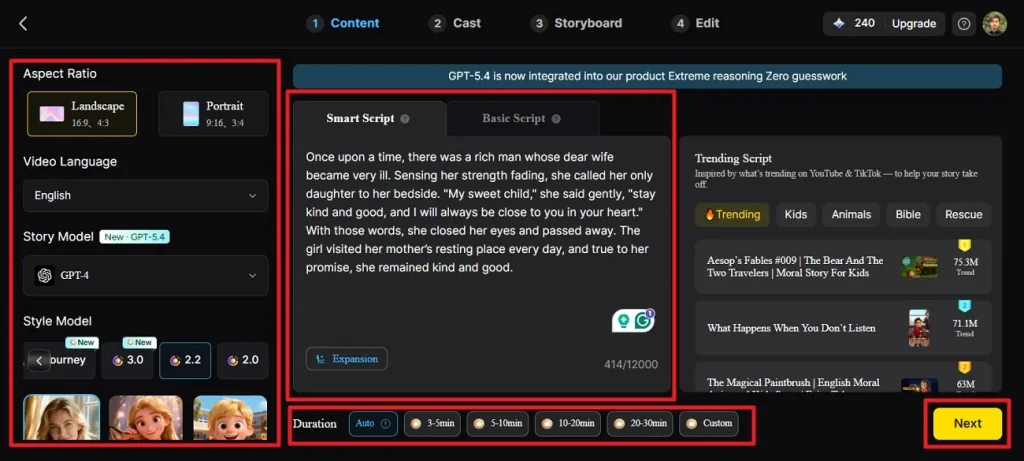
Open the Story to Video feature and begin by selecting the aspect ratio and desired video length. Next, choose the language, story model, and visual style model. After setting these options, enter your script in the Smart Script section so the AI can optimize it. Once all settings are complete, click Next to proceed.
Step 2. Review the Scene Structure
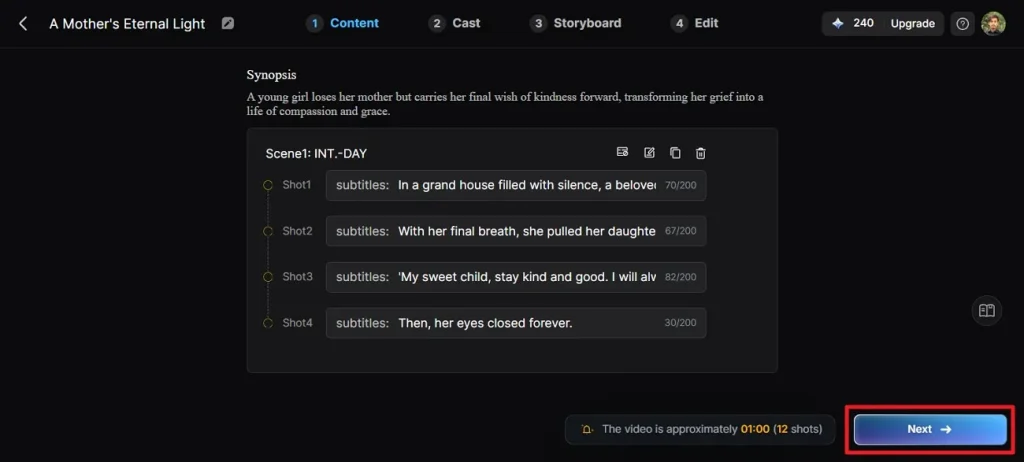
The platform will automatically break your script into scenes. Carefully read the generated scene summaries to make sure they follow your story correctly. If adjustments are needed, use the editing controls to modify scenes before continuing. Click Next when the structure looks accurate.
Step 3. Select Characters for Video
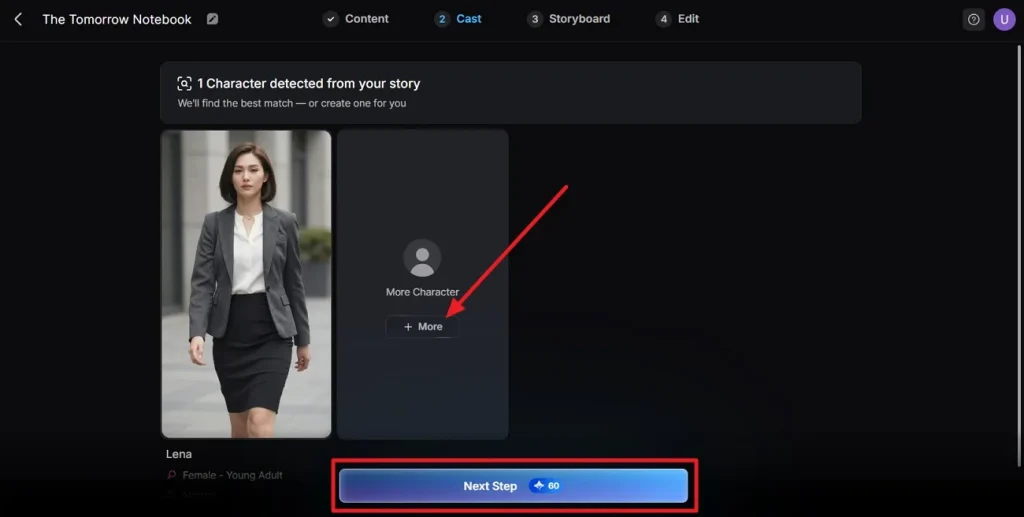
Magiclight.AI will detect characters mentioned in the script and suggest suitable options. You can review the recommended characters or explore additional ones from the library. After confirming the characters for your story, click Next Step to continue.
Step 4. Refine the Storyboard
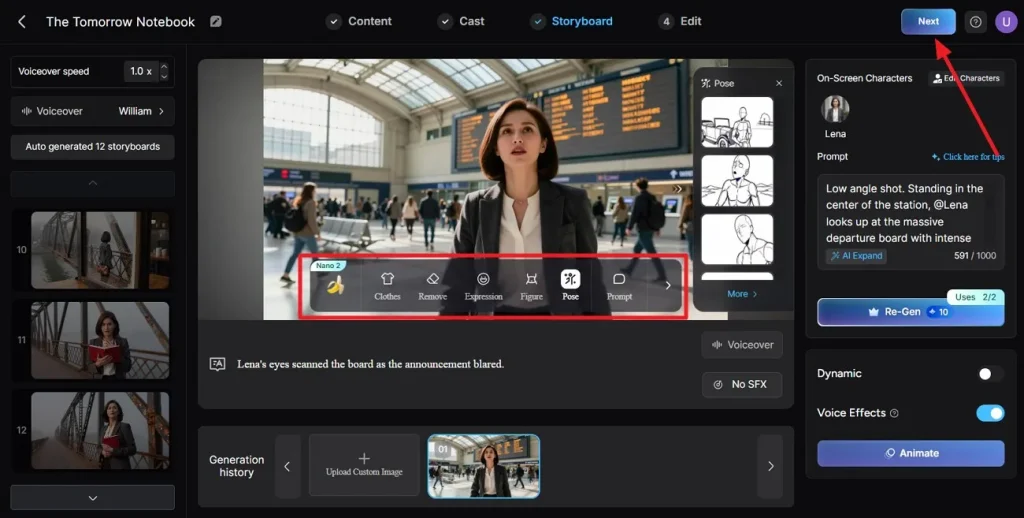
Check each scene in the storyboard to ensure the visuals match your narrative. You can adjust elements such as clothing, facial expressions, or character poses using the available editing tools. Once the scenes look correct, click Next.
Step 5. Set Up Subtitles
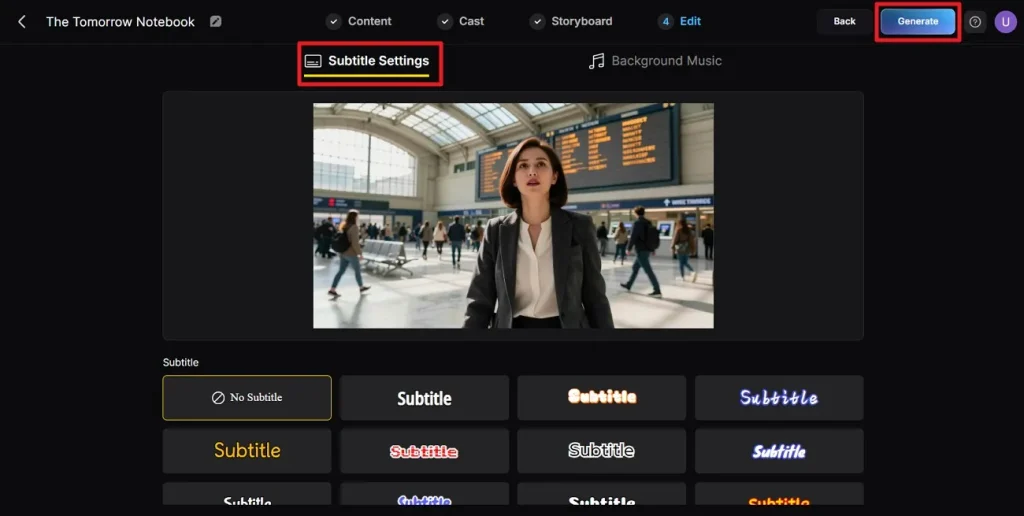
For videos that include narration or dialogue, choose a subtitle style that fits your video design. Configure the subtitle settings according to your preference, then click Generate to start producing the video.
Step 6. Preview and Export the Video
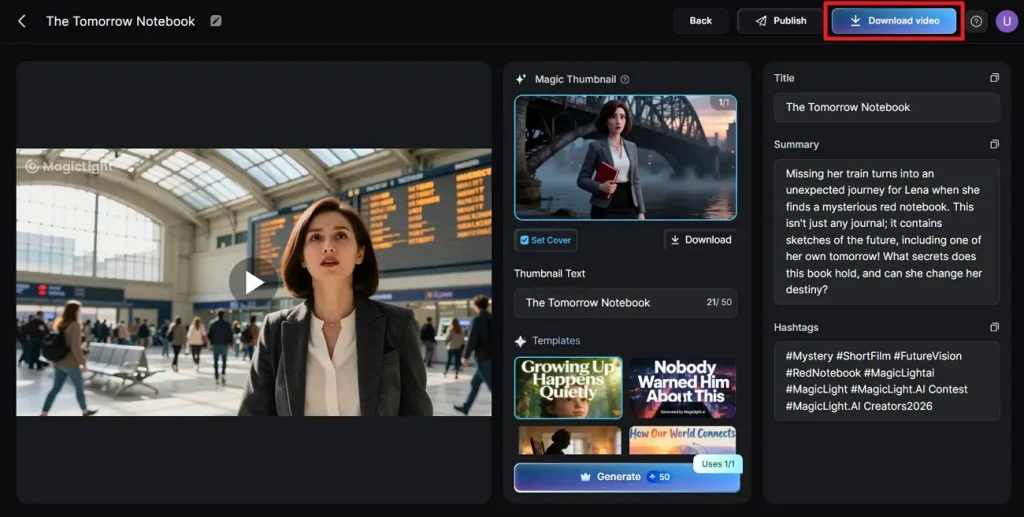
When the rendering process is complete, preview the generated video to confirm everything appears as expected. Review the cover image, thumbnail, and hashtags. If everything looks good, select Download Video to save the final version.
Conclusion
To sum it up, this article provided a detailed guide on what storytelling videos are and how to make a storytelling video. For an all-in-one solution, Magiclight.AI stands out as a powerful AI video platform, offering automatic storyboarding, Nano adjustments, and one-click video rendering. Whether you want to create children’s stories or religious stories, Magiclight.AI simplifies the process and helps bring your storytelling vision to life quickly and efficiently.
FAQs on How to Make a Storytelling Video
1. What tools are needed to create storytelling videos?
You can use Magiclight.AI to create storytelling videos. It provides AI-assisted storyboarding, character creation, and one-click video rendering for easy production.
2. Can I create storytelling videos using AI tools?
Yes, Magiclight.AI lets you generate complete storytelling videos using AI. It handles scripts, visuals, animations, and voiceovers automatically.
3. How to make a digital storytelling video easily?
With Magiclight.AI, simply enter your story or script, select your characters, choose a style, and generate a video in minutes.
4. How to make a storytelling video for YouTube?
Plan your story, use Magiclight.AI to create scenes, characters, and subtitles, then export in 16:9 aspect ratio for YouTube.
5. How to make a storytelling video on TikTok?
Use Magiclight.AI’s 9:16 vertical ratio, add short scenes and subtitles, select a style, and generate your video optimized for TikTok viewing.





![How to Write a Script for a Video 2026 [Full Guide]](https://blog-new.magiclight.ai/wp-2/wp-content/uploads/video-script-writing-setup-300x199.jpg)