


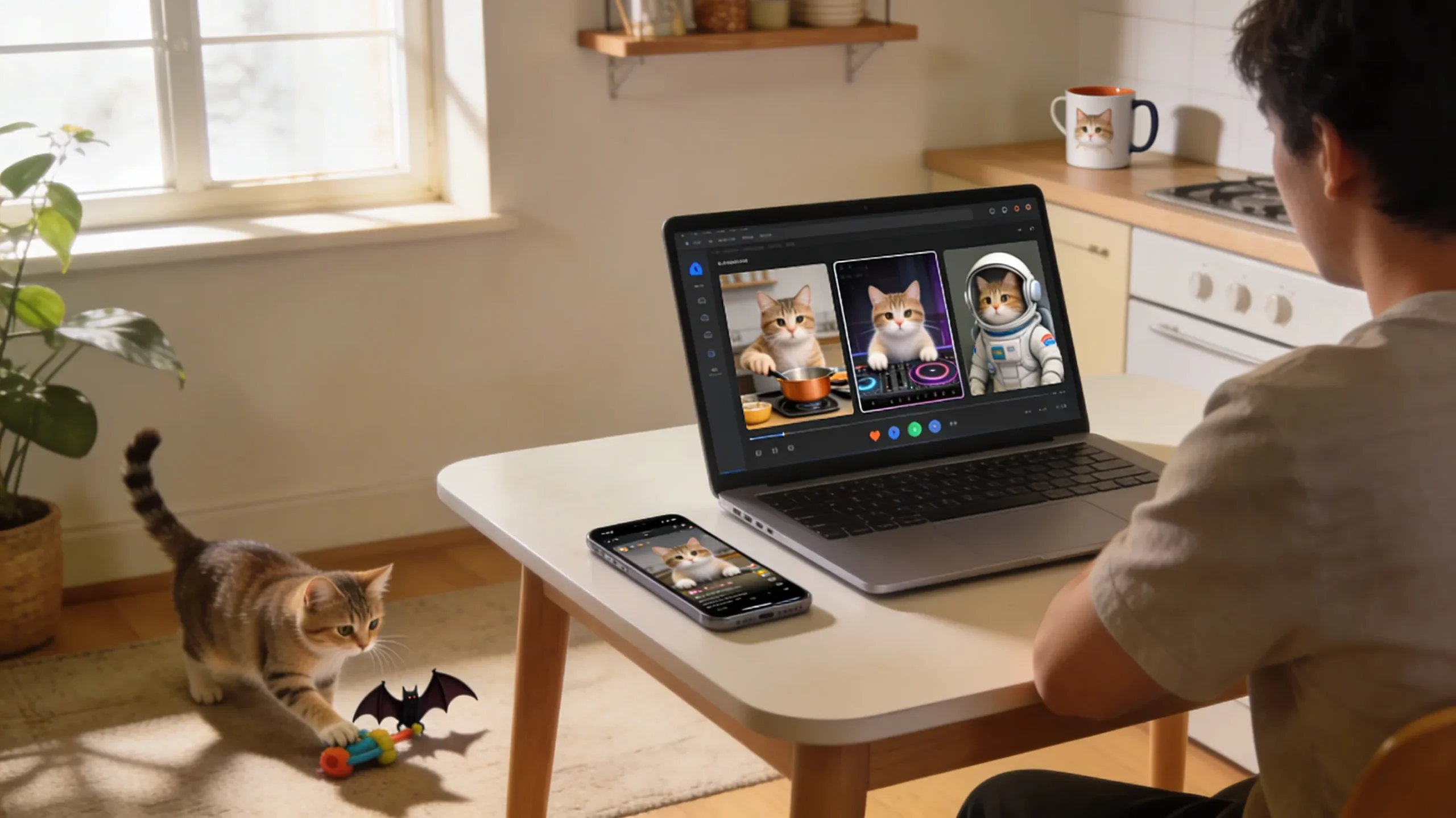
Creating cat videos with artificial intelligence is now easy for creators of all levels. In 2026, AI tools can turn short cat stories or ideas into smooth and realistic videos quickly. You do not need cameras or editing skills because AI handles animation, sound, and visual design automatically.
These platforms let anyone create funny and artistic cat videos with lifelike motion and charming details. This guide clearly explains how to make AI cat videos using modern AI video technology tools. By reading, you will learn each step to create your own AI cat video journey confidently.
Part 1. How to Make AI-Generated Cat Videos in Simple Steps
Many people enjoy AI cat videos because they mix cute moments with creative scenes that feel surprising. These clips are quick to make and perfect for YouTube Shorts and memes everywhere. Now, you will learn how to make cat AI videos and pick a reliable AI video generator:
- Think of a simple idea for your cat video and what you want viewers to feel.
- Write one short line that describes what the cat does from the start.
- Open your AI video maker and start a new video project.
- Paste your text, pick a style and music, then let the AI create the video.
- Watch the video, change anything that looks wrong, and download the final version.
Smart AI Video Tool for Making Cat Clips
When it comes to learning how to make an AI cat video or any other clip, many tools are offered online. Yet, Magiclight.AI allows users to generate long, smooth videos up to 50 minutes without any complex editing. Beyond cat videos, it keeps character and scene consistency, so your full story feels stable and connected.
You can create or select a character, then set name, type, age, and main visual traits. It includes 37 voiceover options with voice cloning, so your character speaks in a unique, natural style. The platform also generates an automatic cover for each video to give projects a clean and professional appearance.
Key Features
- It lets you generate videos in 11 languages with natural pronunciation in each voice.
- Convert storyboard to animation with AI, using 16 models for different visual looks and moods.
- Smart script generator turns one idea into a full story with clear scenes and characters.
- Storyboard preview creates a draft storyboard, then Nano refines scenes with clothing, body type and 50 poses.
Part 2. Why Creators Use Magiclight.AI to Make AI Cat Videos
Many users choose an AI video generator that offers flexible control and natural character animation. Before learning how to make AI cat videos with Magiclight.AI, we will explore why creators trust this tool:
- Long Video Support: Lets creators produce extended cat videos suitable for full stories instead of only short clips.
- Large Script Input: Accepts scripts up to 12000 words to enable users to describe every scene in detail.
- Character Consistency: Magiclight.AI keeps each cat character's look, personality, and movement stable from the beginning until the end.
- Multilingual Output: Generates videos in multiple languages with natural pronunciation to help creators reach wider international audiences online.
- Scene Control: Magiclight.AI lets creators refine individual scenes, adjusting prompts, emotions, and environments without rebuilding the whole project.
Ultimate Guide to Make an AI Cat Video Using Magiclight.AI
Having explored why creators prefer using Magiclight.AI, follow the steps below to learn how to make AI-generated cat videos with it:
Step 1. Start a New Story to Video Project
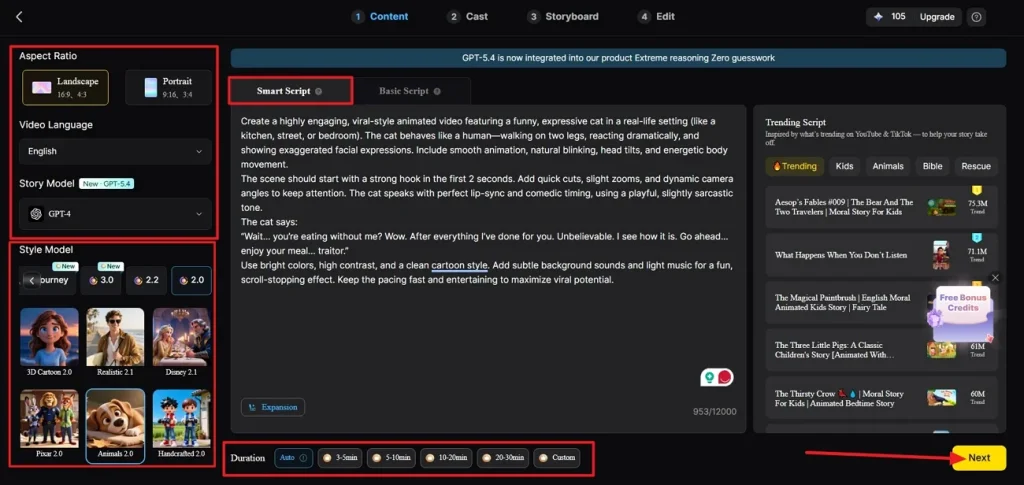
Once you enter the Story to Video tool, press the Smart Script tab and write a script for your cat video. It will optimize your script. Next, choose an appropriate Aspect Ratio and Duration for your video. Afterwards, pick a Video Language, choose a Story Model, and select a Style Model. Once done, click the Next button to proceed further.
Step 2. Review the Scene Breakdown
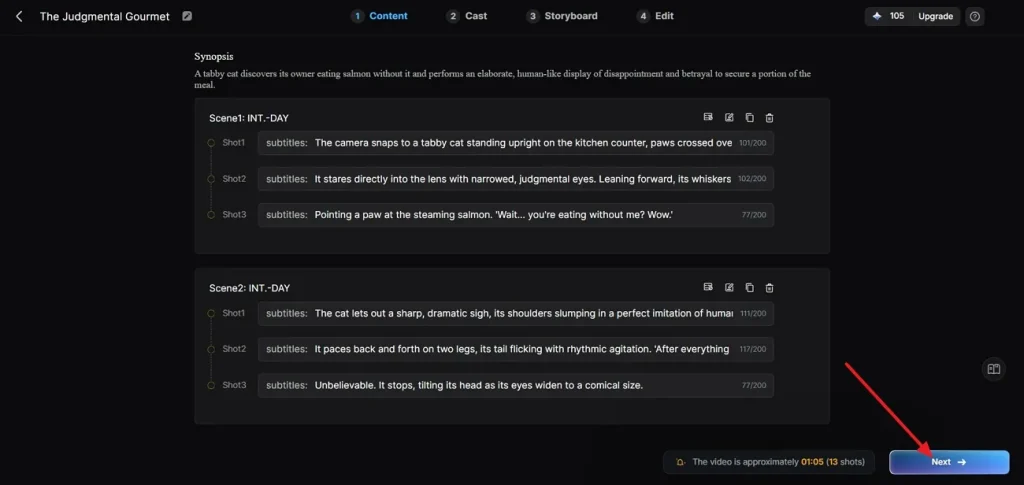
In the following interface, review all the scenes and the Synopsis breakdown. If any adjustment is required, use the Controls at the top. After the scene layout is finalized, click the Next button to proceed further.
Step 3. Select a Character for Your Video
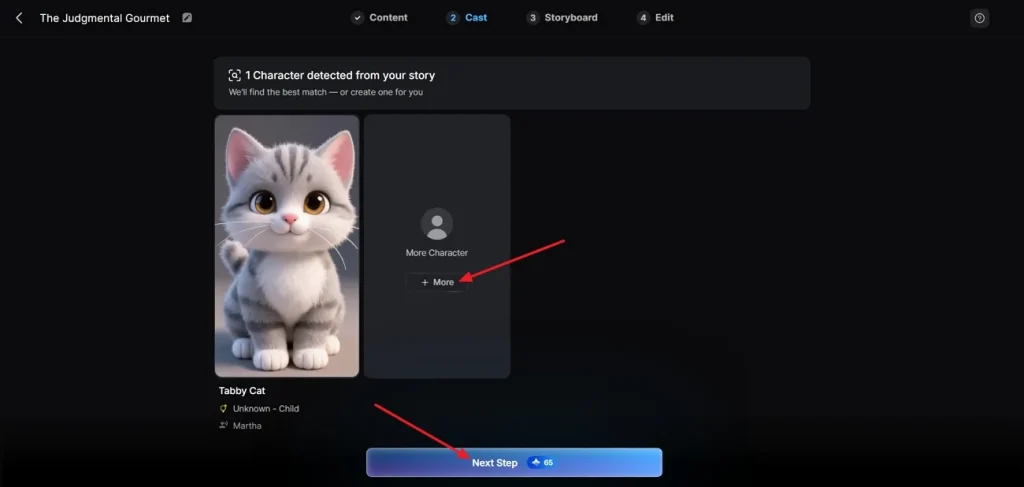
After that, the tool will analyze your script and suggest characters based on it. To explore more character options, click the More button. If the character that the tool suggested is finalized, click the Next Step button.
Step 4. Review The Storyboard
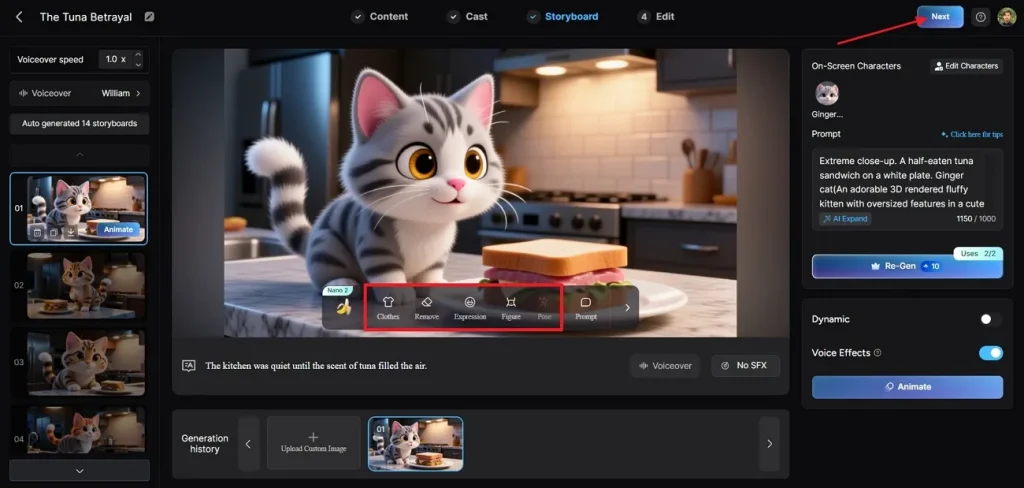
Next, in the generated storyboard, review all the boards. If any adjustments are required in the Clothes, Poses, and Expressions, use the Controls below to amend. After the Storyboard is finalized, click the Next button at the top.
Step 5. Choose Subtitles Style
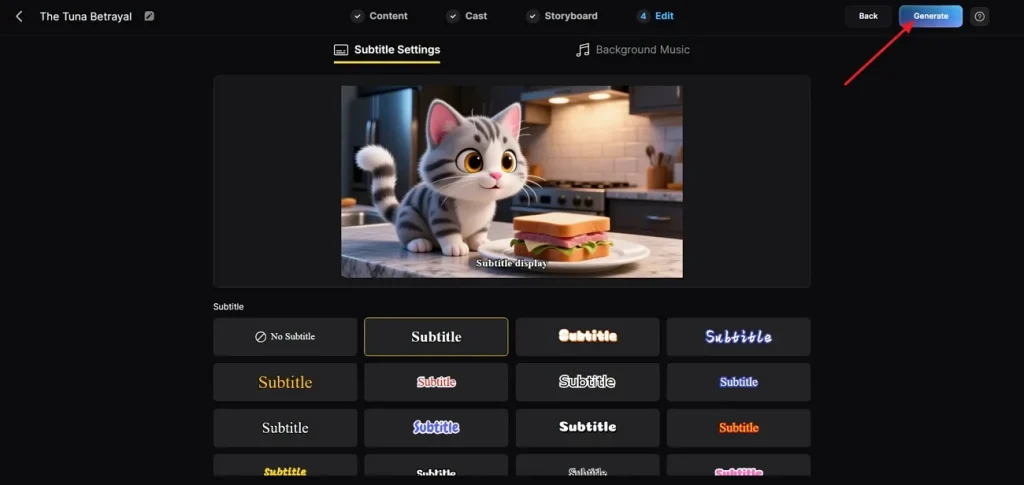
If the AI cat video includes some dialogues, choose a Subtitle style from multiple options and click the Generate button in the top right corner.
Step 6. Download Final Generated Video
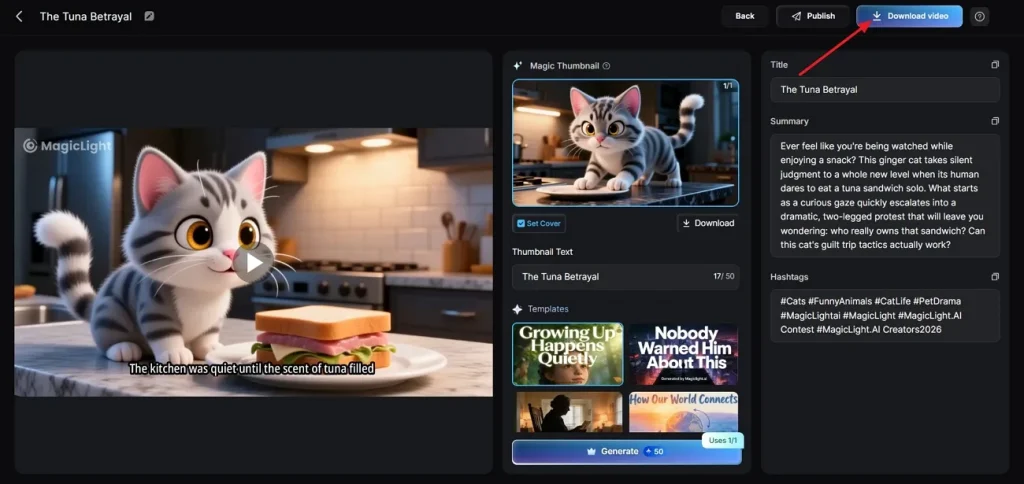
Once the tool generates the video, play the video to check. Next, review the cover, thumbnail, and hashtags. After the video is finalized, press the Download Video button to save the video.
Conclusion
To summarize, learning how to make an AI cat video is pretty easy and all about mixing tools with your own creative ideas. Once you understand the basic workflow, AI video generators like Magiclight.AI do the rest, including generating storyboards, keeping characters consistent across scenes, and animations. If you want a tool that handles the technical work while you focus on ideas, consider Magiclight.AI.
FAQs on How to Make AI Cat Video
Q1. What tools are needed for how to make AI cat videos?
When learning how to make AI cat videos, you mainly need an AI video generator and a basic script or idea. In such cases, Magiclight.AI is especially helpful because it offers templates, character tools, and storyboards tailored for fast, animated pet-style videos.
Q2. How long does it take to make AI-generated cat videos?
Most simple AI cat clips can be created in just a few minutes, depending on the video length. More detailed stories with multiple scenes and edits may take more time to refine.
Q3. Can I make AI-generated cat videos for free?
Yes, you can often start learning how to make an AI cat video using free tiers. Platforms like Magiclight.AI typically provide limited free credits, which are enough to experiment with ideas and stories.
Q4. Can I monetize AI cat videos on YouTube or TikTok?
Content creators can easily commercialize their AI cat videos provided that they abide by the content, copyright, and community rules of each platform. Thus, never follow outdated policies, and avoid using copyrighted music and recognizable characters without proper consent.
Q5. What makes AI cat videos popular online?
AI cat videos are appealing these days as they combine a sense of familiarity with the natural behaviors of pets, combined with impossible and creative scenarios. Funny faces, over-the-top responses, and short and repeated content that can be shared on social media are favorite forms of content with viewers.





![How to Write a Script for a Video 2026 [Full Guide]](https://blog-new.magiclight.ai/wp-2/wp-content/uploads/video-script-writing-setup-300x199.jpg)