


AI video generators are changing how people make animation, even with no design or editing background. These tools turn simple scripts into smooth animated scenes with characters, motion, and detailed environments. You can generate short clips for social media, kids' stories, and anime‑style videos in minutes.
With the best AI video generator for animation, you only need ideas and a clear prompt. This guide will show you tools that work for beginners and more advanced animators today. By reading, you will learn each step to plan, generate, and refine your own animated videos using a reliable video generation platform.
Part 1. 5 Best AI Video Generators for Animation You Should Try
AI animation generators are growing fast in 2026 as more people make videos for work and fun. Powerful new AI models now help anyone turn simple stories into smooth animated scenes in just minutes. In this section, we will explore the top tools and find the best AI video generator for 2D animation.
1. Magiclight.AI
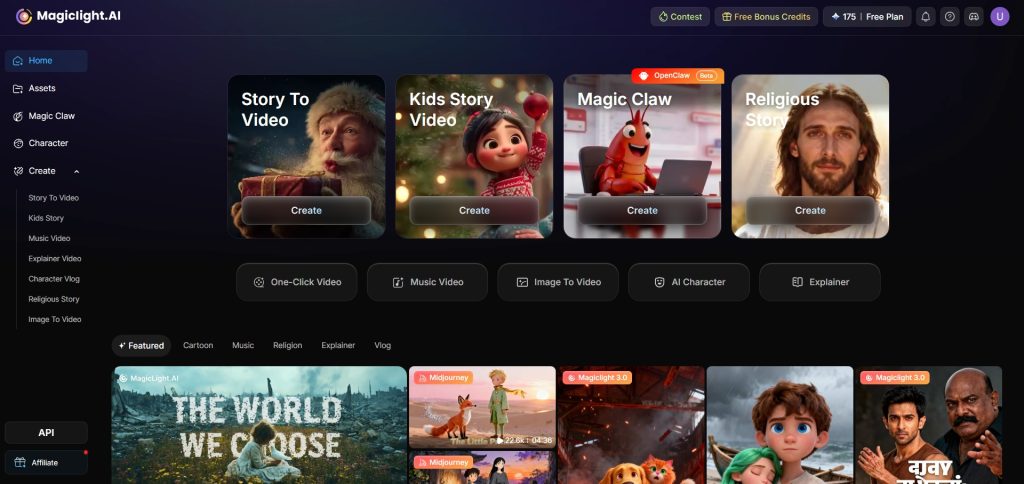
Among AI video generators in 2026, Magiclight.AI stands for powerful storytelling and long video creation. This platform supports 11 languages to help creators find a native voice for global listeners. For longer projects, it offers support for long-form video generation to handle videos up to about 50 minutes.
During rendering, helpful editor tutorials are available, guiding users step by step through key editing actions. For storytelling needs, Magiclight.AI includes 9 story models that structure plots, scenes, and pacing clearly for creators. It also maintains strong character consistency across multiple scenes, keeping designs stable throughout an entire animated video.
Pros
- Remembers your characters to keep their look consistent in new stories.
- You can start with one idea, and Magiclight.AI expands it into stories.
- MagicLight’s AI builds dialogue, pacing, and scenes from your simple starting prompt.
- Uses strong video models like Sora, Veo, and Kling for animation.
Cons
- High-quality models use more credits when you regenerate or refine scenes.
Best For
Magiclight.AI works best for creators who want long-form, story-driven animations with consistent characters, built-in voices, and simple prompts.
2. Runway Gen-3 Alpha
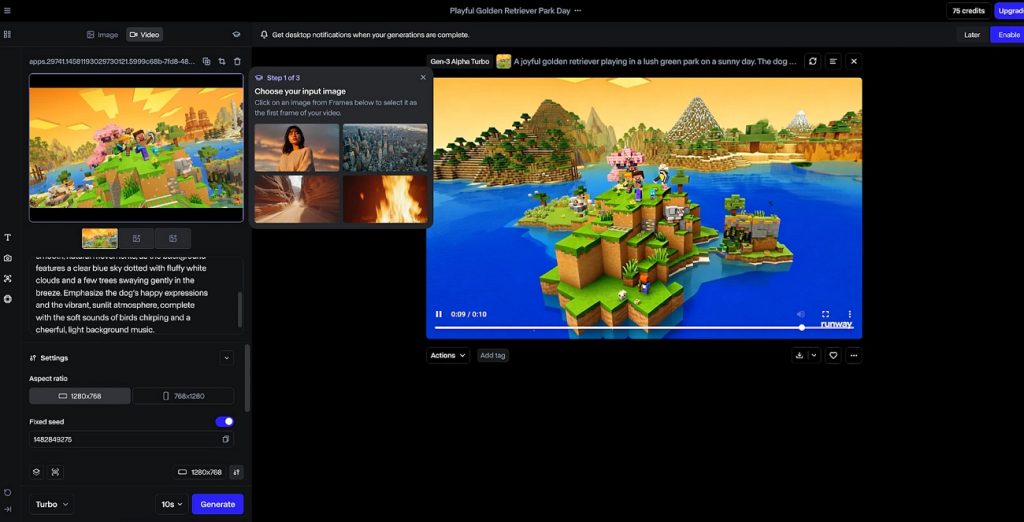
One of the best AI video generators for Anime focuses on punchy clips, often around 5 and 10 seconds per generation. It includes built-in camera movement and action presets to help creators add dynamic motion without manual keyframing skills. The model supports multiple aspect ratios, like 16:9 and several others, for platforms. Its interface centers on fast iteration, letting you regenerate specific segments until scenes match your vision.
Pros
- Handles complex motion like explosions, debris, and environmental effects well.
- Good at cinematic depth of field, giving scenes a polished film feeling.
Cons
- Character faces sometimes drift between shots, hurting story continuity and recognition.
- Text overlays and readable UI elements frequently render distorted or incorrect shapes.
Best For
Ideal for users who want cinematic short clips for ads, trailers, and social platforms.
3. Kling AI
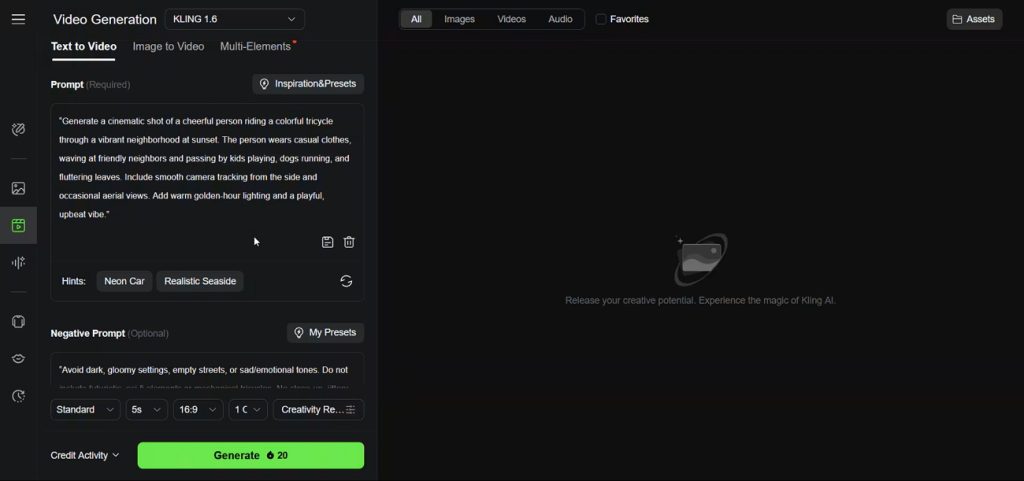
A text‑to‑video best AI video generator for animation that turns prompts into cinematic 1080p clips with smooth motion. It can generate multi‑shot sequences up to 15 seconds from text or animate still images with realistic camera moves. The latest Kling 3.0 model focuses on high‑end realism to improve facial expressions. Kling AI is used to create storytelling shots that feel close to professional live‑action video.
Pros
- Supports detailed style prompts to match specific cinematography or visual reference examples.
- Maintains consistent lighting direction and reflections across related generated shots.
Cons
- Text elements on signs or interfaces frequently appear warped and incorrect.
- Fast camera moves sometimes introduce warping on small background details and edges.
Best For
For users who need grounded realism in brief narrative scenes and product-focused shots.
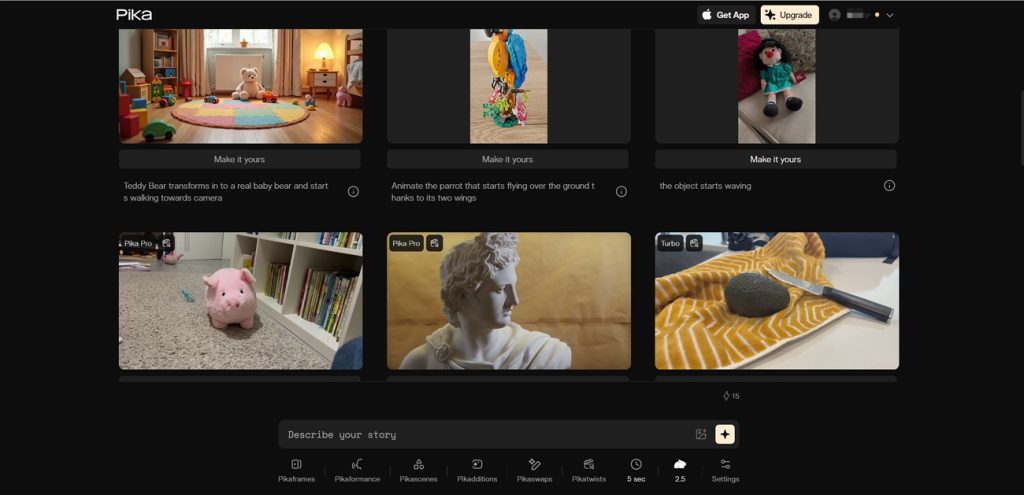
4. Pika 2.5
Pika generates short AI videos, usually around 5 or 10 seconds per generation. It includes multiple AI modes such as PikaTwist, Selfies, and PikaFrames for varied transformations. Each mode changes motion, style, and how your starting images or prompts are interpreted visually. People searching “What is the best AI video generator for animation” often experiment with these specialized Pika modes.
Pros
- Anime-style generations often look crisp, with clear outlines and bold colors.
- Style strength controls make it easier to balance realism against stylized looks.
Cons
- Longer narrative sequences require stitching many short clips manually in another editor.
- Fine control over exact hand shapes or small props remains unreliable.
Best For
Suited to users who enjoy energetic, stylized mini animations with strong anime flair and exaggerated movement.
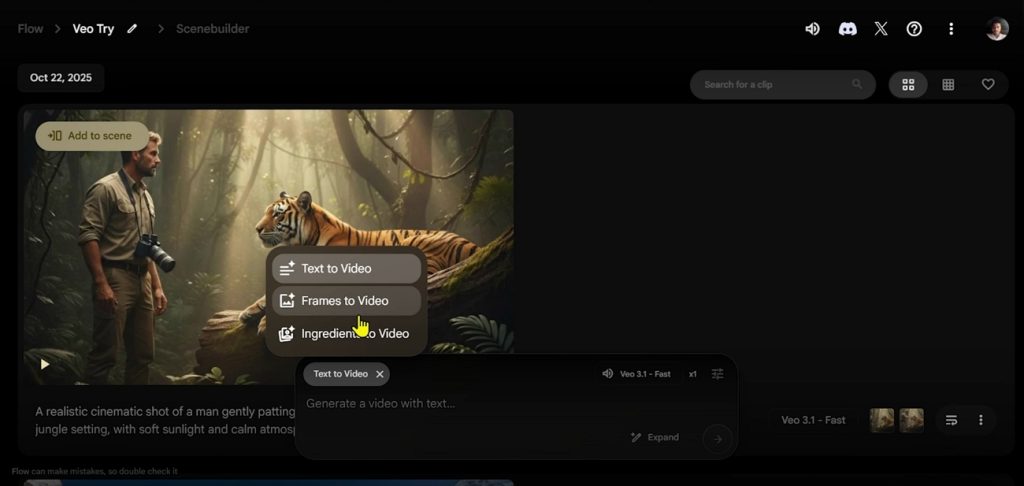
5. Google Veo
A Google high‑end AI model that generates realistic 720p, 1080p, and 4K videos with native audio. It emphasizes real‑world physics and cinematic results, then lets you extend scenes by several additional seconds. You can input up to three reference images so characters, products, or styles stay visually consistent. Creators exploring the best AI video generator for anime can try Veo 3.1 for style‑matched, high‑fidelity shots.
Pros
- High-resolution 4K support keeps details sharp for professional delivery requirements.
- Native audio saves time otherwise spent syncing separate soundtracks later.
Cons
- Per-generation duration is short, so full stories need many stitched clips.
- Complex prompts sometimes produce mismatched details, requiring several retries.
Best For
High-end video model works best for teams producing cinematic campaigns, trailers, and detailed product showcases.
Comparison of the Top 5 AI Animation Video Generators
Having discussed the top 5 tools, many users may still wonder which option truly fits their animation needs. To make choosing the best AI video generator for 2D animation easier, take a clear look at the table below:
| Tool | Max Video Duration | Max Resolution | Input Type | Number of AI Models | Output Format | Pricing (Starting From) |
| Magiclight.AI | Up to 50 minutes per video | 1080p (long‑form focus) | Text to video, image to video | Includes 15+ famous AI models | MP4 video | $15/month |
| Runway Gen‑3 | Up to 20 seconds per generation | 720p | Text, image, video to video | One Gen‑3 Alpha family model | MP4 / Web‑ready | $15/month |
| Kling AI | Up to 15 seconds per generation | 4K (3840×2160) | Text to video, image to video | One Kling 3.0 master model | MP4 with audio | $7/month |
| Pika 2.5 | 5–30 seconds depending on mode and settings | 1080p | Text, image, short video to video | Several modes (PikaTwist, Selfies, PikaFrames) | MP4 social formats | $35/month |
| Google Veo 3.1 | Short clips, extendable in several‑second steps | 4K | Text, image prompts, reference style images | One Veo 3.1 model with style variants | MP4 with native audio | $20/month |
Among all the tools discussed, Magiclight.AI handles full stories in one project. Multiple built-in story models structure plots, scenes, and pacing, reducing manual planning for complex narratives. Character memory keeps designs consistent across episodes, avoiding drifting faces or outfits between separate scenes. So, saying Magiclight.AI is the best AI video generator for animation is not wrong.
Part 2. How to Use MagicLight AI Video Generator for 2D/3D Animation
Having known the best AI video generator for anime, you might be wondering how it actually works. Now, follow the steps below to turn simple 2D or 3D story ideas into finished animations:
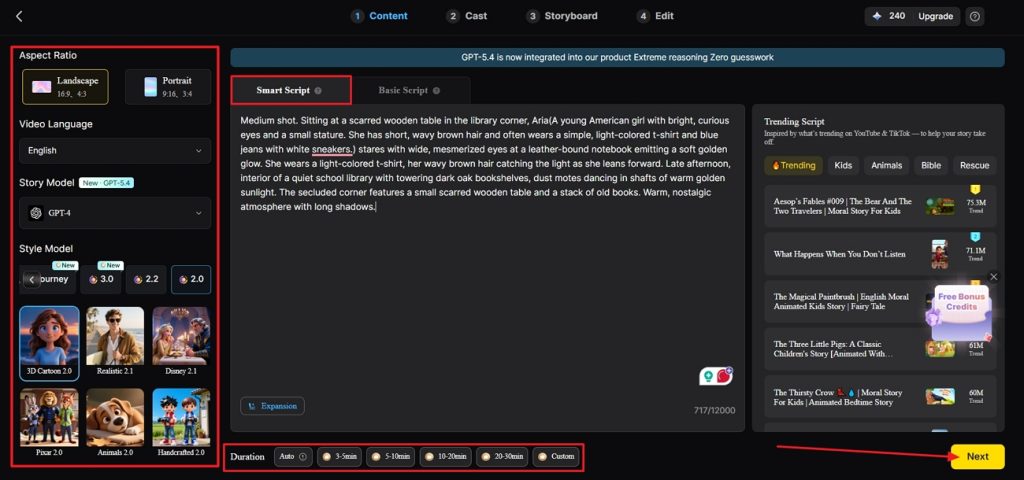
Step 1. Set up a New Project
First, choose the Story to Video tool and enter a video script in the Smart Script tab. Afterward, choose a suitable Aspect Ratio and Duration for the video. Once done, select an appropriate Story Model and Style Model along with the Video Language. After all inputs are finalized, click the Next button to proceed further.
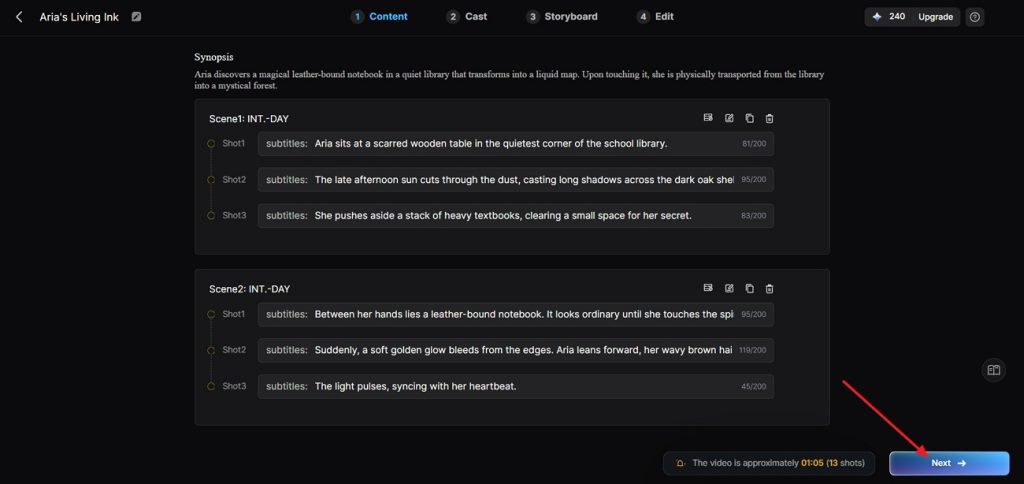
Step 2. Review The Synopsis Breakdown
In the next interface, review the Synopsis breakdown and scene layout, and if any adjustments are needed, use the Controls above. Once the Synopsis breakdown is finalized, click the Next button to move forward.
Step 3. Choose Characters for Your Video
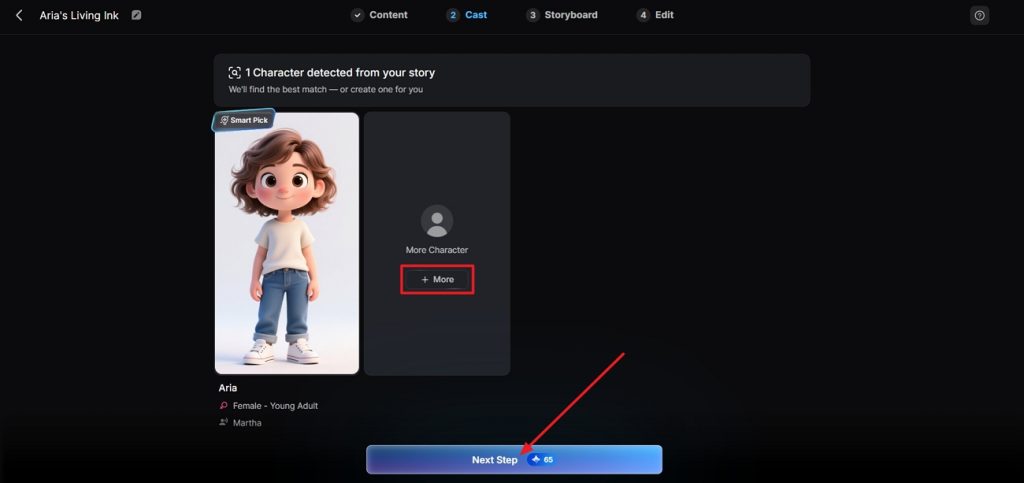
Next, Magiclight.AI will analyze your script thoroughly to identify characters for your video. Next, in the character selection interface, choose a character and click the Next Step button. If you want to explore more characters, click the More option.
Step 4. Review The Video Storyboard
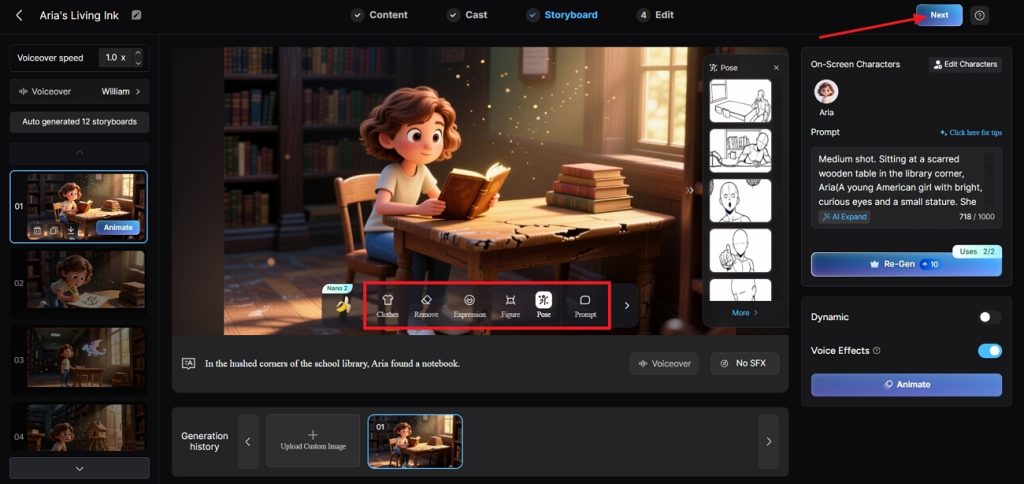
Once the Storyboard is generated, review all the boards thoroughly. If any amendments are required in the Clothes, Poses, and Expressions, use the Control panel to do that. After the Storyboard is finalized, click the Next button at the top.
Step 5. Select Subtitle Appearance
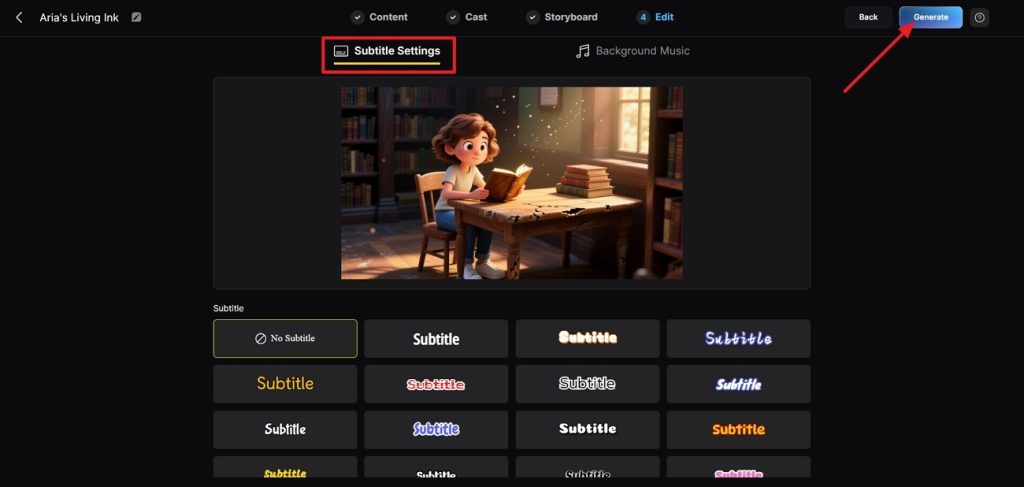
Next, if your animation will include dialogues, select a Subtitle style from multiple options and click the Generate button in the top right corner.
Step 6. Preview The Final Video
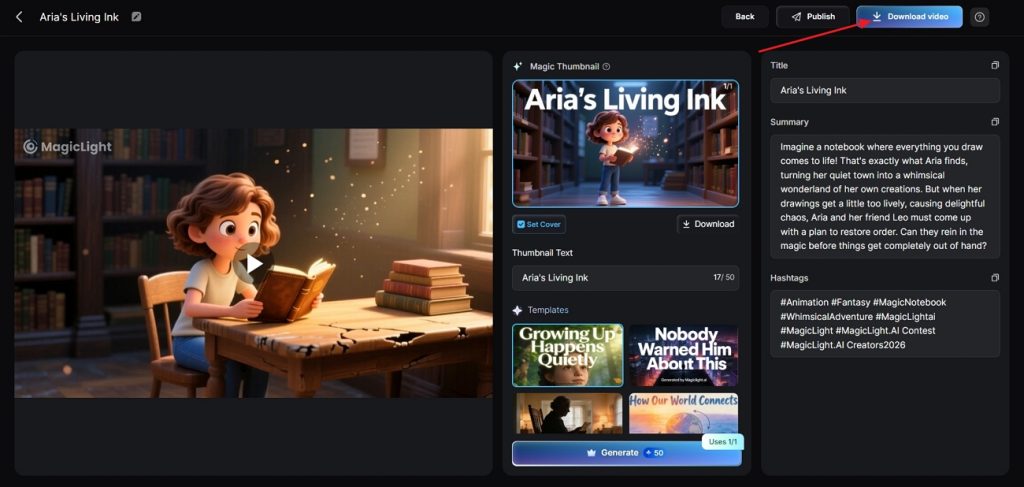
After the final video is generated, preview the video and check the Cover, Thumbnail, and Hashtags. Once the video is finalized, press the Download Video button to save the video.
Conclusion
In conclusion, this guide explored the top AI video generators reshaping animation workflows in 2026. You can now turn ideas into smooth 2D or 3D stories without classic drawing or editing skills. From short anime clips to long-form narrative episodes, these platforms handle most technical steps. If you want the best AI video generator for animation that simplifies everything, choose Magiclight.AI.
FAQs on Best AI Video Generator for Animation
1. What is the best AI video generator for animation right now?
Magiclight.AI stands out because it supports long-form videos, strong storytelling tools, and stable character consistency. It also offers helpful editor tutorials and multiple languages, making it easier for beginners and advanced users alike.
2. Is there a free AI animation generator?
Yes, many tools offer free trials or limited free tiers, often with watermarks or time restrictions. You can start testing features without payment, then upgrade later if you need higher resolution or longer exports.
3. Which AI tool is best for cartoon animation?
For many users, Magiclight.AI feels like the best AI video generator for cartoon animation. Its story models and character memory help keep cartoon episodes consistent, colorful, and easy to follow.
4. What is the best AI video generator for kids' animation?
Magiclight.AI Kids Story Video tool focuses on simple, safe storytelling suited to children’s topics and visuals. It lets you turn short bedtime stories or educational scripts into complete animated episodes with recurring characters.
5. Can ChatGPT create animated videos?
ChatGPT cannot render video directly, but it can write scripts, scene descriptions, and detailed prompts for generators. You then paste those prompts into an animation tool, which handles visuals, motion, and final video export.





![How to Write a Script for a Video 2026 [Full Guide]](https://blog-new.magiclight.ai/wp-2/wp-content/uploads/video-script-writing-setup-300x199.jpg)