


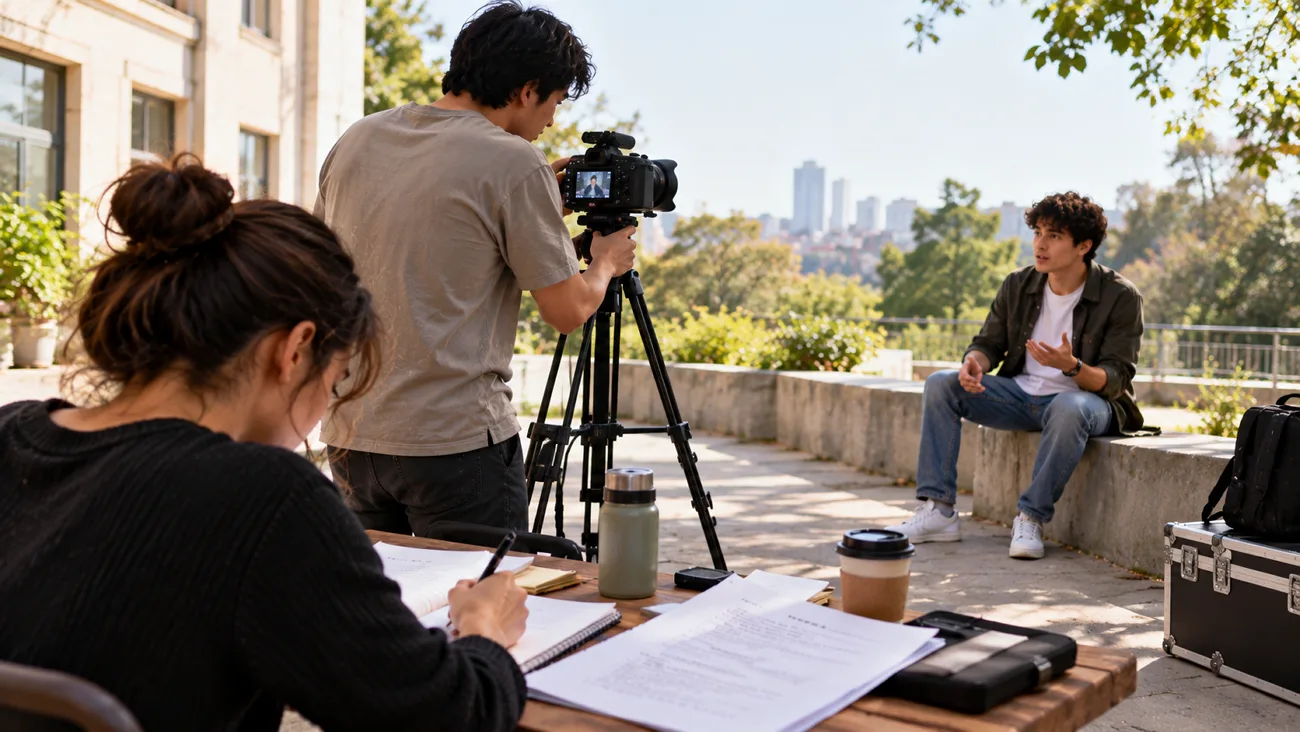
A short film needs a carefully developed story that holds attention throughout its runtime. An exciting story idea can become difficult to manage once you start developing its scenes. Understanding “how to write a script for a short film” helps keep that story focused.
Rather than adding unnecessary events, consider what your characters want and what prevents their success. Their conversations should reveal personal feelings and gradually move the story toward its intended ending. This article explores practical writing steps before introducing MagicLight AI for video creation.
Part 1. What Makes a Good Short Film Script?
A short script has little time to establish its story, making every page especially important. Learning how to write a good script for a short film begins with 4 key elements that help keep the screenplay focused:
- Compact Story Structure: A short film usually revolves around one defining moment, with the setup appearing in the first 2 pages and the resolution near the end. Starting scenes later and ending them earlier helps reduce unnecessary pages.
- Characters With a Clear Goal: A single lead character with an understandable goal can achieve more in 10 pages than a large cast. Keeping speaking roles limited to 2 or 3 also makes casting easier.
- Dialogue With a Purpose: Each conversation should reveal something about the characters and contribute to the developing plot. Lines that merely explain past events can be removed, since a meaningful expression may communicate more than a lengthy speech.
- Proper Screenplay Format: Using 12 point Courier font with standard scene headings and character cues helps maintain accurate page length estimates. Formatting mistakes can also make the screenplay harder for judges and production teams to follow.
Part 2. How to Write a Script for a Short Film
When learning how to write a short movie script, the real challenge lies in deciding what deserves screen time. Here are 5 steps worth considering before your screenplay takes its final shape.
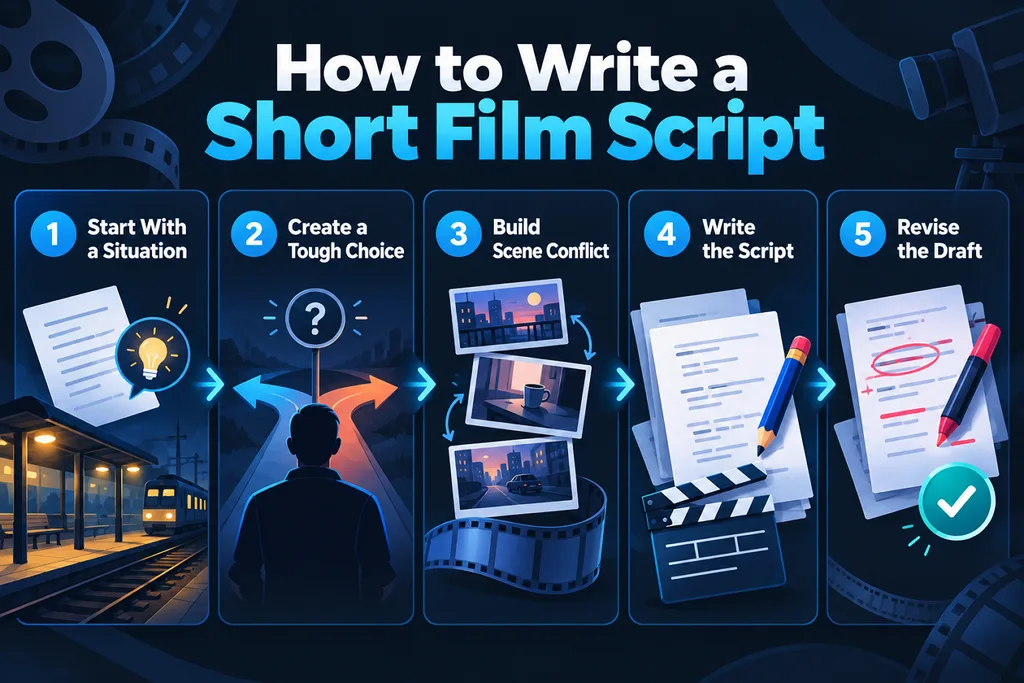
Step 1. Begin With an Unfinished Situation
Imagine a passenger discovering an unsigned letter on the last train home. What makes the incident worth filming is the trouble that follows its discovery.
Step 2. Give the Lead Character a Difficult Choice
The passenger could ignore the letter, yet its contents reveal a familiar address. Now there is a personal reason to act, with consequences attached to that decision.
Step 3. Let the Conflict Shape Each Scene
The next scene need not introduce another problem just to keep things moving. Perhaps reaching that address becomes difficult after the passenger misses the final train.
Step 4. Put the Action Into Script Pages
On paper, describe the empty platform and the passenger searching for another train. Use standard scene headings and place spoken lines beneath the names of characters.
Step 5. Return to the Draft With Fresh Eyes
That opening letter may have taken 3 pages when the scene needed just 1. After a complete read-through, cut the excess and see how the remaining scenes connect.
Part 3. Best Way to Turn a Short Film Script into a Video
A completed short film script gives you the story, yet the scenes still need visual direction. Understanding how to write a good script for a short film also means considering how the story appears onscreen. MagicLight AI can turn your written scenes into animated videos without requiring a film shoot.
It supports videos up to 50 minutes long and provides 14 story models, including GPT-6 Astra and Gemini 3.5 Flash. With MagicLight Agent handling script development, the Story to Video feature helps bring the planned scenes into a finished video.
- Room for a Full Draft: Story to Video takes a pasted script with a 12,000-character ceiling, which fits a tightly trimmed short.
- A Cast That Stays Put: Characters are generated once and reused, helping MagicLight AI maintain consistent character appearances across different scenes and future generations.
- Frame-Level Fixes: Individual storyboard frames can be adjusted through edited prompts, allowing creators to refine selected visuals without rebuilding the entire storyboard.
- Voices, Music, and Subtitles: Every line gets its own voice and speed, and background tracks in the Compose tab are sorted by mood.
Guide: How to Turn a Short Film Script into a Video with MagicLight AI
After learning how to write a script for a short film, you can use MagicLight AI to turn your finished screenplay into a video. To create your video using MagicLight AI, follow the steps below:
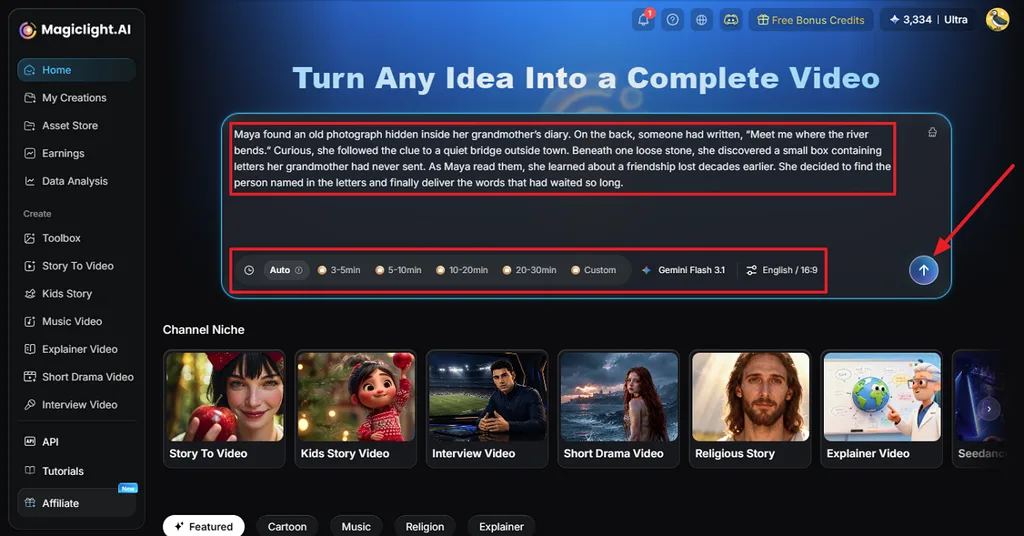
Step 1. Add Your Short Film Script
In MagicLight AI’s homepage, paste your completed short film script. Select the video length along with your preferred model and language. Set the aspect ratio and click Send to proceed.
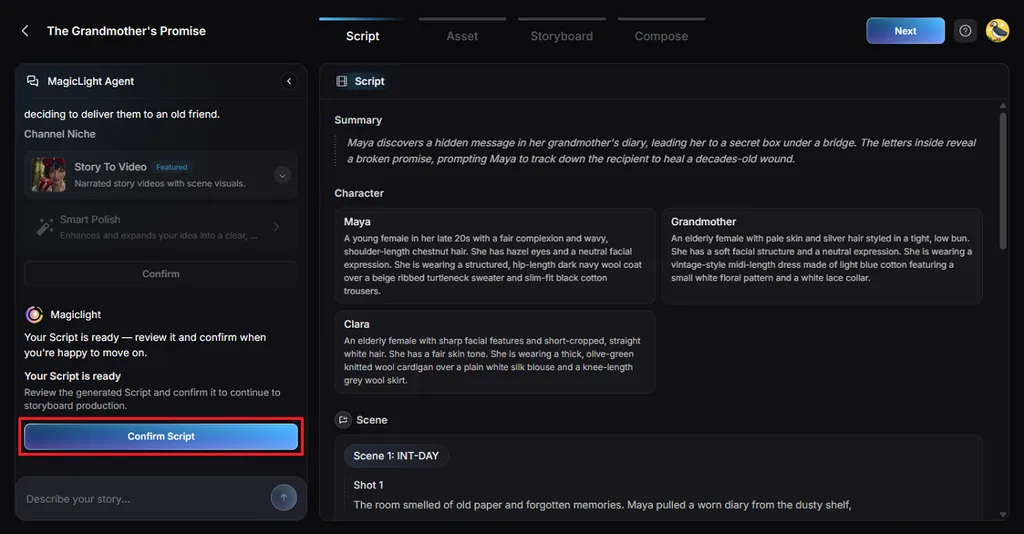
Step 2. Check the Script Details
Review the shots and summary created by MagicLight Agent. Compare these sections with your script and correct any missing details. Press Confirm Script after reviewing the content.
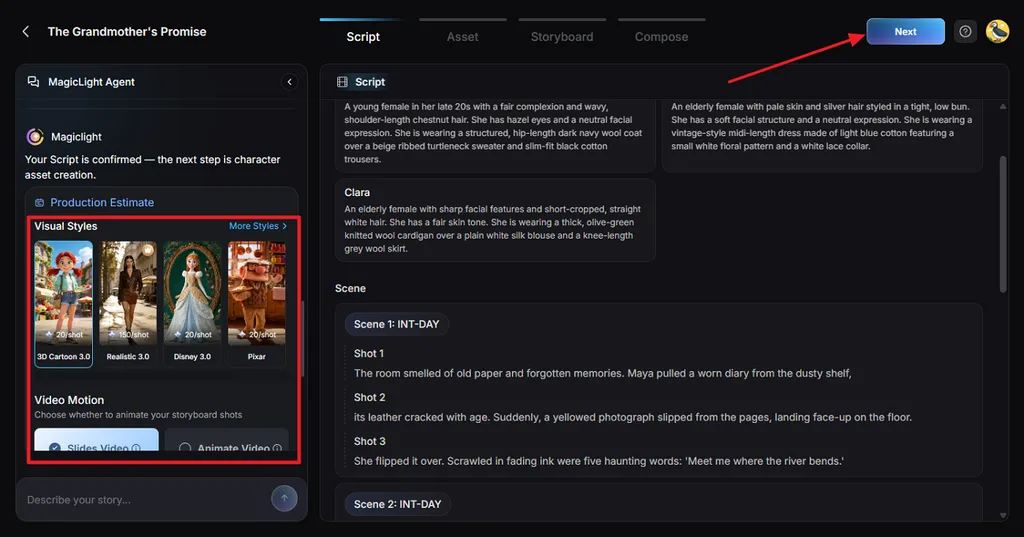
Step 3. Set the Visual Appearance
Choose a Visual Style that suits the setting and mood of your short film. Select Slides Video for still scenes or Animate Video for moving shots. Review the remaining production settings and confirm your selection.
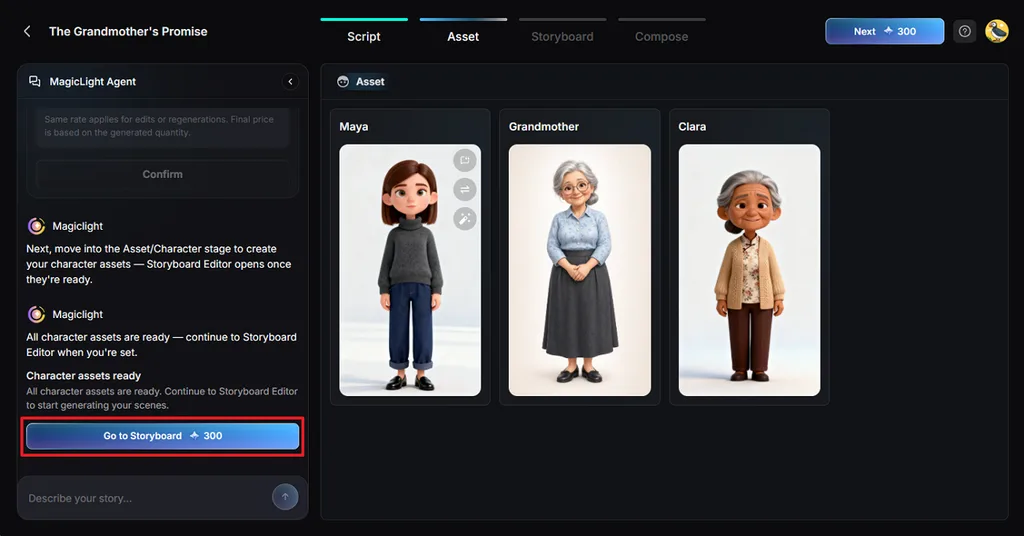
Step 4. Check the Generated Characters
MagicLight AI creates character images from the descriptions included in your screenplay. Check their appearance and make changes if any character looks different from your original idea. Click Go to Storyboard after approving the images.
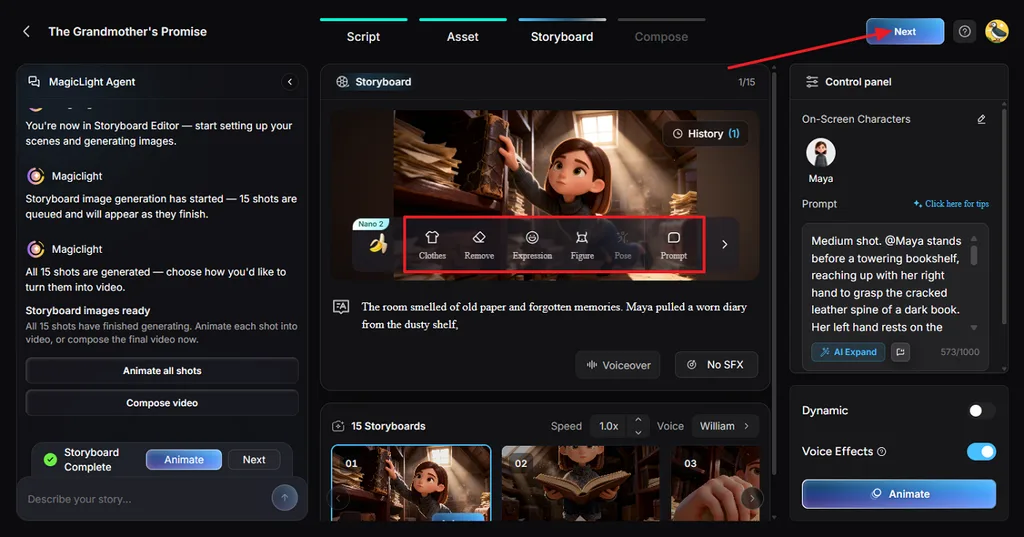
Step 5. Make Changes to the Storyboard
Verify each storyboard shot to see how your written scenes appear on screen. Use Clothes, Pose, and Prompt to change details that need attention. Press Next after finishing the storyboard adjustments.
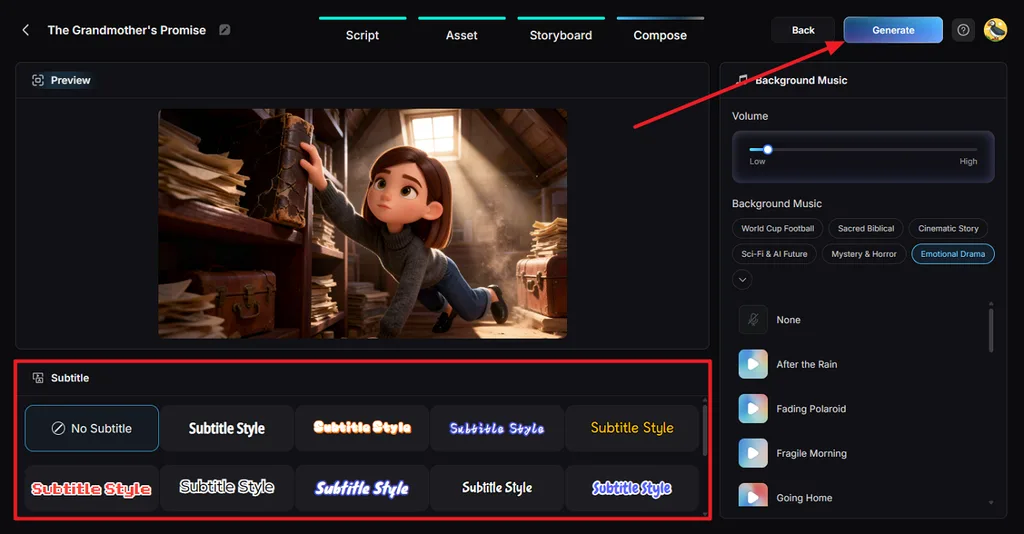
Step 6. Add Music and Generate the Video
Play the available preview and select a suitable Subtitle Style for your short film. You can also choose No Subtitle and adjust the Background Music volume to suit the dialogue. Click Generate to proceed with finalizing the short film.
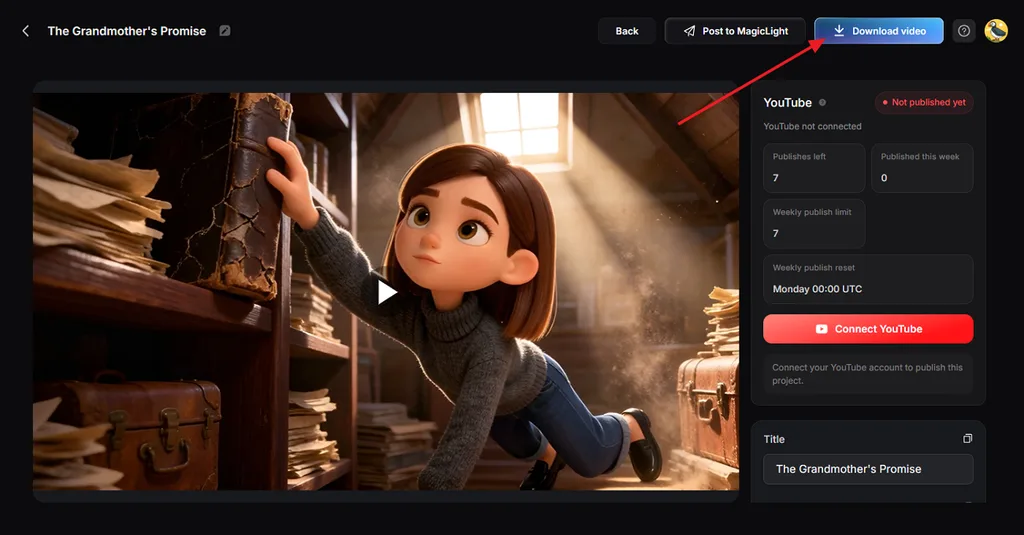
Step 7. Save Your Completed Short Film
Watch the generated film from beginning to end and examine how the scenes connect. Once you are satisfied with the result, click Download Video to save your short film.
Conclusion
Learning how to write a script for a short film takes patience and planning. A focused plot with meaningful scenes can make even a brief film memorable. Reviewing your screenplay before production helps catch weak dialogue and scenes that need attention. For turning finished scripts into storytelling videos, MagicLight AI offers a practical way to bring your ideas onscreen.
FAQs About Writing Short Film Scripts
- How long should a short film script be?
A short film script roughly follows its expected runtime, with one formatted page averaging one minute. The Academy allows films up to 40 minutes, including credits.
- How do you write a good short movie script as a beginner?
Learning how to write a short film script starts with choosing one central conflict. Develop the character around that problem and keep scenes connected to the main story.
- What should be included in a short film screenplay?
A short film screenplay needs scene headings, action descriptions, character names, and spoken dialogue. Each scene should describe what happens onscreen and show how the story develops.
- Can AI help turn a short film script into a video?
MagicLight AI can transform written screenplays into animated videos using its Story to Video feature. You can explore its starter credits to test video creation before purchasing a plan.





![How to Make a Product Video for Marketing With AI [Guide 2026]](https://magiclight.ai/wp-2/wp-content/uploads/product-video-marketing-guide-1-300x198.webp)