AI platforms like GizAI help people turn simple ideas into polished content. In 2026, many professionals use this tool to plan projects and organize assets in one place. The tool combines chat and storage to keep research and files connected.
With its built‑in generators, you can create videos, images, and text content without juggling many separate apps. This guide explains how it works and helps you decide if GizAI fits your needs. You will also see a trusted alternative for video creation, plus a comparison to choose wisely.
Part 1. What is GizAI?
This AI creation platform helps people build visual stories and videos from simple prompts. GizAI is already used in 221 countries, giving creators a shared space to build and share ideas. The tool can keep a consistent character story, so the same hero appears correctly across many scenes.
You can generate playful AI Ghibli Hug videos, adding soft colors, warmth, and emotional moments to projects. GizAI also lets you modify existing images using natural language, changing details without complex editing software. Together, these options help creators move from rough concepts to finished visuals.
Key Features
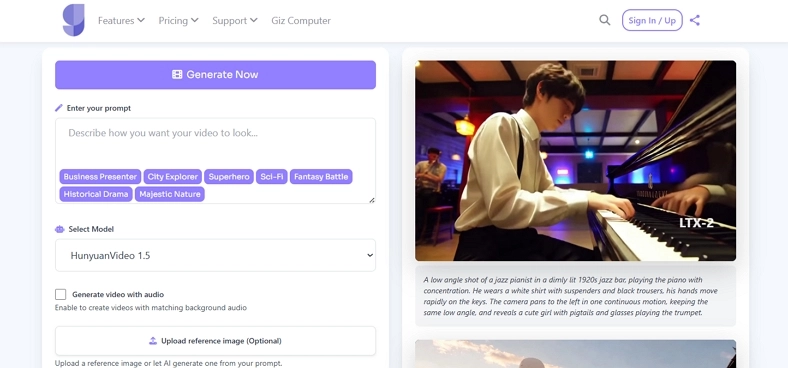
- With 6 video models, including Seedance Pro and HunyuanVideo 1.5, it supports varied styles.
- You can upload custom reference images, guiding the style, framing, and look of your generated videos.
- Advanced language models inside the platform translate YouTube videos and PDF documents into text.
Pros
- Timeline previews help quickly spot broken frames before full export.
- Auto-caption tools speed up social posting for silent-feed platforms.
- Scene-by-scene control improves pacing for explainers and product walkthroughs.
Cons
- Longer clips sometimes show flicker or jitter between generated frames.
- Limited fine control over lip sync for detailed dialogue scenes.
- Some models require strong prompts; weak prompts return boring visuals.
Part 2. How to Use GizAI?
Now that you understand what GizAI is and the main tools it gives creators, you might wonder how to start using it in real projects. To make things simple, follow the clear steps below and learn how to use it effectively:
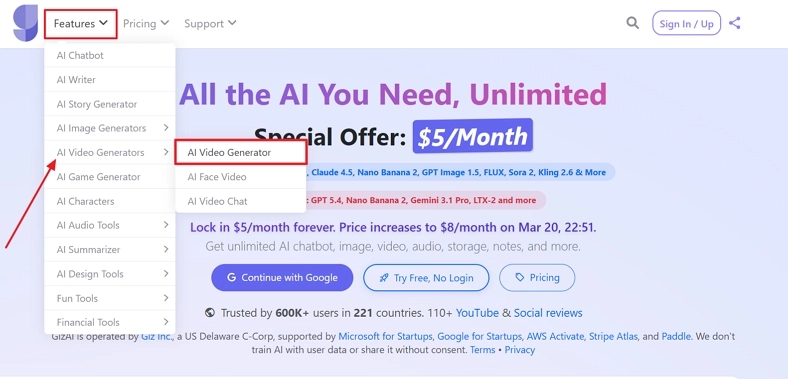
Step 1. Once you enter the landing page, press the navigate to the Features tab on the tap. From the drop-down menu, choose the AI Video Generators option and click the AI Video Generator option to enter the interface.
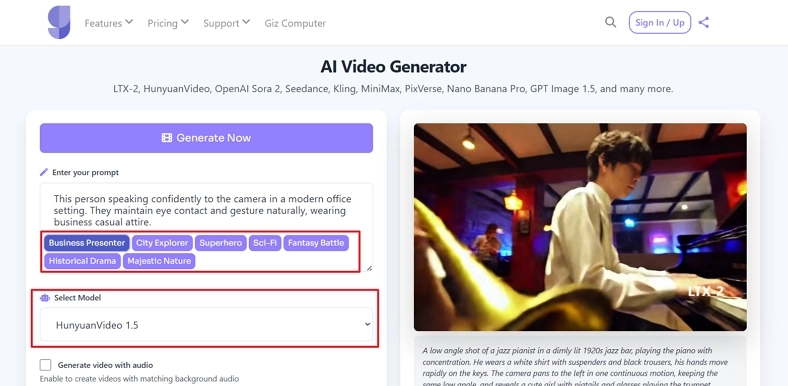
Step 2. Next, enter the detailed prompt for video generation or choose from the Prompt Templates. Afterward, select an appropriate model from the Select Model section.
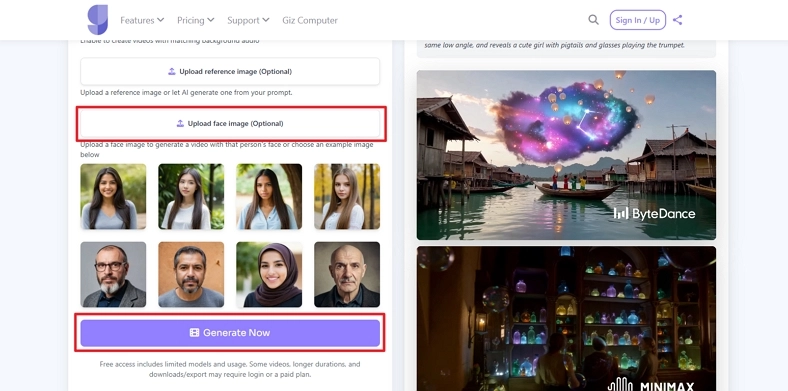
Step 3. Once done, scroll down and upload a reference image if needed. Also, if you want a particular face in the video, press the Upload Face Image button to upload the face photo. Alternatively, choose a face from the list below and click the Generate Now button.
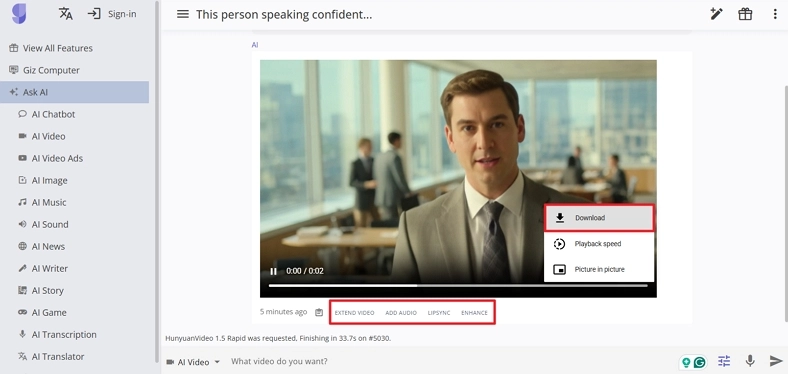
Step 4. After the final video is generated, use the controls below to extend, add audio, or enhance the video. If finalized, press the Download button to save the video.
Part 3. Best Alternative to GizAI for Video Creation
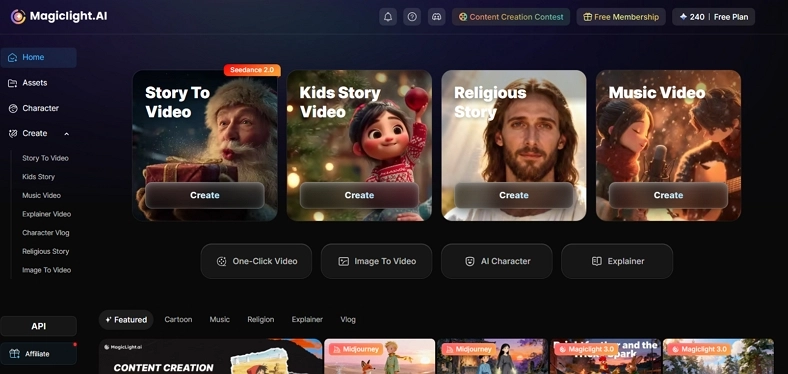
Many users try GizAI for video generation yet soon want more control over pacing and structure. This is where Magiclight.AI stands out, built specifically for extended videos and consistent narrative flow. Instead of short, experimental clips, some creators need tools that can handle longer stories with steady visuals.
It focuses on keeping characters stable from shot to shot, so faces, clothing, and proportions remain reliable. The platform also works to preserve background details and overall style, helping your entire video feel visually unified. With simple, natural prompts, you can guide actions, camera moves, and scene energy without learning complex scripting rules.
Key Features
- Provides 14 different AI models for convenient image to video generation.
- Magiclight.AI outputs full stories with video, voice, captions, and audio, all in 1080p HD quality.
- It supports long videos and can automatically build clips lasting up to 50 minutes.
- You get more than 20 visual looks to fit different channels, audiences, and brand styles.
Part 4. Comparison Table Between GizAI and Magiclight.AI
Many readers, after learning about GizAI and Magiclight.AI, want a clear, side‑by‑side comparison. Take a look at the table below to quickly see which platform better matches your video creation needs:
| Feature | GizAI | Magiclight.AI |
| Primary Focus | An AI suite (chat, images, video) | Dedicated AI video and story generator with an editor |
| Max Video Length | Short clips, 2–10 seconds per generation for T2V/I2V | Long‑form stories up to 50 minutes per video |
| Supported Languages | Multilingual interface; multiple languages via LLMs | Story generation in 30+ languages (e.g., English, Spanish, Hindi) |
| Visual Styles/Templates | Multiple model-based looks | 20+ built‑in visual styles and thumbnail templates |
| Long‑video Tooling | Designed for short AI clips, presentations, and embeds | One‑click story videos; 3,600+ minutes generated/month |
| Input Types | Text prompts, images, 3D, websites, PDFs, YouTube links | Text scripts, prompts, images for image‑to‑video workflows |
| Pricing | Free usage, starting from $8/month | Free 300 credits, $7.50/month |
| Best Suited For | Users who need one subscription for research and media creation | Creators focused on story videos, YouTube content, and long animations |
Conclusion
In conclusion, we walked through the GizAI video generator, its main options, and overall workflow. We then examined Magiclight.AI as an alternative that is better suited to longer, tightly structured story videos. So, if you want steady characters, consistent environments, and full multi-scene episodes, Magiclight.AI is a dependable alternative to use.
FAQs on GizAI
1. Is GizAI free to use?
GizAI includes a small free tier, which is mainly helpful for testing basic tools and simple projects. To unlock higher limits and advanced features, users must switch to one of its paid plans.
2. What is the best alternative to GizAI?
If you mainly create videos, Magiclight.AI is a strong choice with focused, long-form storytelling features. It offers structured workflows, multiple visual styles, and clear pricing suited to different video creator levels.
3. What videos can GizAI create?
GizAI can generate short clips, video ads, promos, and life-like animations for social platforms. For longer, story-driven videos or more dedicated video workflows, Magiclight.AI is a reliable alternative to use.




![How to Write a Script for a Video 2026 [Full Guide]](https://blog-new.magiclight.ai/wp-2/wp-content/uploads/video-script-writing-setup-300x199.jpg)