
AI tools now let anyone turn ideas into short videos without needing technical skills or editing experience. In 2026, creators can build smooth scenes with motion, characters, and camera moves using simple controls online. The Upsampler free AI video generator is one popular option for testing fast concepts and social clips.
You do not need expensive software, because modern AI handles animation details that once took experts many hours. This guide explores a reliable alternative to Upsampler and compares them to help you choose the best.
Part 1. How to Use Upsampler Free AI Video Generator
Upsampler free AI video generator is part of an all‑in‑one web platform for image and video creation. It runs entirely in the browser, so you can generate clips without installing software or downloading separate models. The video tool is powered by 12 advanced AI models, including options like Grok Imagine Video, Kling 2.5 Pro, and Veo 3.1.
On the similar site, you can also use text‑to‑image, image upscaling, restoration, and precise editing tools in one workflow. This makes it easy to turn a prompt into an image, enhance it, and then animate it into a finished video.
Guide to Generate AI Videos Using Upsampler
Now that you have seen what this tool can do, let’s go through the steps to use it:
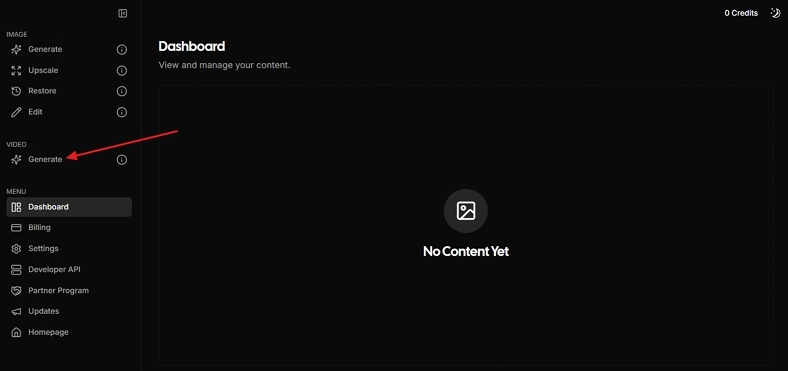
Step 1. First, access the main dashboard and click the Generate option under the Video section in the left side panel to enter the video generation interface.
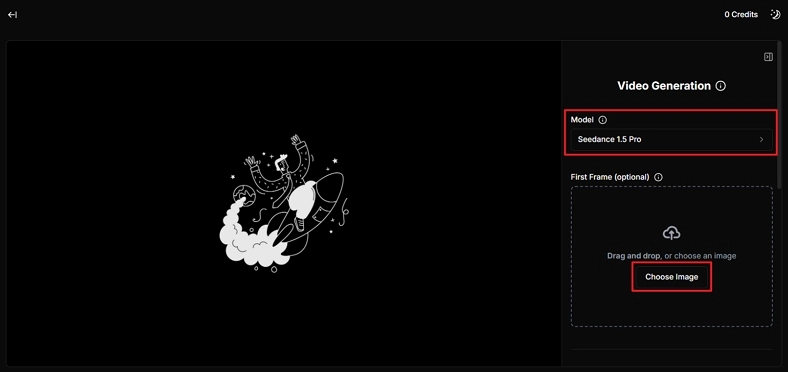
Step 2. Once entered, choose the video generation model from the Model section. Next, press the Choose Image option to upload the first frame image.
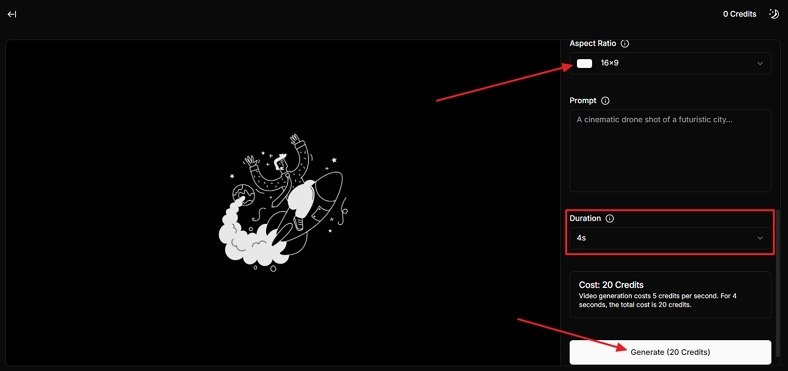
Step 3. Afterward, scroll down and select an appropriate Aspect Ratio. Behind this, enter a detailed prompt for the video description you want. Next, choose the Duration of the video you want and click the Generate button to begin the generation process.
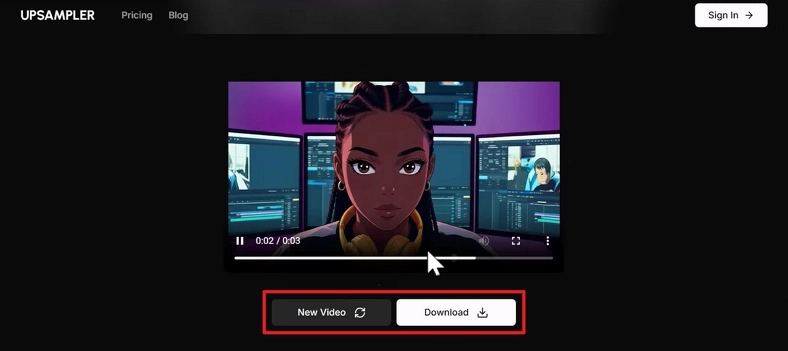
Step 4. Once the video is generated, review the video. If you want any adjustments or to generate a new video, press the New Video button. After the video is finalized, click the Download button to save the generated video.
Part 2. Best Alternative to Upsampler Free AI Video Generator
Many users start with Upsampler free AI video generator, but soon feel limited by short, inconsistent clips. This is where Magiclight.AI appears as a stronger option, designed for longer videos and stable storytelling. It keeps character designs consistent from scene to scene, so faces and outfits never suddenly change. Magiclight.AI also maintains a stable background and style to give your whole video one unified visual look.
You can describe desired actions with simple words, and the system follows them instead of forcing complicated syntax rules. It allows you to use prompts to suggest camera movements or character gestures to create dynamic scenes.
Key Features
- Over 20 built‑in visual styles to match different niches, platforms, and branding needs.
- Features a smart script generator, AI visual builder, voice and sound sync, and storyboard editor in a single space for exquisite video generation.
- Full commercial usage rights suitable for client projects, advertisements, online courses, and social campaigns.
- Long‑form video support, allowing automated creation of videos up to 50 minutes in length.
Ultimate Guide to Generate AI Video Using MagicLight.AI
Having introduced the key features, follow the steps below to see how MagicLight.AI works better than the Upsampler free AI video generator:
Step 1. Setup The Project
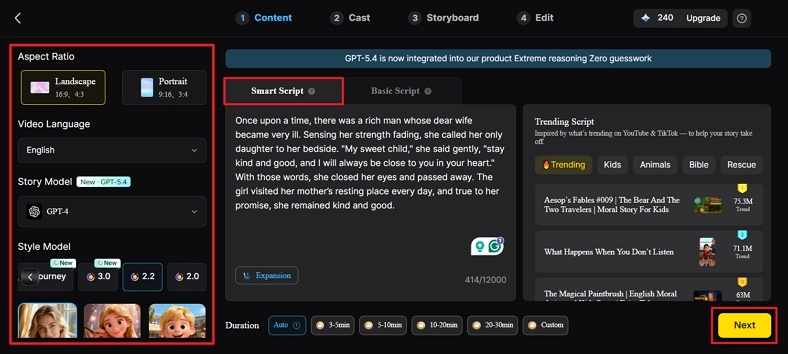
Once you enter the Story to Video tool from MagicLight.AI homepage, choose the Aspect Ratio and Video Duration for your video. Afterward, choose the Video Language, select the Story Model, and write a script in the Smart Script section. This will optimize your script for the video. Next, press the Next button.
Step 2. Review The Scene Breakdown
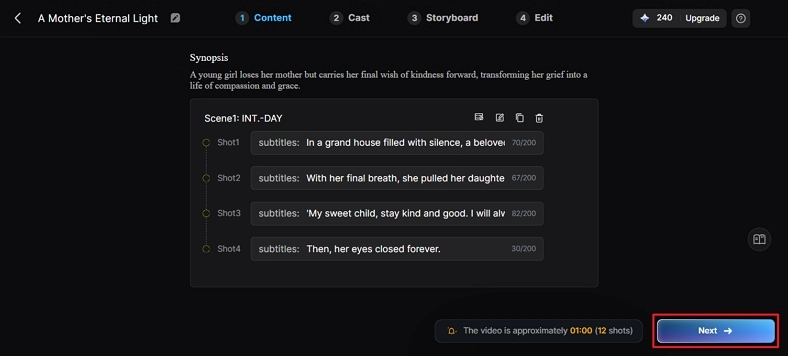
Afterward, check the generated scene layout and Synopsis. Read each scene and make any adjustments if needed. Following this, click the Next button to continue with the video creation.
Step 3. Select Your Character
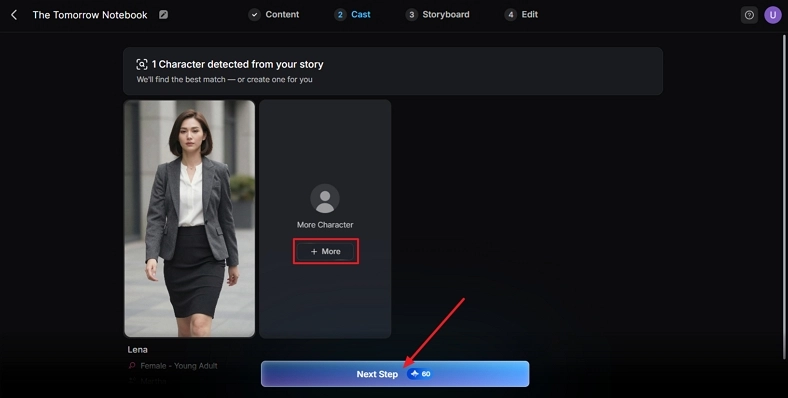
Now, the tool will automatically detect the character from your script and provide you with available options for your video. To explore more character options, click the More button. If your character is finalized from the given options, press the Next Step option.
Step 4. Check The Storyboard
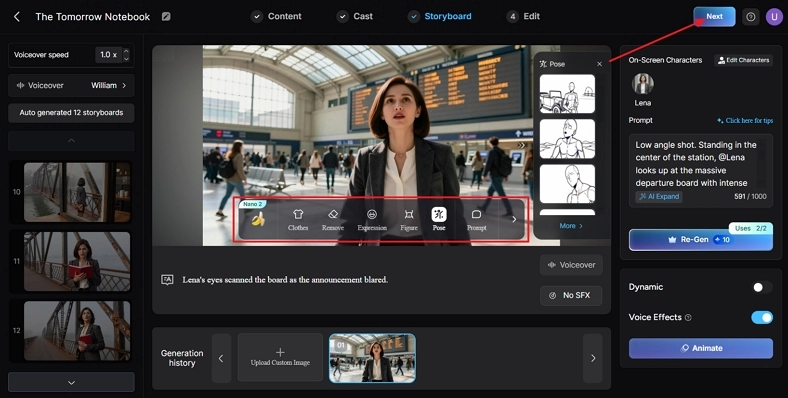
After the storyboard is generated, review all scenes carefully. If needed, make some adjustments in the clothes, pose, figure, or expressions from the scenes by using the Controls below. Afterward, press the Next option.
Step 5. Save The Final Video
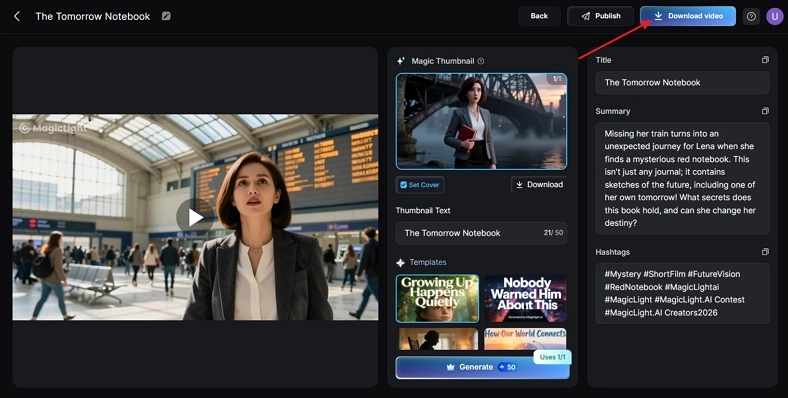
Once the video is generated, review the preview, cover, thumbnail, and hashtags. Once finalized, press the Download Video to save the final file.
Part 3. Comparison Table Between Upsampler Free AI Video Generator and Magiclight.AI
Many users, after reviewing the alternative to Upsampler free AI video generator, start wondering how both tools truly stack up. They want to know whether Upsampler is still enough for quick clips or if Magiclight.AI offers more value. Now, look at the table below to see which option better fits your needs and goals:
| Aspect | Upsampler AI Video Generator | Magiclight.AI |
| Max Video Length | Short clips, mainly seconds per generation | 50 minutes per video, built for full episodes and stories |
| Supported Creation Tools | Text‑to‑image, upscaling, restoration, text‑to‑video, image‑to‑video | Story to Video, Text to Video, Script to Video, Long Video Generator, AI Lip Sync, AI Voice Cloning, and much more. |
| Character Consistency | Basic consistency inside one short clip, not optimized for long narrative continuity | Keeps main characters consistent across many scenes |
| Visual Styles/Templates | Relies on the 29 image and 12 video models for different styles | 30+ ready templates for kids stories, religious content, animations, and more |
| Pricing | Starting from $15/month | Free 300 credits, starting from $7.5/month |
| Best For | Quick experiments, social clips, generating and enhancing images, short AI video snippets | Long YouTube videos, story content, faceless channels, educational or narrative projects |
Conclusion
In conclusion, we explored Upsampler free AI video generator with its main features and basic workflow. On the other hand, we also introduced an alternative tool that focuses on longer, more consistent story videos. However, if you need stable characters, unified backgrounds, and complete episodes, we recommend using Magiclight.AI because it handles everything in one place.




![How to Write a Script for a Video 2026 [Full Guide]](https://blog-new.magiclight.ai/wp-2/wp-content/uploads/video-script-writing-setup-300x199.jpg)