


AI video platforms are crowded now, and Vidfly needs more than surface praise. Creators want to know how its templates, editing controls, and exports perform clearly. This Vidfly AI review explains its core tools without exaggerating everyday production value. It should also explain where users may still need manual editing control. That practical angle helps readers confidently judge features, pricing, pros, and cons, along with a progressive alternative.
Part 1. What Is Vidfly AI?
Vidfly AI works like a quick studio for people who need video ideas shaped fast and clearly. Users can type a scene, upload a photo, build an avatar clip, or add effects without moving between different tools. Its model choices also help creators test several visual directions before spending time on a longer production plan.
The platform feels useful when teams need drafts that still look presentable. A brand can prepare product teasers, while educators can shape short explainers from simple concepts. Furthermore, social creators can animate images, apply effects, and create avatar led clips when filming is impractical or budgets are tight.
Key Features
- AI Shorts: Turns ideas into short, ready to share videos for launches, reels and campaign testing across channels.
- Lip Sync: Keeps spoken lines matched with mouth movement, making avatar presentations feel natural and polished.
- AI Video Caption: Vidfly AI adds readable captions that support silent viewing, accessibility and stronger message recall across platforms.
- AI Video Upscaler: Refines low resolution footage helping compressed clips look sharper before publishing or reuse in campaigns.
- Video Compressor: Reduces heavy video files while keeping uploads, sharing, and storage easier for teams online.
Part 2. Is Vidfly AI Free? Is Vidfly Safe?
Vidfly offers a free plan, but it works best for testing rather than serious publishing. Free users receive 100 initial tokens, 10 to 30 daily reward tokens, basic AI tools, one concurrent task, watermarked exports, and personal-use access only. Moreover, the Vidfly AI video generator requires paid access for commercial exports.
For safety, Vidfly is legitimate enough to review, but users should not treat uploads as private by default. Its privacy policy says it collects account details, payment information, prompts, uploaded media, generated videos, usage data, and cookies. Therefore, creators should avoid sensitive files and check ownership terms before publishing online.
How to Use Vidfly AI - Complete Guide
Before judging Vidfly’s output quality, users should understand how its video creation workflow works from prompt setup to final export.
Step 1. In the left panel, click the Model dropdown and select Vidfly v2.0. Next, type the video idea inside the Prompt box, including the subject, action, mood, background, and camera movement. After that, choose an aspect ratio like 16:9 and select the resolution, such as 720p.
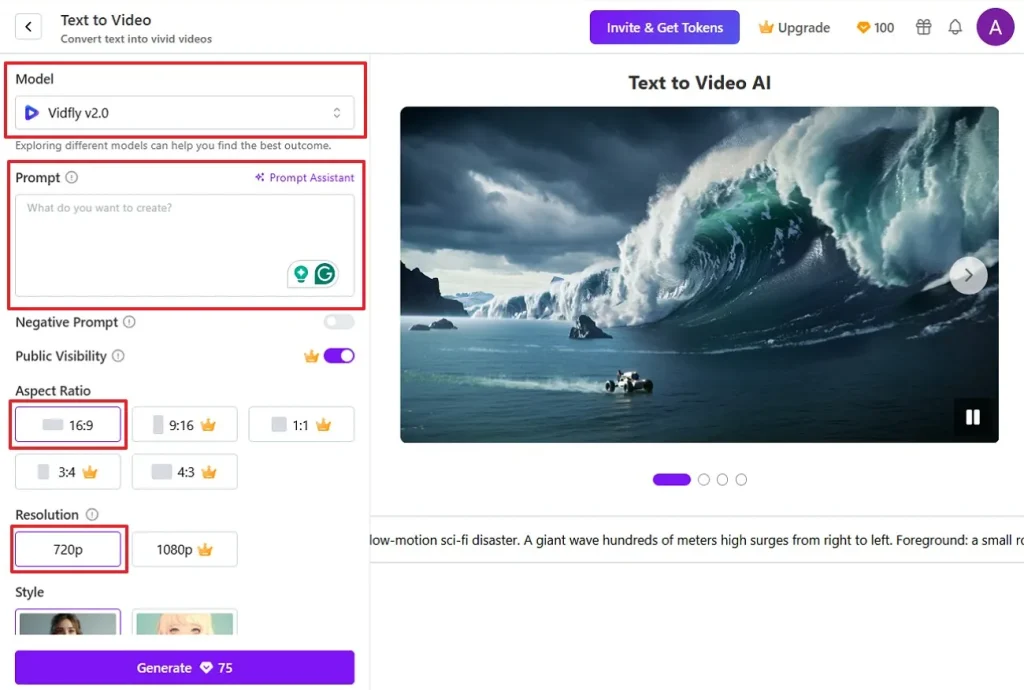
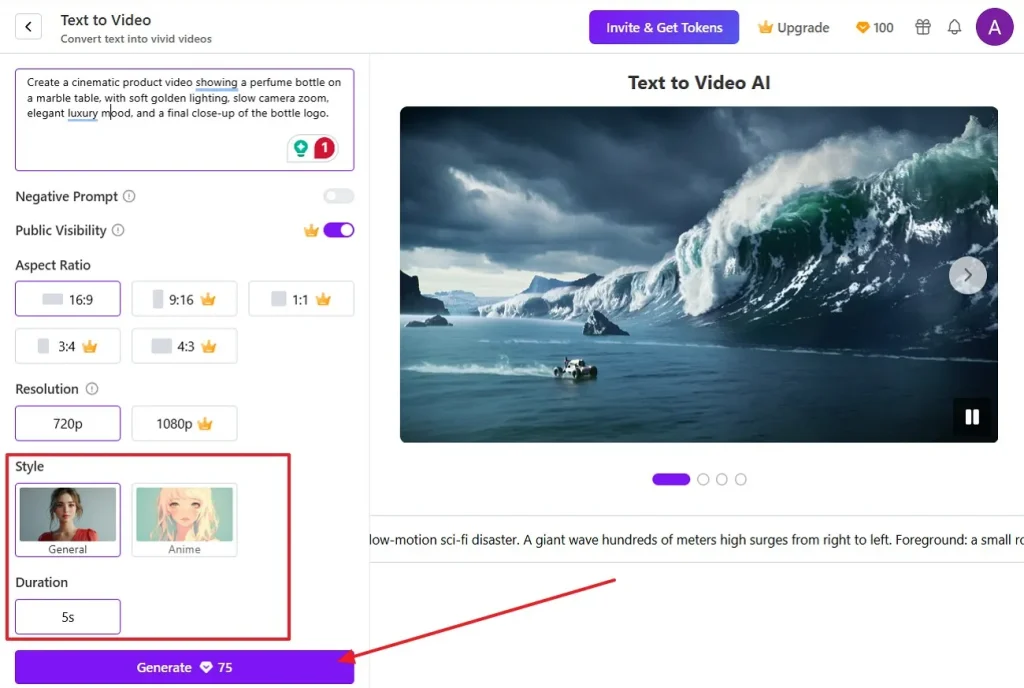
Step 2. Now, scroll down to the Style section and select a visual style, like General or Anime. Then, choose the available Duration, such as 5s. Once the prompt and settings look correct, press the purple Generate button to start creating the video.
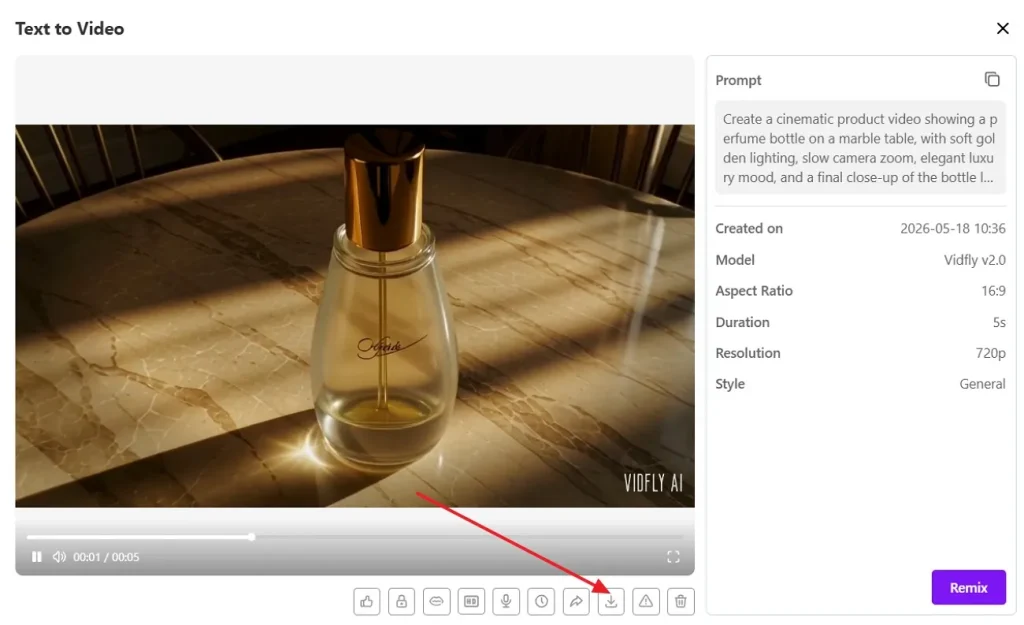
Step 3. Once Vidfly generates the video, review the preview on the left side and check the final settings on the right panel. If the result looks correct, select the Download icon below the video to save it.
Vidfly AI Review: Pros & Cons
For a balanced Vidfly AI Review, these points show where the tool feels useful and where its free plan stays limited:
Pros
- Includes over 300 effects and many premium models for creators.
- Paid plans remove watermarks and allow commercial use for subscribers.
- Camera controls help prompts feel more directed during video generation.
Cons
- Token-based generation can complicate budgeting when teams create many drafts.
- Advanced outputs may still need external editing for brand accuracy.
Part 4. Why Magiclight AI Outperforms Vidfly AI for Video Creation
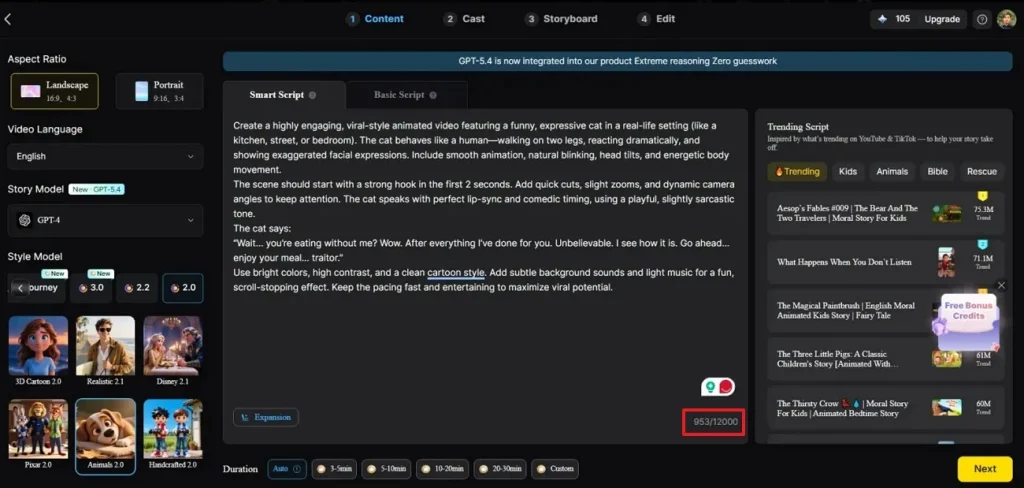
Magiclight AI suits creators who need more structured videos beyond short clips and quick drafts. Its workflow turns ideas, scripts, and narratives into planned visual scenes with clearer production direction. Moreover, users can manage characters, voiceovers, timing, visual styles, and pacing inside creative projects. This control helps teams prepare explainers, kids’ stories, product videos, and branded campaigns confidently across channels.
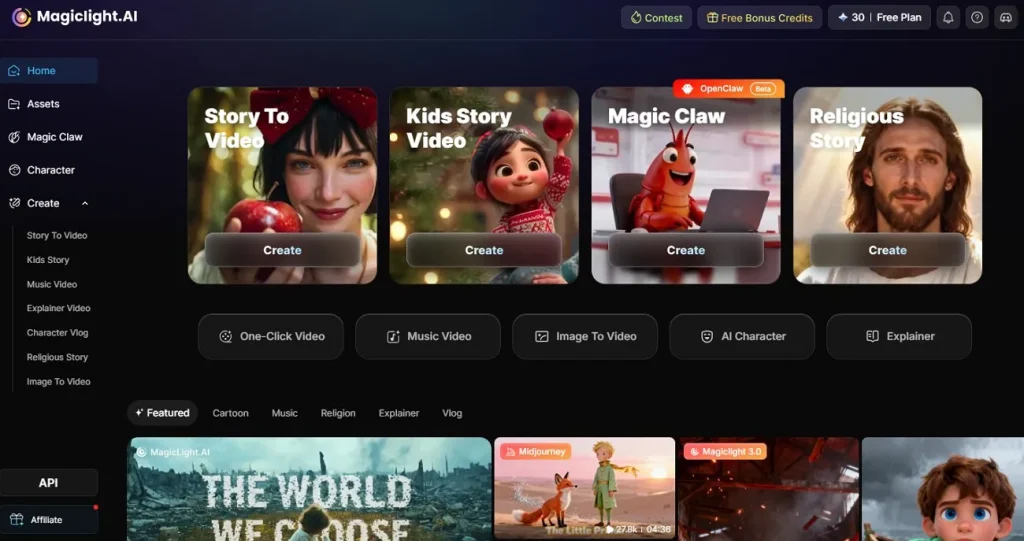
Unlike Vidfly, it handles longer scripts with scene continuity and consistent character direction across videos. Its story-to-video workflow supports multilingual outputs, voice choices, storyboard controls, and detailed creative adjustments. Therefore, creators can shape educational lessons, marketing explainers, or narrative videos with a steadier flow. That makes it stronger for teams needing polish, consistency, and repeatable video workflows at scale.
Key Features
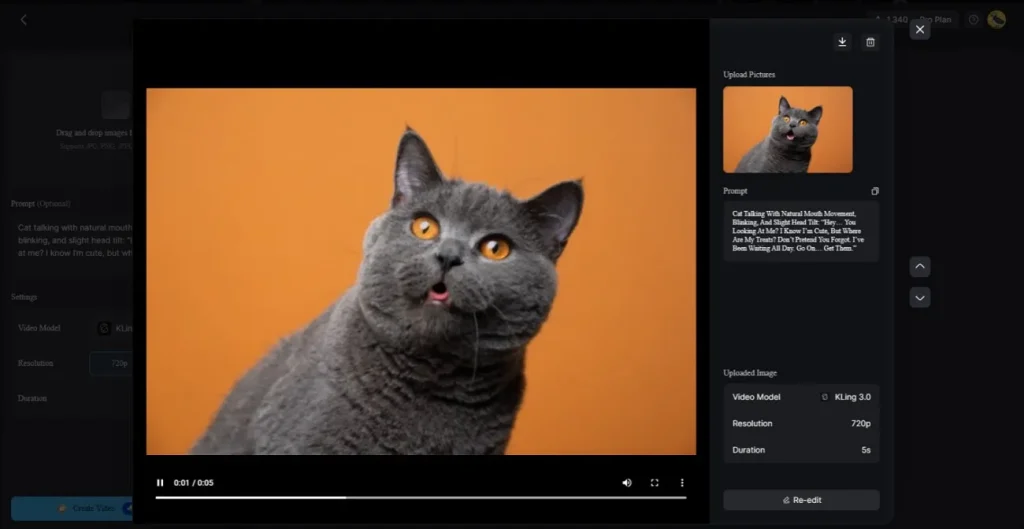
- Image to Video: Transforms static visuals into moving scenes, supporting product showcases, story hooks, and creative previews.
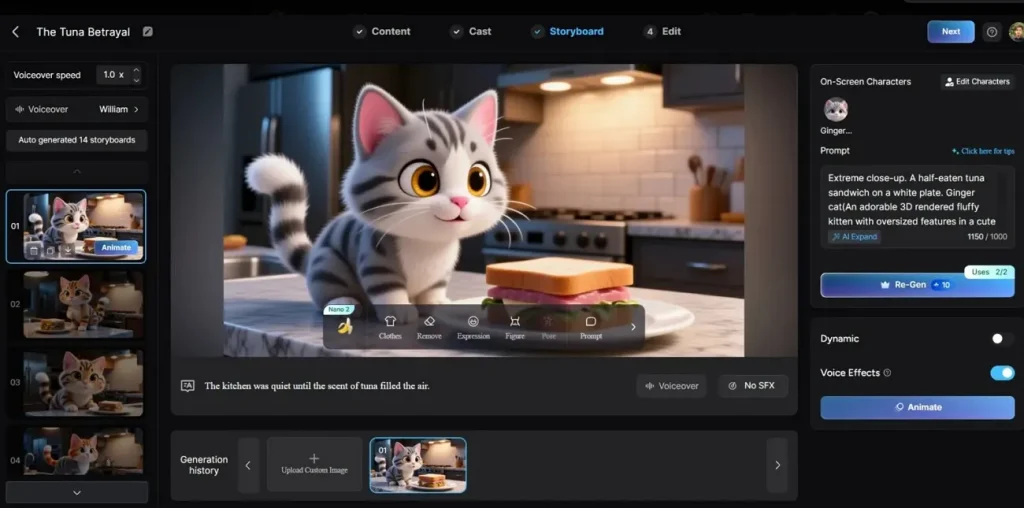
- Nano Storyboard Control: Lets users refine each storyboard scene with prompts, clothing, expressions, character placement, and up to 50 pose options before animation.
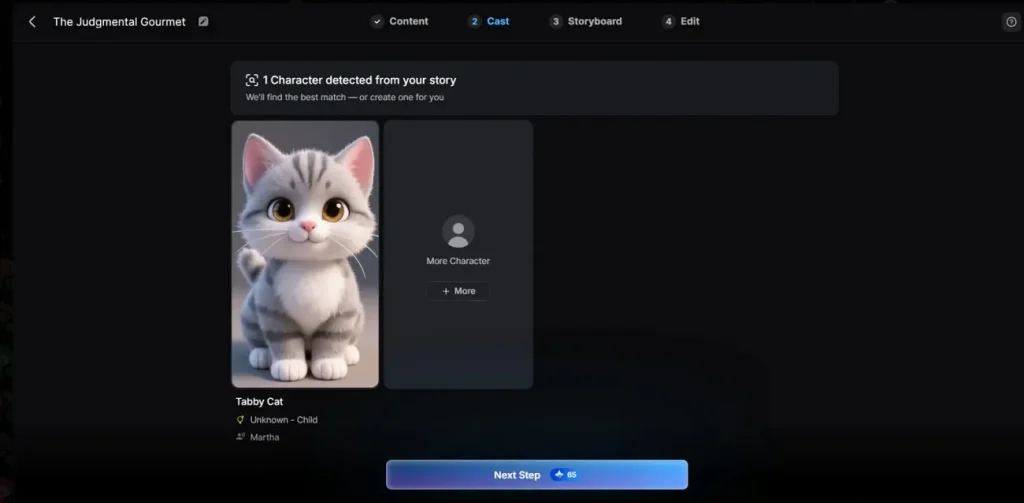
- AI Character Creation: Magiclight AI detects story characters and creates matching visual cast members for consistent scene development.
- Extended Video Output: Supports long-form video creation up to 50 minutes, making it stronger for complete stories, explainers, and branded narratives.
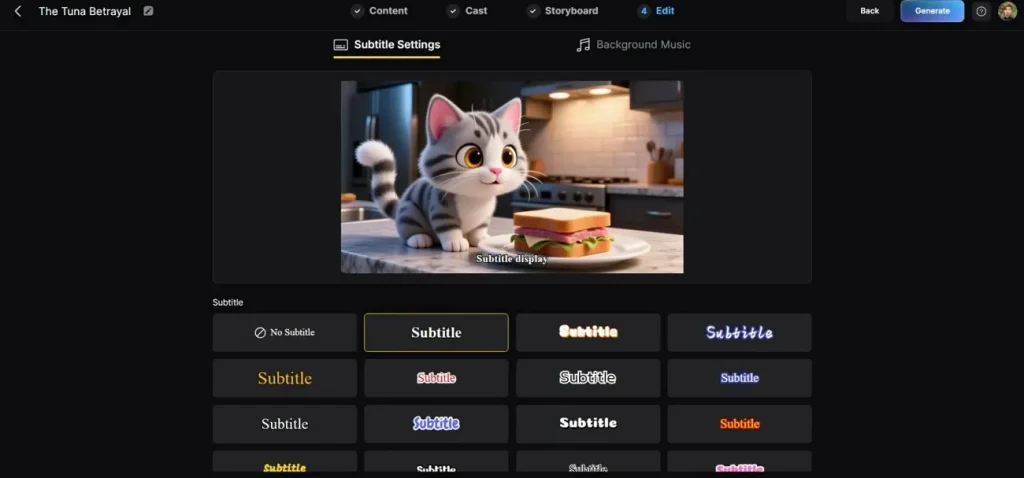
- Subtitles and Background Music: Generates timed subtitles, supports 30+ subtitle languages, and lets users add background music for more complete videos.
With the basics covered, the table below compares Vidfly and Magiclight AI side by side. It shows where each tool performs better and what users should expect before choosing.
| Feature | Magiclight AI | Vidfly AI |
| Primary Workflow | Script, story, and scene-based video creation | Prompt, image, avatar, and effect-based video creation |
| Video Length | Supports videos up to 50 minutes | Uses model-based generation with selectable settings |
| Storyboard Control | Includes Nano storyboard editing for scene adjustments | Offers prompt, model, style, duration, and resolution settings |
| Creative Tools | Characters, voice cloning, subtitles, music, and storyboard edits | Avatars, lip sync, captions, upscaling, and compression |
| Models and Effects | Focuses on story, character, and scene workflow tools | Lists 50+ AI models and 300+ AI video effects |
| Plan Limits | Feature access depends on the selected plan | Free plan includes tokens, watermark, and personal-use limits |
Conclusion
To conclude, this Vidfly AI review shows that Vidfly can help creators test ideas, generate short clips, and speed up simple video tasks. Still, its token limits, watermark rules, and shorter workflow may not suit every project. For users needing stronger story structure, character consistency, subtitles, music, and longer outputs, Magiclight AI is the more practical choice.
FAQs on Vidfly AI
1. Does Vidfly AI support image-to-video generation?
Yes, Vidfly AI supports image-to-video generation for turning uploaded visuals into short animated clips. Magiclight AI also offers image-to-video tools for building scene-based visuals with clearer continuity control.
2. Can beginners use Vidfly AI easily?
Yes, Vidfly AI keeps beginner workflows simple through prompts, models, and preset settings online. For guided planning, Magiclight AI suits beginners moving from script planning to scene refinement.
3. Does Vidfly AI include subtitles and voiceovers?
Vidfly AI lists caption tools and lip sync for clearer spoken-video presentation workflows online. For voiceovers, users should review the selected tool and plan before creating professional content.
4. What are the limitations of the Vidfly AI free plan?
Vidfly AI’s free plan includes basic tools, limited tokens, watermarks, and personal-use access only. Teams needing larger projects can consider Magiclight AI for cleaner exports and licensing support.
5. What are the best alternatives to Vidfly AI?
Alternatives should match the project type, including avatars, effects, explainers, stories, or publishing needs. Creators needing structured scripts, subtitles, music, and longer outputs may choose Magiclight AI instead.





![How to Write a Script for a Video 2026 [Full Guide]](https://blog-new.magiclight.ai/wp-2/wp-content/uploads/video-script-writing-setup-300x199.jpg)