


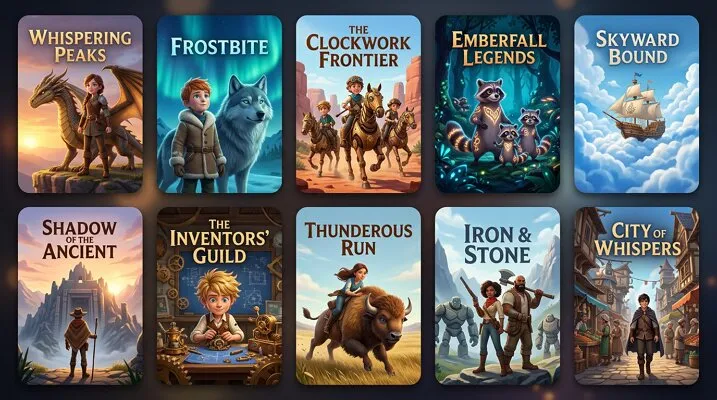
A beginner opens a laptop, eager to create a 3D animation but unsure where to begin. The excitement quickly meets confusion when complex tools and expensive software appear. Fortunately, free 3D animation programs now offer simple interfaces and powerful features designed for newcomers. These tools help users build characters, animate scenes, and render visuals without prior experience.
With the right software, learning becomes faster and more enjoyable. This guide highlights the best 3D animation software that balances ease of use with creative control, making it possible to turn ideas into impressive animations without spending anything.
Part 1. Top 3D Animation Software for Free & Easy Animation
To get the right animation option in hand, it’s time to explore the best free software for 3D animation that combines simplicity with powerful features:
1. Magiclight.AI
Magiclight.AI is an innovative 3D animation-style tool that simplifies video creation using advanced AI workflows. Its standout image-to-video feature allows users to upload a single image and instantly transform it into a dynamic animated scene with realistic motion and smooth transitions. By combining prompt-based controls with physics-aware animation, it ensures natural movement while preserving visual consistency across frames.
With thousands of templates to choose from, the platform also supports character animation, storytelling, and scene generation in one place. With minimal effort, creators can produce engaging, high-quality animations without needing traditional 3D animation skills. To learn how to use this 3D animation software free online for 3D video creation, read the steps provided below:
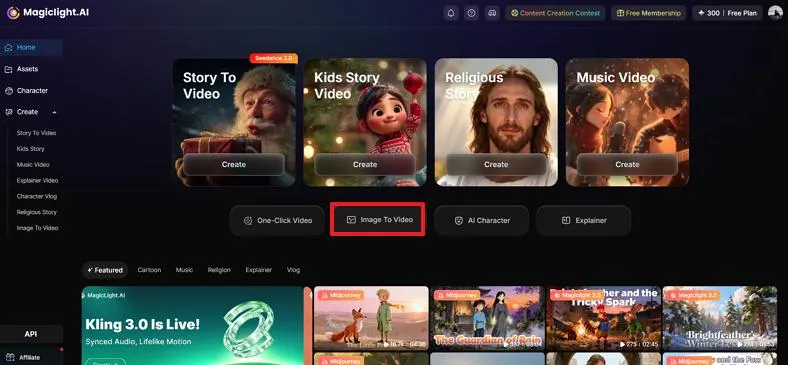
Step 1. Start by Choosing the Image to Video
To begin, open Magiclight.AI on your browser and choose the Image to Video feature from the homepage for an easy 3D animation experience.
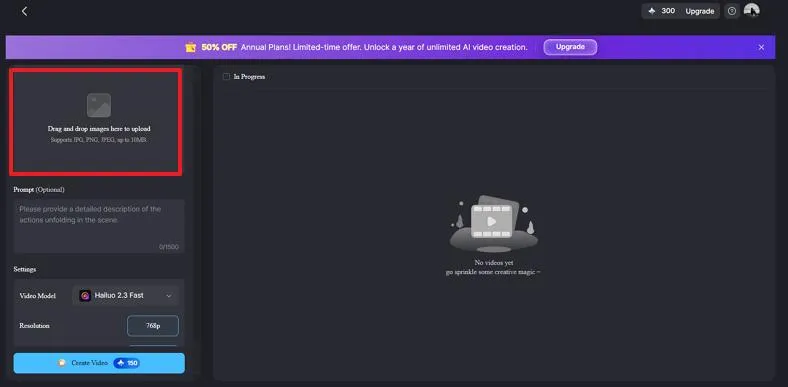
Step 2. Import Image to Tool
In the following interface, locate the "Drag and Drop Image Here to Upload” option to add your image. You can add a JPG, PNG, or JPEG images of up to 10MB in size.
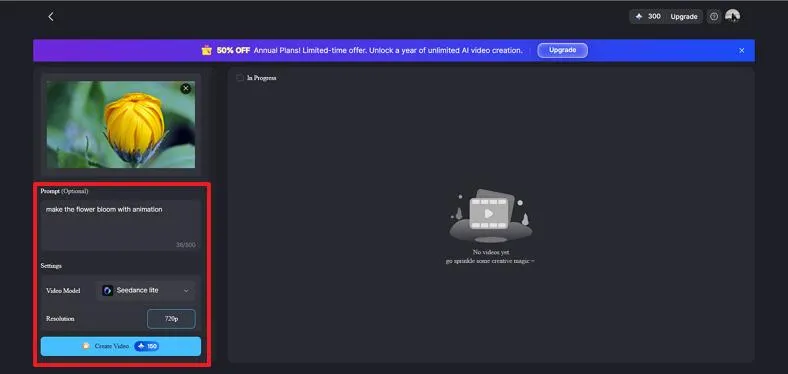
Step 3. Enter Prompt and Generate
Next, input your text requirements in the designated field and select the AI model among the 18 options. Next, choose the duration and resolution as desired and hit the “Create Video” button to start the 3D animation process.
Step 4. Export the 3D Animation from Platform
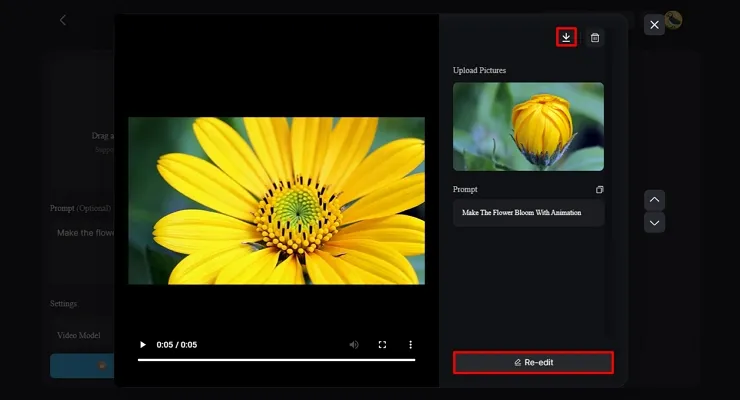
Once you get your results, tap on the generated preview to check it. If you are satisfied, tap the Download icon on the top, and if you wish to make edits, go for the Re-edit option.
Key Features
- Numerous AI Models for Generation: Magiclight.AI offers multiple AI models, allowing users to generate diverse animation styles tailored to different creative needs.
- Customized Duration Setting: Users can easily adjust video length to match their storytelling goals, ensuring precise control over animation timing.
- Choose Resolution: This 3D animation software free online lets users select preferred resolutions, helping create high-quality videos optimized for different devices and platforms.
Pricing Plans
| Plans | Pricing |
| Standard | $6/month |
| Plus | $13/month |
| Pro | $17.5/month |
| Ultra | $45/month |
| Ultimate | $75/month |
Ease of Use: Beginner-friendly interface with easy-to-use features.
2. Blender
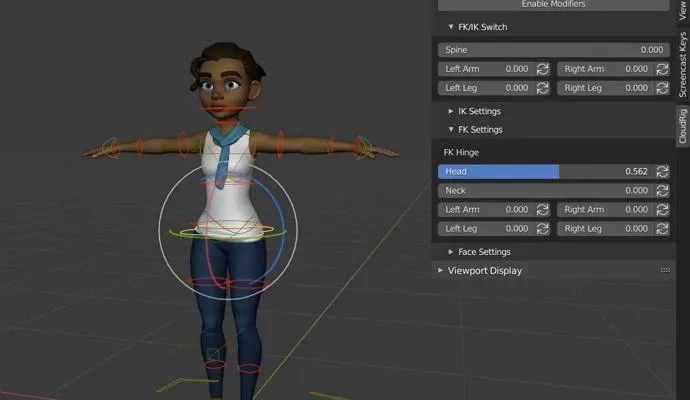
Widely recognized as the best 3D animation software, Blender offers a complete open-source suite for modeling, animation, simulation, and rendering. It includes advanced sculpting tools, physics simulations, and powerful render engines like Cycles and Eevee for realistic output. Animators can visualize and refine movement trajectories with the Path Motion feature, making it easier to control object paths and achieve fluid motion.
Key Features
- Allows users to create smooth animations by interpolating frames automatically.
- Audio can be aligned precisely with animations, ensuring visuals match timing, dialogue, and background music.
- Detailed control over character positioning enables precise adjustments to poses.
Pricing: Free and open source
Ease of Use: Interface is not beginner friendly.
3. Cinema 4D
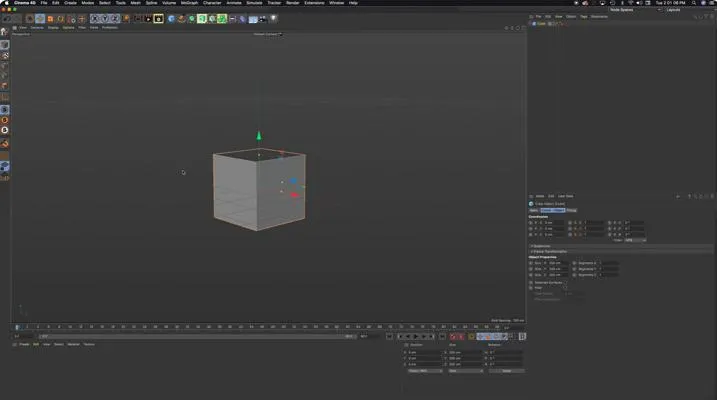
Designed for professionals, Cinema 4D is often considered among the best 3D animation software free alternatives through trial access and learning resources. It features an intuitive interface, powerful MoGraph tools, and a GPU-accelerated Redshift renderer for fast performance. The software offers different animation models for character animation with precise controls.
Key Features
- Users can create dynamic interactions between objects or characters using the Interaction tag feature.
- The face rig controls enable precise manipulation of facial expressions.
- It allows users to define multiple animation states and smoothly blend facial expressions.
Pricing Plans
| Plan | Pricing |
| Individuals | €71.64/month |
| Teams | €105.47/month |
Ease of Use: Expert skills are required to use this tool.
4. Daz 3D
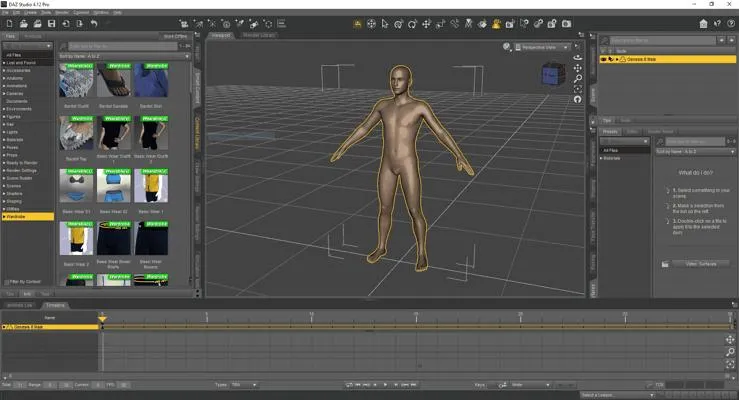
Focused on character design, Daz3D stands out as an easy 3D animation software for beginners interested in creating realistic human models. It provides ready-made assets, customizable characters, and simple posing tools that reduce the complexity of 3D workflows. Users can quickly build scenes and export assets to other platforms, making it ideal for hobbyists, storytellers, and content creators.
Key Features
- Offers a variety of AI models to generate diverse 3D animations and styles.
- Enables customization of character shapes, facial features, and overall appearance easily.
- Includes a library for clothing and accessories, allowing quick outfit and style changes.
Pricing Plans
| Plans | Pricing |
| Daz+ | $8.99/month |
| Daz Premiere | $18.98/month |
Ease of Use: Comparatively easy to use compared to other 3D modeling tools
5. Cascadeur
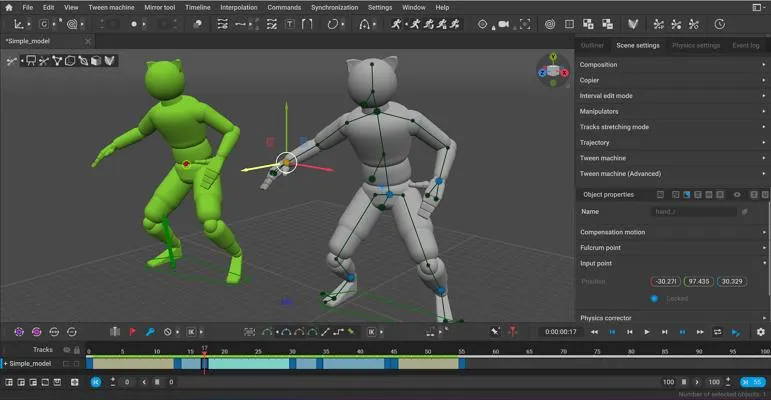
Built for character animation, Cascadeur is regarded as the best free software for 3D animation when focusing on realistic motion. It uses AI-assisted tools like AutoPosing and physics-based animation to create natural movements with minimal effort. Features such as quick rigging streamline workflows, helping animators produce high-quality results faster and more efficiently.
Key Features
- Allows fine-tuning and modification of animations to achieve polished final results.
- Adds realism by simulating secondary movements, enhancing the natural flow of characters.
- Supports video-based motion capture combined with advanced tools to unbake, clean, and refine animations.
Pricing Plans
| Plans | Pricing |
| Indie | $19/month |
| Pro | $49/month |
| Teams | $49/user/month |
Ease of Use: Requires basic animation skills.
Comparison Table Between the Best 3D Animation Software
Choosing the right easy 3D animation software can be challenging when each tool offers different strengths, features, and learning curves. To simplify your decision, the following comparison table breaks down the key aspects of these tools:
| Magiclight.AI | Blender | Cinema 4D | Daz 3D | Cascadeur | |
| AI Automation | Advanced AI workflows (image-to-video, prompts) | Limited native AI | Includes some AI-powered tools like search | Some automation via plugins | AI tools like AutoPosing & AutoPhysics |
| Character Animation | Built-in with AI support | Full rigging & facial animation tools | Professional character animation support | Strong focus on character creation & posing | Specialized in character animation |
| Realism & Motion Quality | Physics-aware natural motion | Physics simulations (fluid, cloth, particles) | Dynamic simulations (cloth, particles, fluids) | Realistic character rendering workflows | Physics-based animation |
| Learning Curve | Very low | Steep learning curve | Moderate to high | Moderate | Moderate |
Part 2. Key Features to Look for in 3D Animation Software - 5 Considerations
Choosing the right easy 3D animation software becomes simpler when you understand the essential features that truly matter. Focusing on these key considerations helps beginners avoid frustration:
- User-Friendly Interface: A clean and intuitive layout allows beginners to navigate tools easily without feeling overwhelmed during the learning process.
- Built-in Templates and Assets: Pre-made models, rigs, and scenes help users start quickly and reduce the time needed to create animations from scratch.
- Animation and Rigging Tools: Essential features like keyframing, auto-rigging, and motion controls make character animation more manageable and efficient.
- Rendering Capabilities: Good rendering options ensure your final animation looks polished with proper lighting, textures, and realistic visual output.
Conclusion
To sum it up, this article highlighted beginner-friendly tools and essential features for creating stunning 3D animations. Choosing the best 3D animation software depends on your goals, skill level, and workflow needs. For effortless creativity and advanced AI-powered features, Magiclight.AI stands out with its image-to-video and customizable animation tools, making it an ideal choice for both beginners and professionals.
Frequently Asked Questions
1. What is the best 3D animation software free?
Magiclight.AI is considered the best 3D animation software free for beginners and professionals alike. It offers intuitive tools, AI-powered features, and seamless image-to-video animation capabilities.
2. Which free software is easiest for beginners?
Magiclight.AI is the easiest option for newcomers to start creating animations quickly. Its user-friendly interface and automated AI features lets you generate animated videos.
3. Can I do professional work with free 3D animation software?
Yes, tools like Magiclight.AI provides you a free 3D animation generation experience by offering free credits for starters. You get enough options to understand how to use it professionally for 3D animations.
4. Which AI is best for 3D animation?
Tools like Blender provides a great experience for creating 3D animations for free. However, Magiclight.AI is believed to offer the right experience required when searching for beginners.





![How to Write a Script for a Video 2026 [Full Guide]](https://blog-new.magiclight.ai/wp-2/wp-content/uploads/video-script-writing-setup-300x199.jpg)