


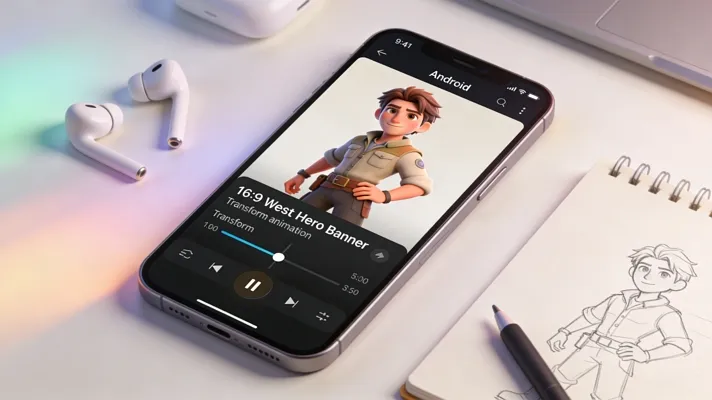
In today’s world, short videos and creative content are everywhere, and many people want to try 3D animation. However, finding the right tool can feel a bit difficult, especially for beginners who do not want to spend money. That is where free 3D animation apps for Android become helpful, offering simple tools to start creating anytime.
In this article, we will explore some apps you can download for free on your Android today, so be sure to try them out. We will also go over various features that a good 3D animation app should have.
Part 1. 5 Free 3D Animation Apps for Android (Top Picks)
Here, we have compiled our top picks, so it is worth trying them out, whether you are a beginner or a professional. Review the following section to check some of the best 3D animation apps available in 2026:
1. Magiclight.AI
An all-in-one video creator, Magiclight.AI is a versatile app that will feel simple for even beginners. It lets you turn scripts, ideas, or stories into fully animated videos right from your Android device. Magiclight.AI is perfect for content creators, casual users, beginners, and professionals alike. Essentially, anyone who wants to quickly bring their ideas to life without complicated software will love this app.
It has simple tools for character creation, animation, and AI-generated voices so anyone can create polished animations in just a few taps. Whether you’re making short videos for social media or educational content, this app makes the process quick and enjoyable. It is one of the best options for 3D animation software for free download.
Key Features
- Generates lifelike voices and syncs them with character movements.
- Users can easily adjust camera moves, transitions, and lighting effects within the embedded editor.
- With this app, users can create animated stories up to 30 minutes long.
- It offers glam filters and 20+ styles created by favorite social media influencers.
User Rating: 4.0/5
Step-by-Step Guide For Creating 3D Animated Videos Using Magiclight.AI
Now, look at the steps below for using Magiclight.AI to create stunning 3D animated videos:
Step 1. Start a New Project
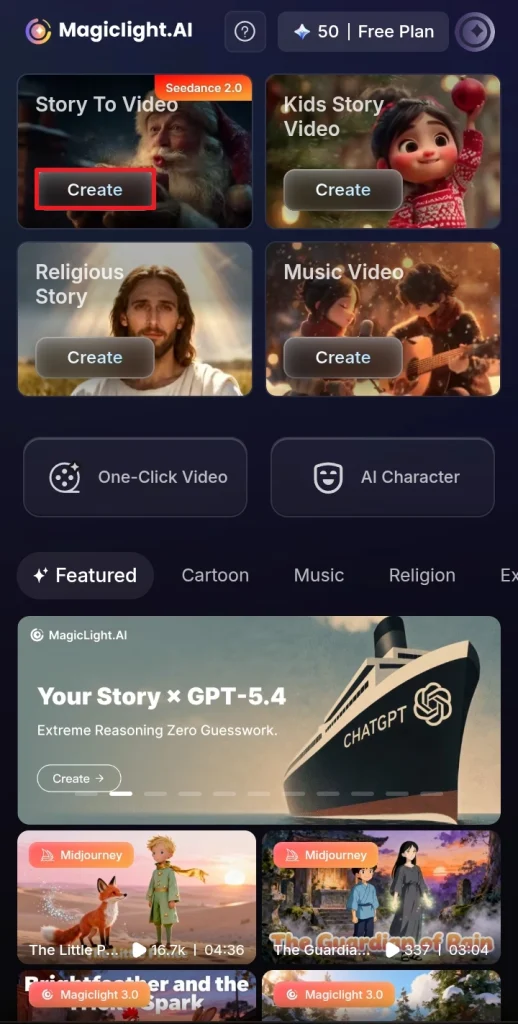
Initially, after opening the app, tap the Story to Video option on the main interface to start a new animation project.
Step 2. Enter Your Story or Idea into Basic Script
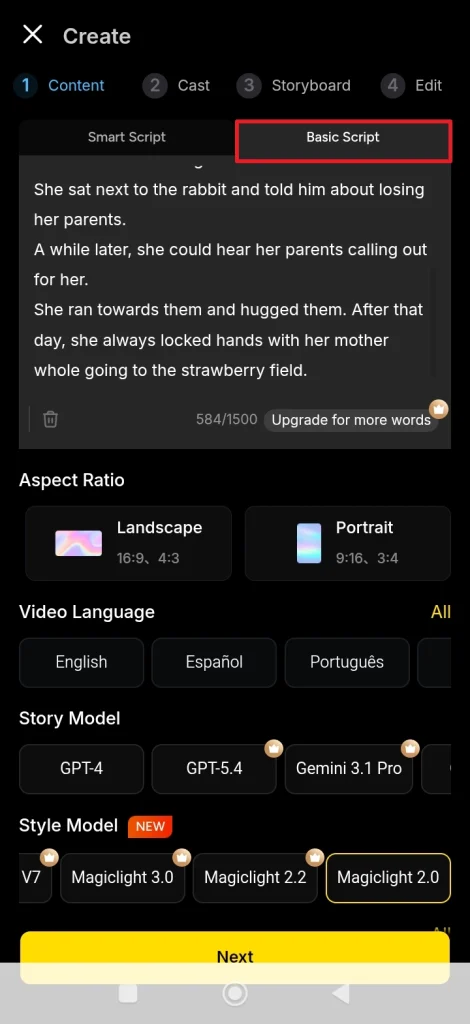
Now, you can type or paste your story or idea into Basic Script. Alternatively, use the Smart Script option if you want AI to write the story for you.
Step 3. Select Visual Style & Story Model
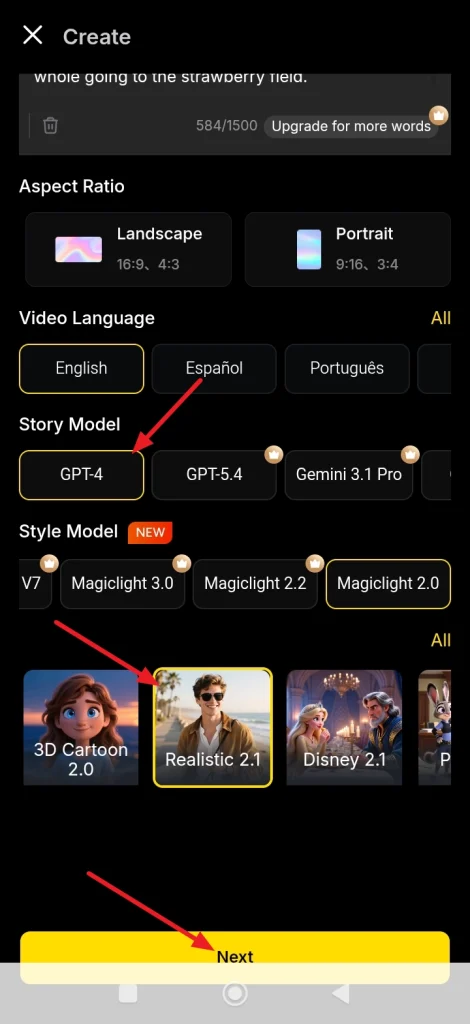
Next, scroll down, and you will see a variety of options that you can choose from. Users can decide aspect ratio, video language, style model, etc. For example, choose an animation style, like Realistic, select a story model GPT-4, and press the Next button.
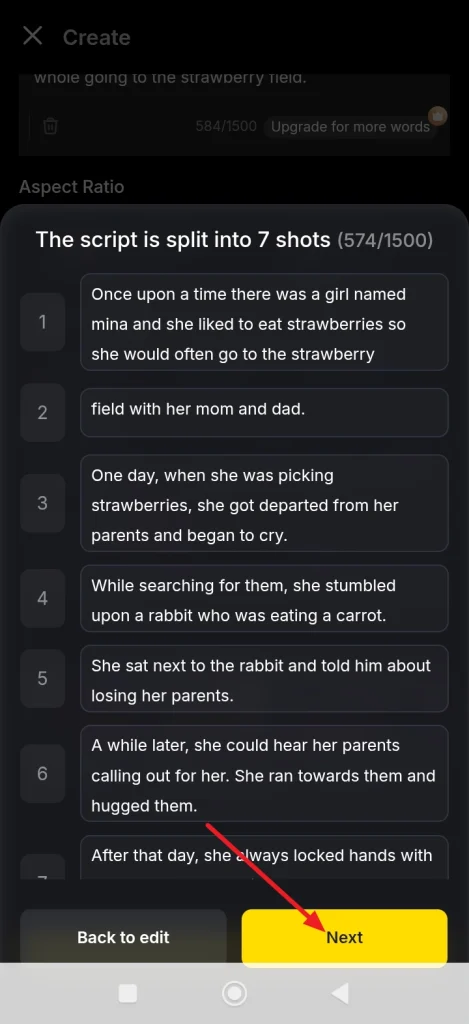
Step 4. Generate Scenes From Script
After the previous step, the app automatically creates scenes from your script. You can edit each scene individually, and if not needed, press the Next button.
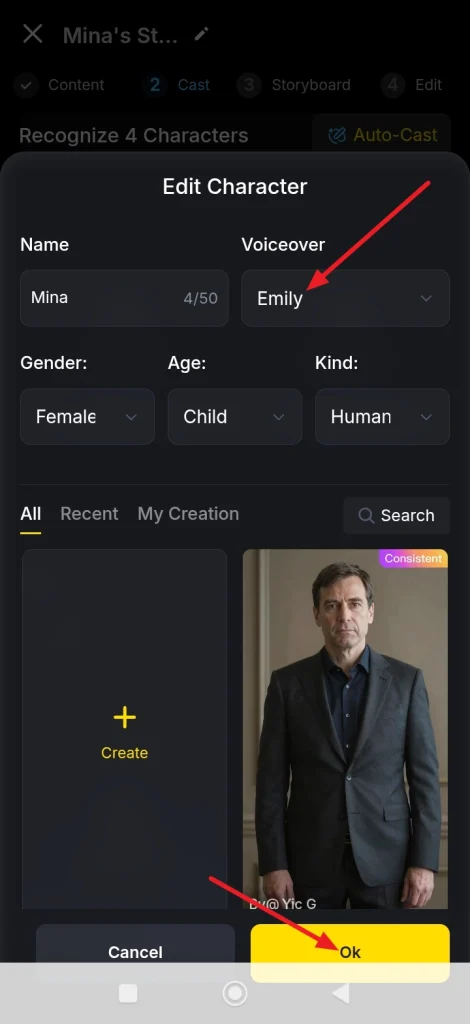
Step 5. Choose Characters and Voice Styles
Then, you can edit all the characters for your story. Each character’s name, gender, age, and voiceover can be changed. To do that, select a voice style like Emily, and once you have finalized for each character, press Ok.
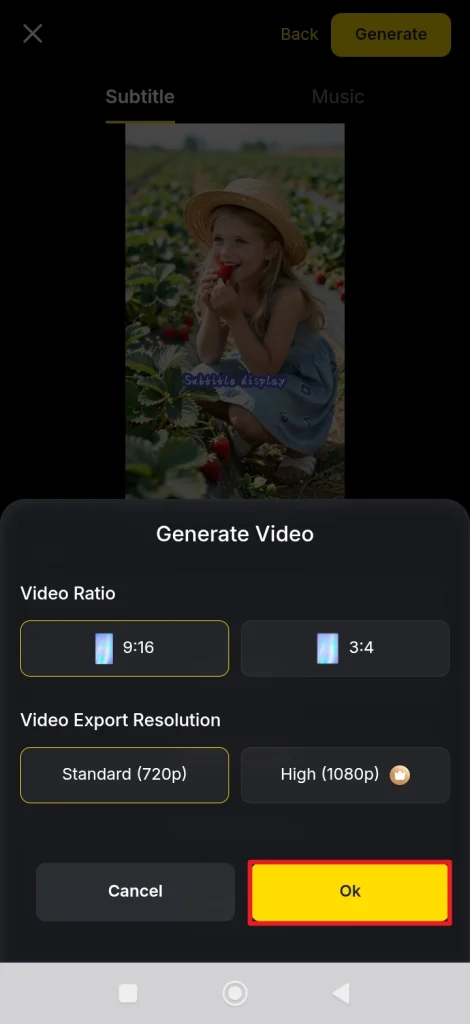
Step 6. Select Video Ratio and Export Resolution
Subsequently, you will have to select a Video Ratio and a Video Export Resolution according to your preference, then tap the OK option.
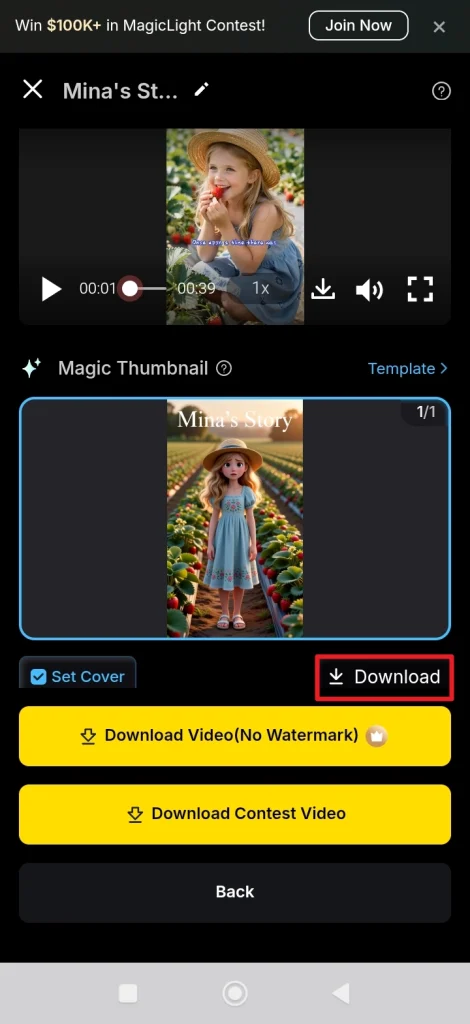
Step 7. Preview Your Animation and Export the Video
Finally, once your video is generated, you can preview it. In case you need to make any changes, tap the Back option. If you are happy with the results, press the Download option to export your video to your device.
2. Prisma3D
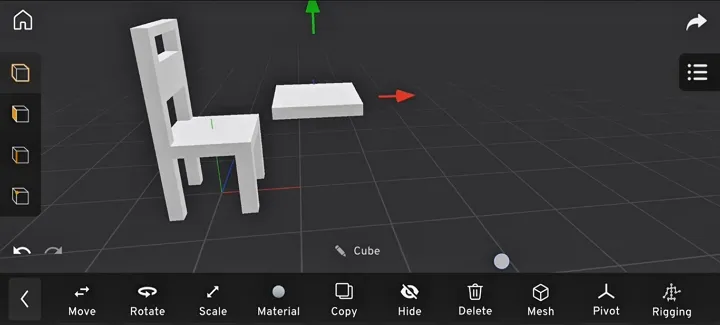
It is a mobile 3D animation and modeling studio that lets you create objects, characters, and animated scenes. Prisma3D supports model imports, animation timelines with keyframes, cameras, lights, and rendering. This free 3D animation app for Android is easy to use and requires no advanced editing knowledge.
Key Features
- There are 3D object creation, lighting, camera controls, and rigging tools available.
- Prisma3D offers timeline-based keyframe animation for motion graphics.
- This software provides fast video rendering with various high-resolution formats.
Pricing: Free; items starting from $12.99/month
User Rating: 3.1/5
3. Reconn 4D
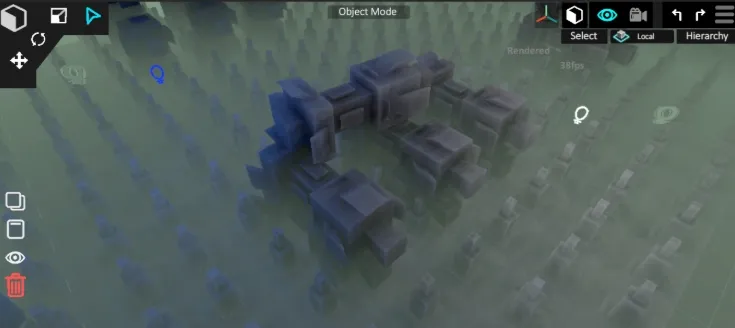
For users who want something simple but high-performance, they should definitely try out Reconn 4D. This is a free Android app focused on 3D rendering, modeling, and animation, transforming your mobile into a creative hotspot. It aims to provide minimalism and video rendering for hobbyists and beginner designers.
Key Features
- Reconn 4D offers animation tools to bring scenes and characters to life.
- Users enjoy a special feature for immersive environments like landscapes and worlds.
- Stable performance with fewer crashes than some other mobile 3D apps.
Pricing: Free with ads
User Rating: 4.3/5
4. Nomad Sculpt
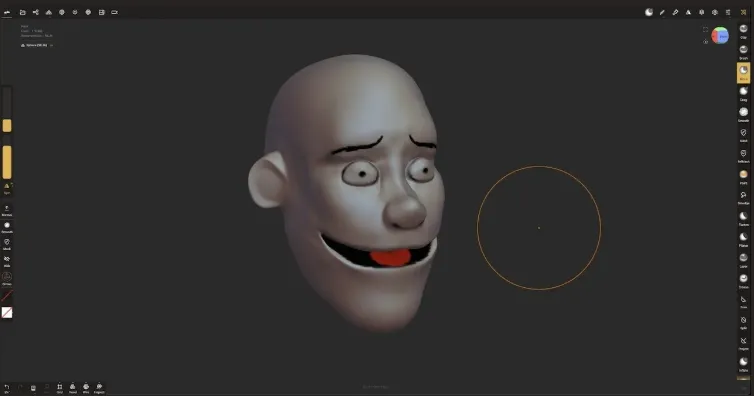
Now, we have a powerful 3D sculpting and painting app for Android that brings desktop‑level creative tools to your mobile device. Nomad Sculpt is a bit more focused on modeling and sculpting than animation. However, users can still use it for video animations by following YouTube tutorials.
Key Features
- Nomad Sculpt provides its users with multi‑resolution and dynamic topology support.
- Some other features that this tool provides include vertex painting and material customization.
- Users are offered multiple import/export formats, including glTF, OBJ, STL, or PLY.
Pricing: $14.99 (one-time purchase)
User Rating: 4/5
5. AnimeTok 3D
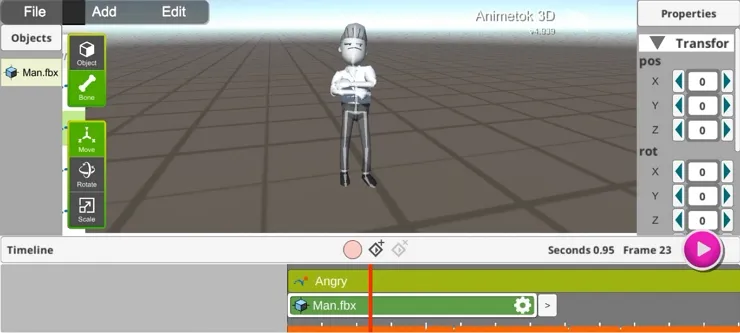
Last on our list of top choices for a 3D animation movie maker app for Android is AnimeTok 3D. This is a great Android animation maker designed for character posing and basic 3D animations. For users who want more control and focus on their animated characters, this tool gets the job done. However, many users report stability and usability issues, with frequent ads or crashes as well.
Key Features
- This Android app gives users precise control over character posing and editing.
- Loop animation with basic FK/IK support is a great extra feature for more sophisticated users.
- Content creators can easily import their customized characters using this tool.
Pricing: Free with ads; starting at $12.47 for a premium subscription.
User Rating: 1.9/5
Comparison Table
Now that we have discussed all of these animation maker apps in detail, please check out the comparison table below:
| Mobile App | Best For | Animation Tools | Pricing | User Rating | Export Options |
| Magiclight.AI | AI video creation, content creators, and beginners | Script to Video, voice, and lip sync, and character consistency | Free with credits; a subscription plan starts from $7.50/month | 4/5 | MP4 social media formats available |
| Prisma3D | Beginners learning 3D animation | Keyframe animation, basic rigging, camera, and lighting tools | Free; $12.99 a month for special features | 3.1/5 | Supports OBJ/GLTF/FBX |
| Reconn 4D | Good for both beginners and intermediate users | Scene creation, modelling tools, rendering tools | Free, but users need to watch ads to use features | 4.3/5 | Image and video export formats available |
| Nomad Sculpt | Advanced users who need more control for modelling and sculpting | Sculpting brushes, painting tools, and limited animation features | $14.99 (one- time purchase) | 4/5 | No direct video export; export as OBJ, STL, GLTF is available only |
| AnimeTok 3D | Basic animation character and posing | Character posing, simple timeline tools, and keyframe animation features | Free with ads; premium plan starts from $12.47 | 1.9/5 | Limited export options |
Part 2. Key Features to Look For in 3D Animation Apps
Now that we have discussed some of the top 3D animation apps, we will discuss key features to consider before downloading them to your phone. A detailed list of features to consider is given below:
- Variety of Animation Tools: Make sure the tool you select offers a wide range of features. Go for those apps that have multiple styles, templates, and editing options to breathe life into your visual creations.
- High-Quality Rendering: The selected app should support realistic textures, lighting, and effects. All of this is important so that your creations look professional and visually appealing on mobile screens.
- Multiple Export Options: Allows exporting in multiple formats for social media or editing software. The best app is one that lets you easily export to social platforms for sharing.
- Built-in Tutorials: There is no doubt that the best free 3D animation app for Android has tutorials to assist all users. These guides help by quickly showing animation techniques and workflows.
- Regular Updates and Support: Reliable customer support or community forums can help resolve any issues. Furthermore, frequent updates ensure compatibility with the latest devices and promptly fix common bugs.
- Intuitive Interface: Despite technical expertise, the best animation app should have a simple and easy-to-navigate interface.
Conclusion
To summarize, we discussed the reasons behind the growing popularity of and the various benefits they provide. When exploring free 3D animation apps for Android, each app offers unique strengths, such as modeling in Nomad Sculpt and complex character editing in Reconn 4D. Overall, for a balance of AI-powered features, ease of use, and creative freedom, Magiclight.AI stands out as the top choice.
Frequently Asked Questions
1. What is the best free 3D animation app for Android?
The best free 3D animation app for Android is Magiclight.AI, offering an intuitive interface and AI-powered tools for creating professional animations easily.
2. Can I make 3D animation movies on Android for free?
Yes, you can create full 3D animation movies on Android for free using a 3D animation movie maker app for Android like Magiclight.AI.
3. Which apps let me download 3D animation software for Android?
On Android, you have multiple options to choose from while exploring the Play Store. However, if you are a beginner and want to create animations quickly and easily, try Magiclight.AI. This is because of its AI-powered features, ease of use, and free trials.





![How to Write a Script for a Video 2026 [Full Guide]](https://blog-new.magiclight.ai/wp-2/wp-content/uploads/video-script-writing-setup-300x199.jpg)