


Making short videos now takes less effort when the right tool handles visuals well. The Meta AI video generator stands out for speed, simplicity, and flexible creative control. It helps users turn ideas into polished clips without a difficult learning process. Many creators also like how quickly it supports testing, editing, and refining outputs. That makes it useful for social content, promotions, explainers, and everyday visual storytelling tasks.
Part 1. How to Use Meta AI Video Generator
Creating videos from simple ideas now feels faster than many people expect. Meta AI Video Generator supports Meta AI video generation by turning prompts into short visual content with less manual editing. It is built for speed, ease, and flexible creativity across different content needs. That makes it useful for social posts, quick promotions, and experimental storytelling projects. Now, have a look at the steps mentioned below to see how it works:
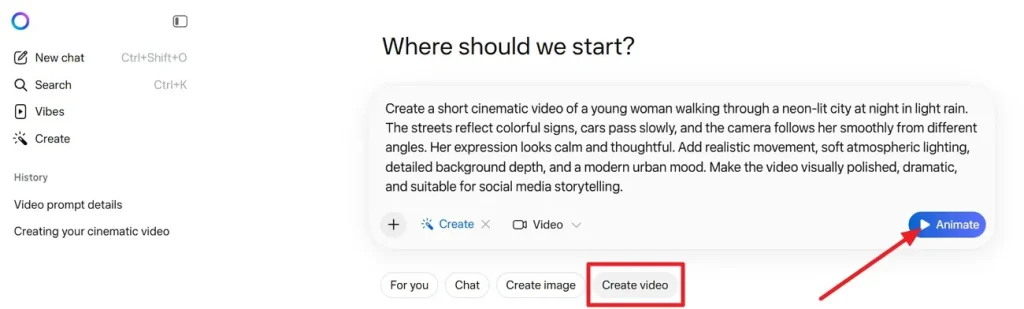
Step 1. Start by opening Meta AI and choosing the Create video option from the main creation bar. After that, enter your idea in the prompt field and click Animate to begin generating the first result.
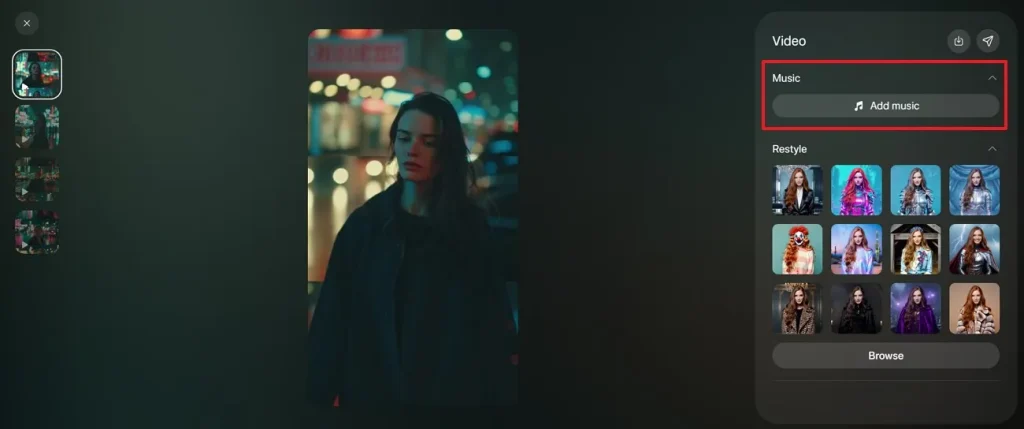
Step 2. Once the clip appears, move to the editing panel and open the Music section. Next, select Add music to browse available tracks that can match the mood and pacing of your video.
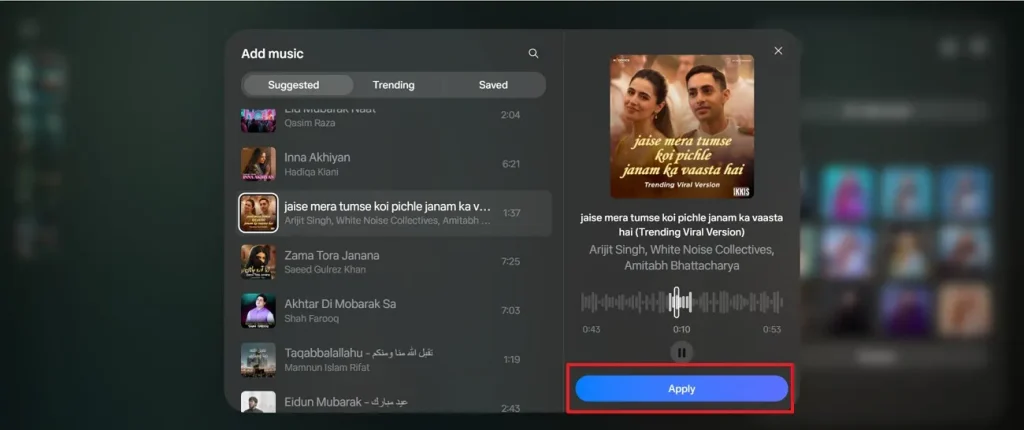
Step 3. Look through the suggested or trending music options and preview the one you like most. When you find a suitable track, press Apply to attach it to the generated video.
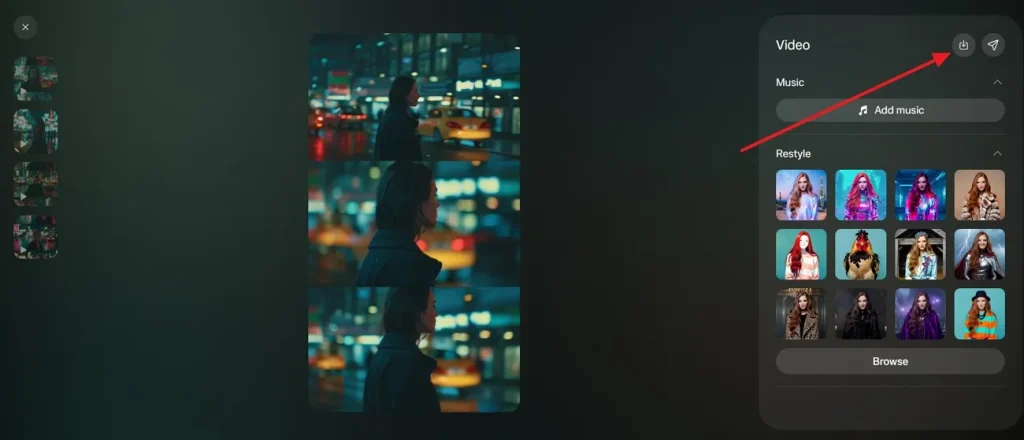
Step 4. After reviewing the finished clip, move to the top-right corner of the editor panel. Use the Download option there to save or send the final version of your video.
Part 2. What are the Advantages and Disadvantages of Meta AI Video Generator
Before deciding whether it fits your workflow, it helps to examine where the Meta AI video creator performs well and where it still feels limited. The points below explain its main strengths and weaknesses in a clear, practical way:
Advantages of Meta AI Video Generator
- Fast Output: It generates short video results quickly, which saves time during early content testing. That speed helps creators review ideas faster and move through experiments more confidently.
- Easy Workflow: The interface feels simple enough for beginners who want a low-pressure starting point. Users can move from prompt entry to preview without learning complex editing controls.
- Creative Flexibility: It supports different visual ideas, making concept testing easier across many content styles. This gives creators more room to explore moods, scenes, and storytelling directions.
- Prompt-Based Creation: Text prompts reduce manual work and make video building feel more direct overall. That approach helps users generate visual drafts without filming, animating, or editing heavily.
- Social Readiness: The tool suits short-form content often used on social and promotional platforms. This makes it useful for campaigns, experiments, announcements, and fast visual communication through Meta text to video workflows.
Disadvantages of Meta AI Video Generator
- Limited Control: Users may find fewer editing controls than traditional video software usually provides. That can make precise adjustments harder when scenes need detailed visual refinement.
- Output Variance: Results may change noticeably depending on prompt wording and scene complexity levels. Some generated clips look polished, while others may require retries for better quality.
- Short Formats: The tool works better for shorter videos than complex long-form visual storytelling. That limitation may affect users planning tutorials, narratives, or layered branded content.
- Style Inconsistency: Visual consistency may shift slightly across scenes, movements, or generated subject details. This can reduce realism when a project needs a steady appearance throughout every frame.
- Refinement Needs: Many outputs still need prompt edits before reaching a more satisfying final version. That means users may spend extra time testing wording instead of exporting immediately.
Part 3. Best Alternative to Meta AI Video Generator
MagicLight AI brings a more cinematic feel to AI video creation without making the process confusing. It gives creators a smoother way to turn written ideas into dramatic scenes, styled visuals, and polished motion. For users comparing options in this space, even a Meta video AI generator may feel simpler, but MagicLight AI often appears more visually ambitious and creatively focused.
What makes MagicLight AI stand out is the way it balances imagination with presentation quality. It feels designed for storytellers, marketers, and creators who want a stronger atmosphere in every generated clip. Instead of only producing quick drafts, it aims to deliver videos that look more expressive, more branded, and more ready for audience-facing content across different platforms.
Guide to Generate AI Video with Magiclight.AI
To understand the workflow better, follow the stepwise guide below to see how Magiclight.AI turns simple ideas into polished AI video content:
Step 1. Choose a Video Format to Start
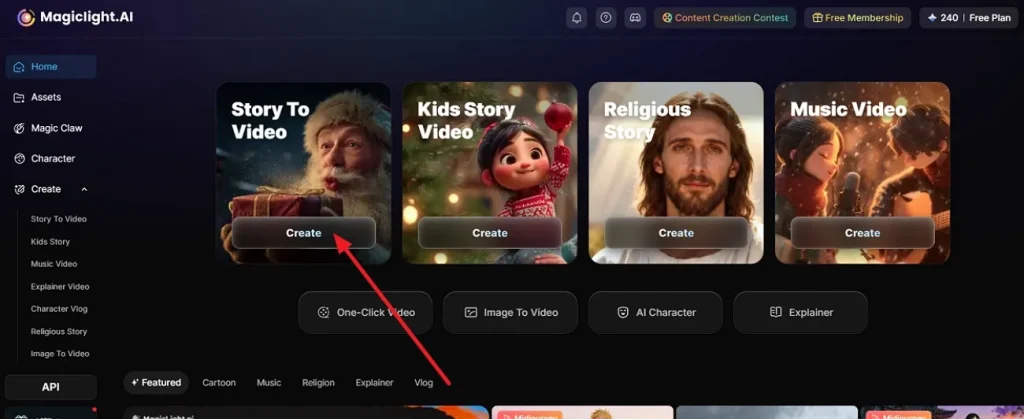
Start by choosing a video type from the dashboard, clicking Create under options like Story To Video to begin building your new AI video.
Step 2. Set the Main Creation Preferences
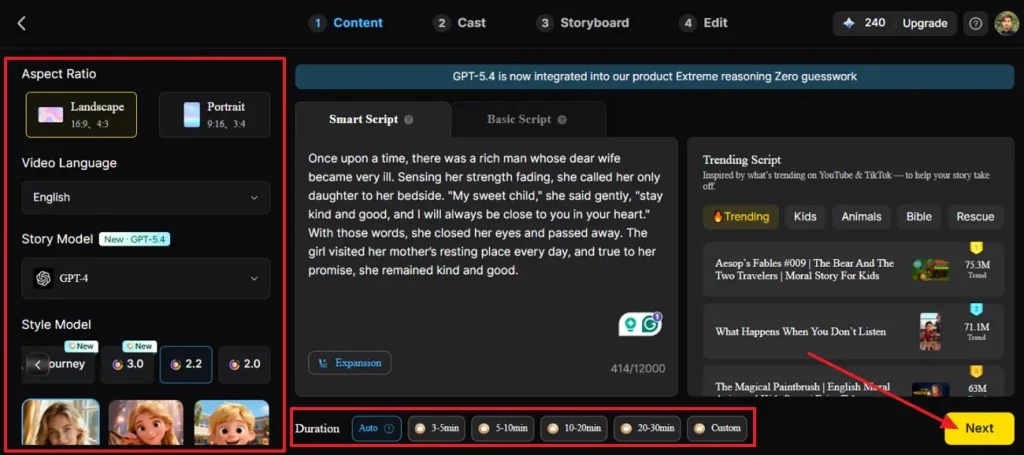
Now, choose the aspect ratio, video language, story model, visual style, and duration before moving ahead. Once these settings match your idea, press Next to continue to the content stage.
Step 3. Review the Story Scenes and Continue
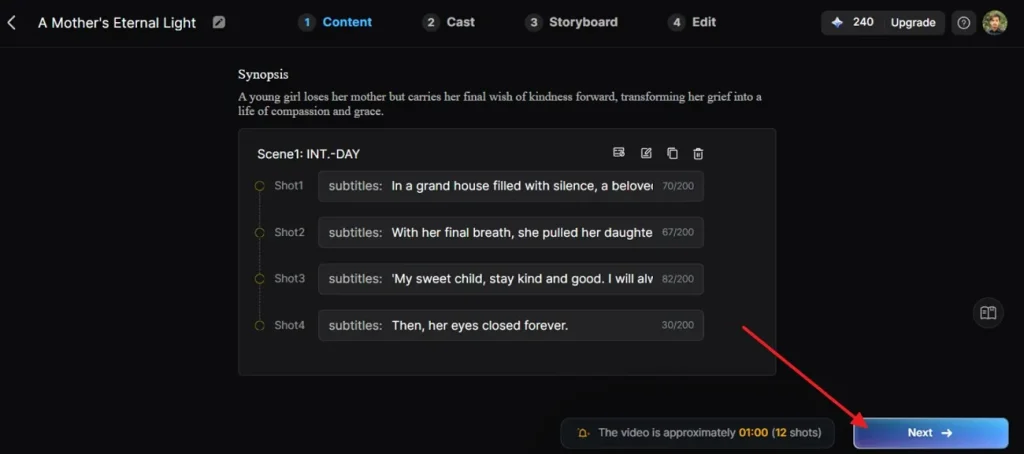
After the script loads, check the generated synopsis and scene breakdown carefully. Make sure each shot matches your idea, then choose the Next button to move forward.
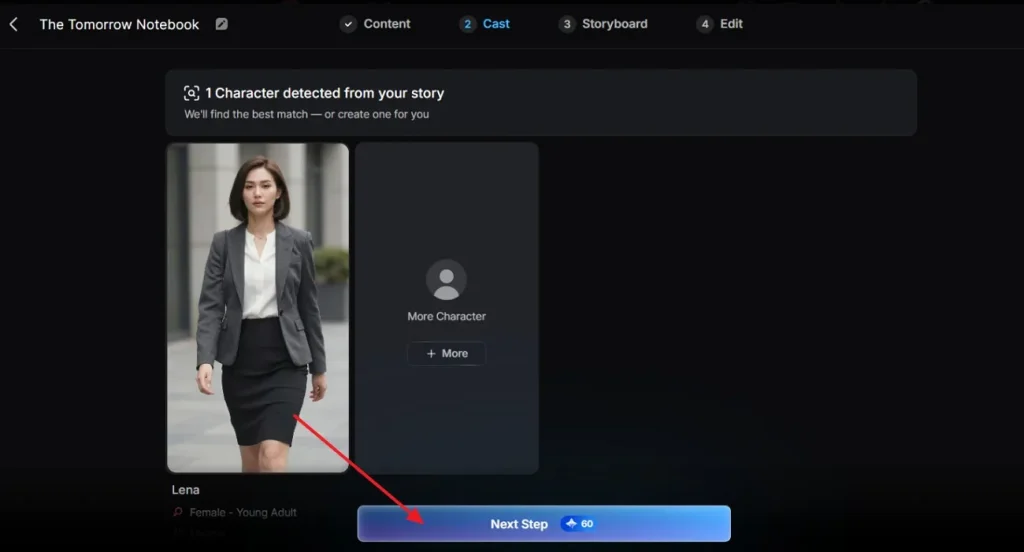
Step 4. Confirm the Character Selection
Here, choose the character, add more if needed, and press Next Step to continue.
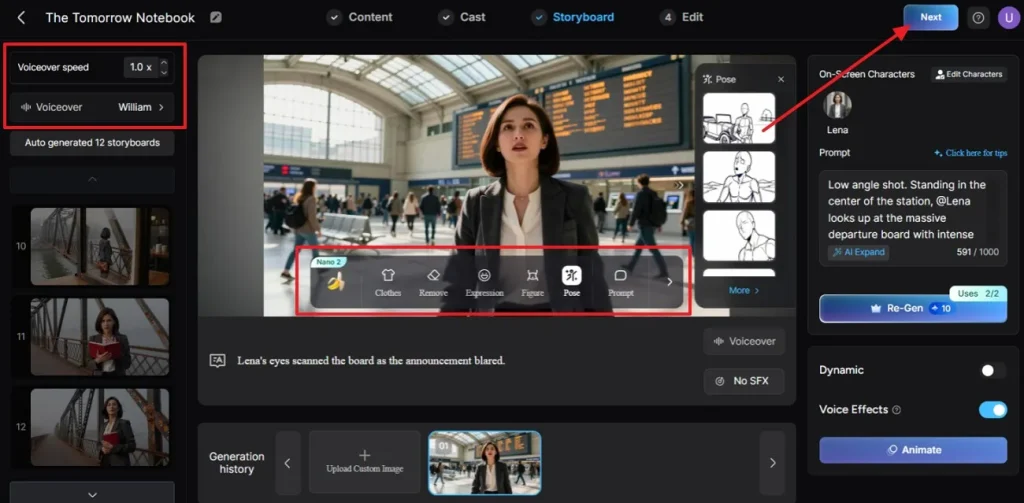
Step 5. Generate the Storyboard and Finalize the Video
In the storyboard section, review each generated scene one by one. Adjust pose, expression, figure, clothes, or prompt details where needed, choose Voiceover and Voiceover Speed, and click Next after the storyboard looks right.
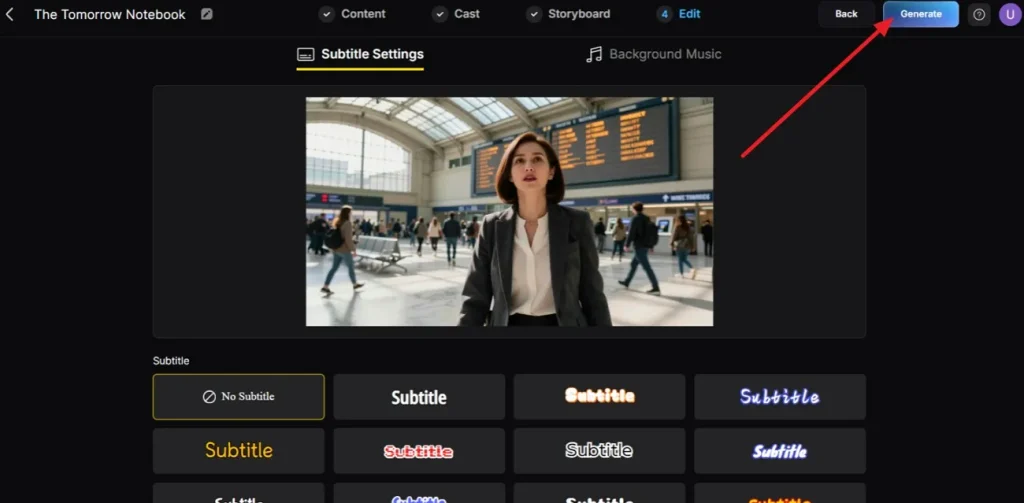
Step 6. Pick Subtitles Style to Proceed
Now, if you want subtitles for your video, choose a style for subtitles in Subtitle Settings, then press Generate to continue.
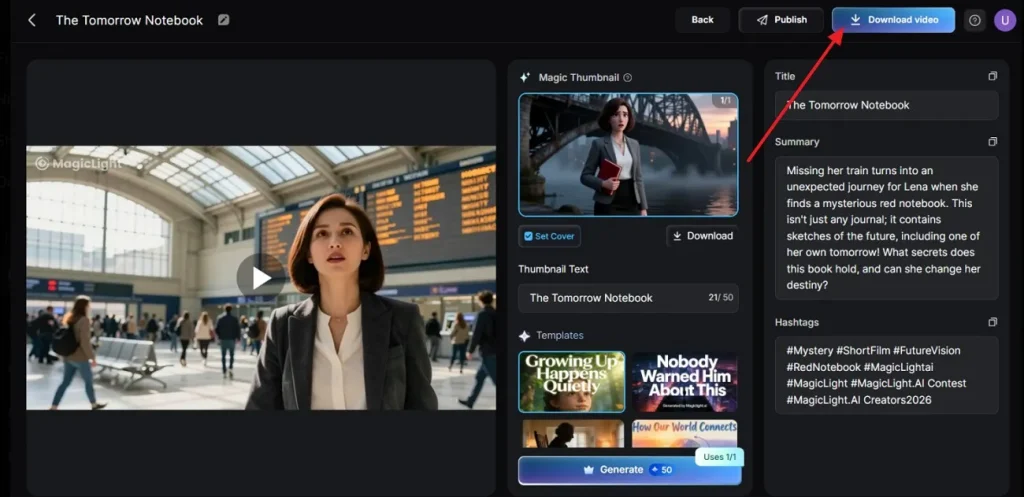
Step 7. Download the Finished Video
When the project is ready, review the preview, title, and select the Download Video icon to save the completed Magiclight.AI video to your device.
Part 4. Comparison Table Between Meta AI Video Generator and Magiclight.AI
To make the choice clearer, the comparison table below shows how the Meta AI video generator and Magiclight.AI differ in features, ease, and creative flexibility:
| Aspect | Meta AI Video Generator | MagicLight AI |
| Best for | Quick social clips and simple creative experiments | Story-driven videos and more polished branded content |
| Main strength | Fast prompt-based video creation | More cinematic and visually ambitious output |
| Ease of use | Very simple for beginners | Easy to use, but slightly more feature-rich |
| Learning curve | Lower learning curve | Slightly higher because of broader creative options |
| Workflow style | Quick generation with minimal setup | More guided creation with stronger storytelling feel |
| Input method | Mainly text prompt-based | Text prompts with broader creative flexibility |
| Speed | Better for fast results | Better for refined creative output |
| Creative control | More limited overall | Better control over style and presentation |
| Visual quality | Good for quick short-form content | Stronger for polished and dramatic visuals |
| Flexibility | Works well for fast idea testing | Works better for creative exploration and richer concepts |
| Output focus | Speed, simplicity, and convenience | Style, atmosphere, and presentation quality |
Conclusion
To conclude, the Meta video generator AI experience feels useful for quick clips, simple testing, and social content creation. It helps users turn prompts into short videos without much effort or editing knowledge. Still, creators who want deeper storytelling, stronger visual control, and more polished final results may outgrow its limits. In that case, MagicLight AI feels like the better choice.
FAQs on Meta AI Video Generator
1. Can Meta AI generate unlimited videos?
No official source confirms unlimited video generation across all Meta AI workflows. Usage can vary by feature access, rollout stage, account status, or limits.
2. Is the Meta AI generator free?
Some Meta AI features are free, though availability and terms can change. The Meta AI video generator may offer free tools during limited rollouts.
3. How long can Meta AI Video Generator create videos?
Meta currently limits generated or edited videos to a maximum of 10 seconds. That short length suits quick promos, reactions, teasers, and lightweight social clips.
4. What is the best alternative to Meta AI Video Generator?
Magiclight.AI is a strong alternative for deeper storytelling and richer visual control. It feels better for cinematic projects, longer workflows, and polished branded output.





![How to Write a Script for a Video 2026 [Full Guide]](https://blog-new.magiclight.ai/wp-2/wp-content/uploads/video-script-writing-setup-300x199.jpg)