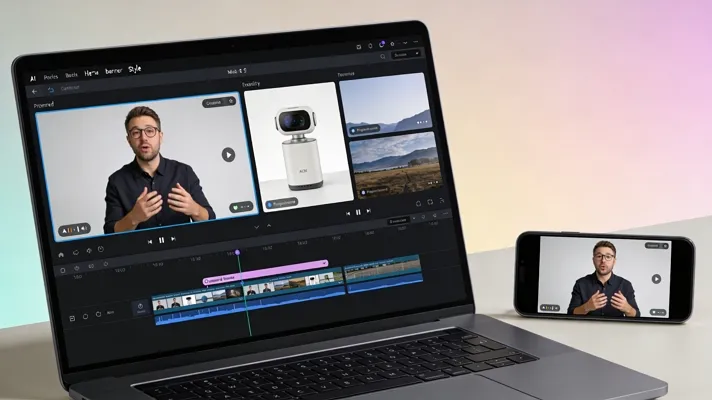
AI video tools are quickly becoming a favorite among creators, turning simple ideas into lifelike visuals within minutes. From viral reels to movie-like clips, social media is buzzing with content that looks surprisingly real. This growing trend has everyone asking, what is the most realistic AI video generator, and which one actually delivers the best results?
As more users explore these tools, choosing the right platform becomes necessary for quality, creativity, and standing out online. In this article, we explore what makes these AI generators realistic and what options are available in today’s world.
Part 1. What Makes an AI Video Generator Realistic
Realistic AI Video Generators have certain qualities that distinguish them from generic video editing tools. In the section below, we will provide a breakdown of some of the necessary requirements of a realistic AI video generator:
- AI Facial and Body Movements: Realistic AI tools mimic subtle details like micro-expressions, blinking styles, and natural head tilts. Advanced generators avoid stiff animations by mimicking how humans pose, gesture, and react in real time.
- Natural Voice and Lip Sync: Aligning lip movements precisely with speech timing is another basic quality of a lifelike video generator. Realistic AI voices also capture tone shifts, breathing patterns, and emotional delivery, making characters sound less robotic.
- High-Resolution Visuals and Animations: Sharp textures, detailed lighting, and smooth frame transitions create lifelike visuals. Instead of flat images, high-quality generators simulate depth, shadows, and motion blur to create a more immersive watching experience.
- Realistic Backgrounds and Effects: Static backgrounds do not work well with realistic animations. The best tools blend characters with their surroundings using shadows, reflections, and motion effects such as wind or light changes.
Part 2. Challenges in Creating Realistic AI Videos
As we explore what is the most realistic AI video generator, it is important to understand the challenges that come with achieving truly lifelike results.:
- AI-Generated Faces May Look Uncanny: Some tools struggle with facial details, causing slightly off expressions or unnatural eye movements. These small inconsistencies can make characters feel off and not entirely convincing.
- Higher Realism Requires Longer Rendering Time: The more detailed your video is, the greater the processing power it requires. High-end lighting, textures, and motion effects can significantly increase rendering time, especially on mobile devices.
- Complex Scenes May Need Advanced Editing: Videos with multiple characters, camera angles, or interactions often require manual fine-tuning. Without these adjustments, animations may feel choppy, making it harder to maintain a realistic flow.
- Balancing Realism with File Size and Performance: Highly realistic videos tend to be larger in size, which can affect storage and sharing. Creators often need to balance visual quality and performance, especially on social media platforms.
Part 3. Leading AI Video Generator For Ultra-Realistic Content
An all-in-one video creator, Magiclight.AI is the leading realistic AI generator, delivering easy, quick results. For people without advanced editing skills, this tool makes everything easy and convenient. It allows you to create animated content directly from simple text, making it especially popular among content creators, educators, and storytellers.
Magiclight.AI positions itself as a practical option that blends ease of use with modern AI-powered video creation. As more people ask, “What is the most realistic AI video generator,” apps like this are gaining attention for making video creation feel quick, simple, and surprisingly approachable.
Key Features
- Generates animated videos up to 50 minutes, ideal for storytelling, YouTube, or educational content.
- Converts written scripts into structured scenes with visuals, pacing, and storytelling flow automatically.
- Users can choose from 20+ visual styles and 15+ AI models for their videos.
- Creates multilingual voiceovers with synchronized lip movements for more realistic animated storytelling.
Quick Guide For Creating Realistic Content Using Magiclight.AI
Now, look at the steps below for using Magiclight.AI to create stunning, realistic animated videos:
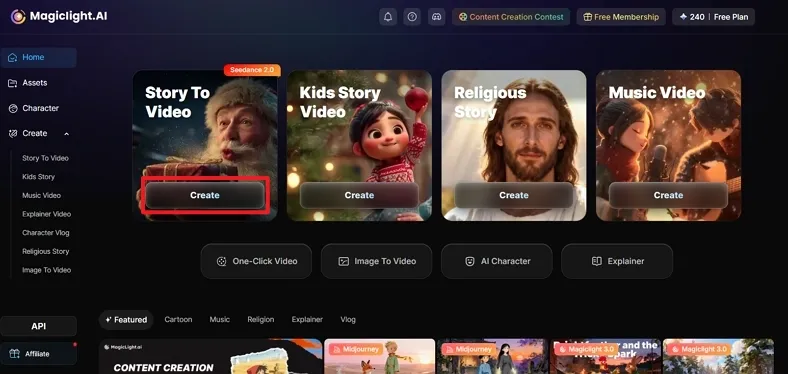
Step 1. Select Story to Video to Initiate Creation
Firstly, open the program on your PC, click on the Story to Video option to begin a new video project.
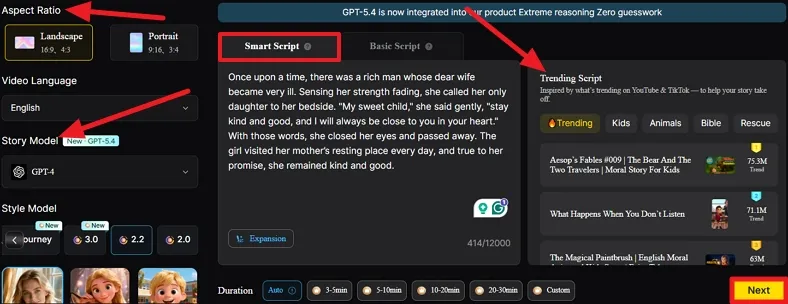
Step 2. Select a Script and Choose Specifications
Next, choose one of the scripts in the Trending Script tab. As you select one, the entire script will be pasted into the Smart Script box. Afterwards, select the desired Aspect Ratio, Video Language, and Story Model, then click the Next button.
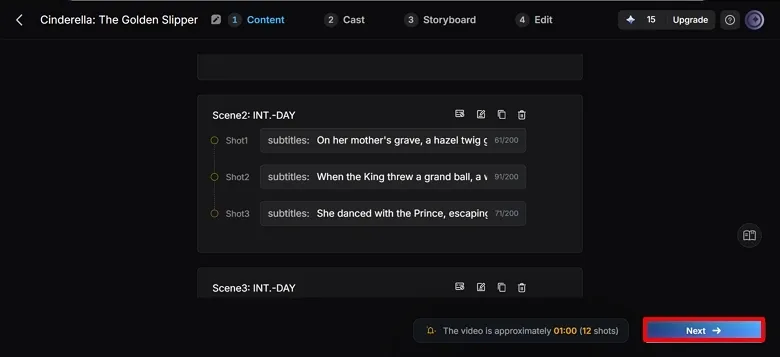
Step 3. Edit Scenes and Sequence From Generated Script
Here, the software automatically creates scenes/shots from your script. You can edit or even delete a scene by clicking on one of the icons on the top tab of each scene. Once you are happy with every individual scene, press the Next button.
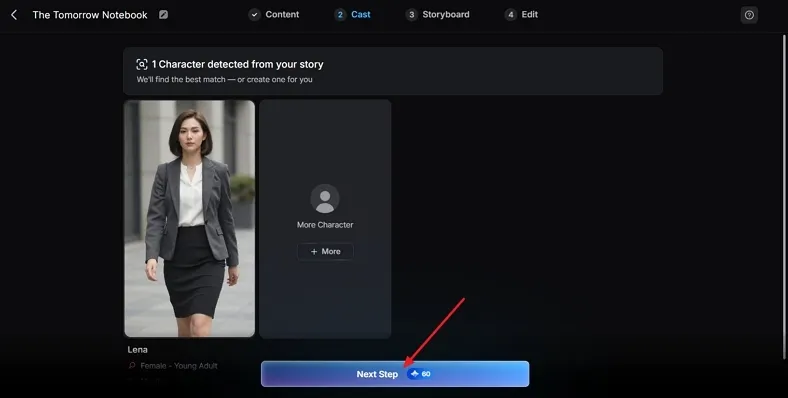
Step 4. Edit Characters and Voice Selection
Continuing, users can adjust each character’s voice by clicking the character and selecting a voice. Users can choose from options such as age, gender, and style for each character’s voiceover. Click the Next Step button after finalizing each character’s voice-over style.
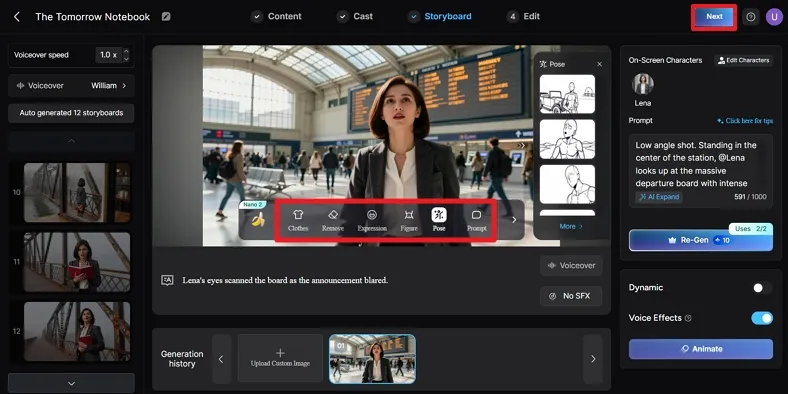
Step 5. Change Storyboard Settings to Preference
Subsequently, once the cast is complete, users will be transferred to the Storyboard tab. On this interface, you can change the Clothes, Expression, and Pose by clicking the icons at the bottom of the video screen, then selecting the Next option.
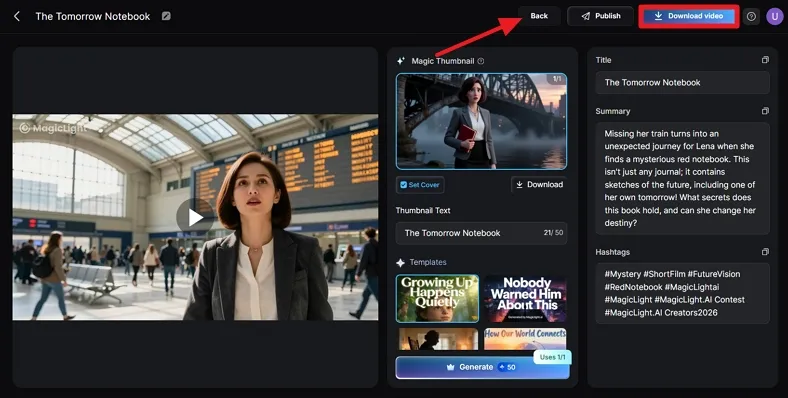
Step 6. Preview and Download the Generated Video
Finally, preview the generated video, and if any changes are needed, click the Back option. However, if you are happy with the results, press the Download Video option.
Why Choose It?
Magiclight.AI has a lot to offer to users of all kinds, regardless of technical expertise. Below, we have compiled a couple of reasons why you should choose Magiclight.AI as your go-to solution for all your video animation needs:
- Creates Long-Form Videos: Unlike most AI tools limited to short clips, this tool can generate full videos up to 50 minutes.
- Maintains Character Consistency: It keeps characters visually consistent across scenes, avoiding the common issue of changing faces or designs mid-video.
- All-in-One Workflow: Script writing, storyboarding, animation, voiceovers, and subtitles are all handled on one platform, so there is no need for multiple software.
- Add Captions, Voiceover, and Music: Users can easily add captions, voiceover, and music to their videos, generating stunning and impressive clips.
Part 4. 5 Tips to Make AI Videos Look More Realistic
We have gone over how to create an ultra-realistic video using Magiclight.AI. In this section, we will discuss some tips to ensure that your AI videos always look more realistic than cartoonish ones:
- Avoid Overloading Scenes: Keep backgrounds and characters minimal, as cluttered scenes often reduce realism and confuse visual focus.
- Test Outputs Before Finalization: Compare results across platforms when deciding what is the most realistic AI video generator for your specific video content style.
- Break Dialogue into Natural Speech Patterns: Shorten sentences and add pauses so the AI voiceovers sound more conversational and human-like.
- Match Lighting Across Video: Ensure light sources stay consistent between shots, including shadows and highlights, to avoid a mismatched or artificial look.
- Avoid Static Frames: Add slow zooms, pans, or slight motion to mimic real camera behavior rather than keeping scenes completely still.
Conclusion
To summarize, AI videos are trending because they make high-quality content faster and more accessible for creators everywhere. Still, challenges like uncanny visuals, rendering delays, and scene complexity can affect results. By refining lighting, motion, and audio, creators can improve realism significantly. If you’re wondering, “What is the most realistic AI video generator?” tools like Magiclight.AI stand out as a top choice to get started.
Frequently Asked Questions
1. What is the most realistic AI video generator?
There are quite a few AI generators that offer realistic visuals, but Magiclight.AI is one of the top choices. This is because this tool provides users with structured video creation, consistent characters, and high-quality output.
2. Can AI create professional-looking videos for free?
Yes, many AI tools offer free plans that allow users to create professional-looking videos with decent quality and editing flexibility.
3. Which AI creates the most realistic videos?
Several tools exist, but Magiclight.AI is often preferred for its ability to generate cohesive and visually polished videos with minimal effort.
4. How do I make AI videos look more natural?
If you want your AI videos to look more natural and human-like, focus on consistent lighting, realistic voice pacing, and subtle camera movement. Furthermore, try to avoid overcrowding scenes to improve overall video quality.
![15 Top Cartoon Characters of All Time [New List]](https://blog-new.magiclight.ai/wp-2/wp-content/uploads/top-cartoon-characters-300x168.webp)
![9 Best AI Video Generation Models in 2026 [Easy Selection]](https://blog-new.magiclight.ai/wp-2/wp-content/uploads/best-ai-video-generation-models-300x168.webp)