Imagine you are searching for an AI tool that can quickly help you create content, generate ideas, or automate everyday tasks. With so many AI platforms appearing online, choosing the right one can feel confusing. This is where Zorq AI comes into the picture. Many users are now exploring this tool to see whether it truly improves productivity or is just another AI platform with basic features.
In this review, we will take a closer look at what the tool offers, how it works, and whether it is actually worth using. By the end, you will clearly understand if Zorq AI is the right choice for your needs.
Part 1. What is Zorq AI?
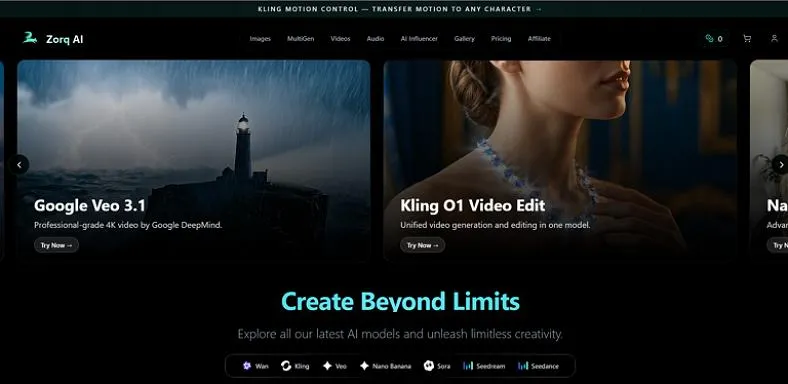
Zorq AI is an AI-powered creative platform that helps users generate images and videos from text prompts or ideas. Instead of designing visuals manually, users simply describe a concept, and the AI transforms it into realistic visual content within seconds. The tool is designed for creators, marketers, and businesses that need fast visual production. The tool offers models like Google Veo 3 and Sora 2 to generate visual content with the latest technology.
Key Features
- Users get the ability to select the duration and resolution for the video according to their preferences.
- The tool can generate multiple variations of an image from a single prompt.
- Zorq AI includes editing capabilities such as inpainting and outpainting to modify specific parts of an image.
- The platform also offers multiple resolution options for users to generate high-quality visuals.
Pros
- It supports multiple visual styles, which helps creators produce different types of content.
- Built-in editing features allow users to refine or adjust generated images without additional software.
- The platform organizes generated media in a library, making it easier to manage and reuse visual content.
- AI voice generation enables users to create voiceovers for videos and presentations directly within the platform.
Cons
- You need a paid subscription to access all the features offered by Zorq AI.
- AI models may receive updates periodically, which can change output styles or affect result consistency over time.
- The interface of Zorq AI is quite complicated and could be intimidating for beginners.
Part 2. How to Use Zorq AI?
Having learned about this tool in detail, let us have a look at how to use this tool in the section below:
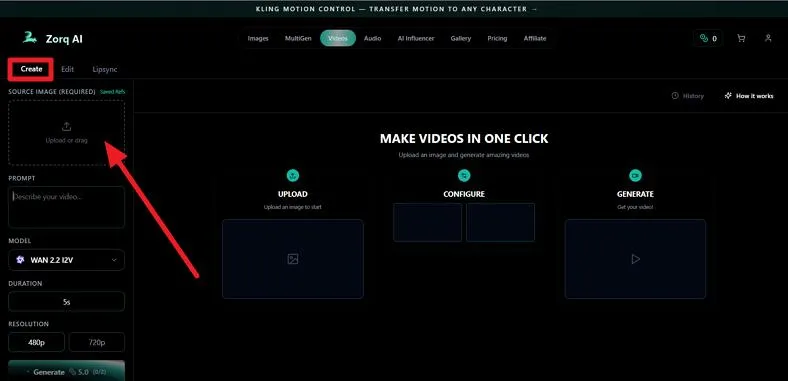
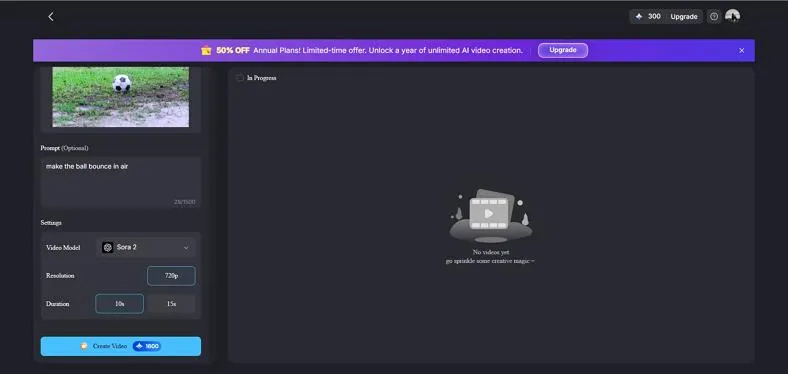
Step 1. Begin by accessing the tool on your browser and choosing its Video Generation section from the top. Now, locate the Create section and press the Upload or Drag Photo tab to upload the reference image for the video.
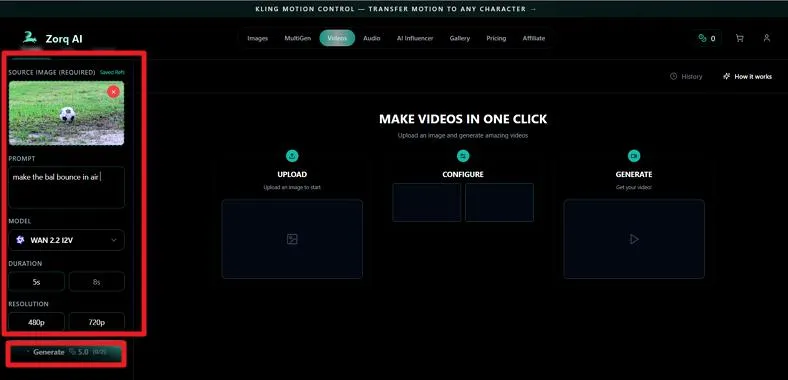
Step 2. Once the image is uploaded, input the relevant text prompt for the video in the designated field. Next, select the AI model, Resolution, and Duration for the video from the options provided. When all the configurations are done, press the Generate button to execute the process.
Part 3. Best Alternative to Zorq AI for Video Creation
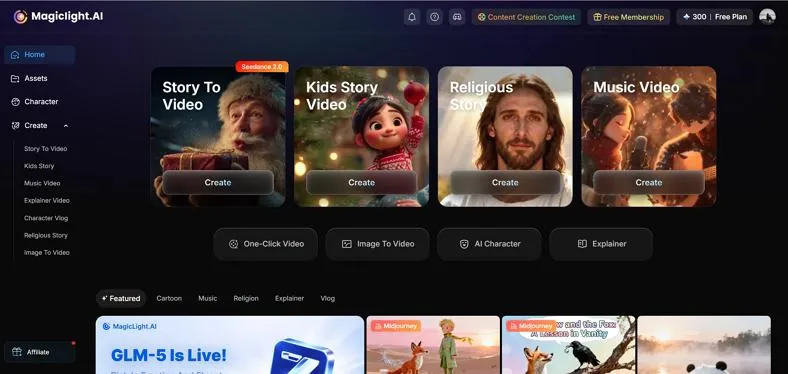
If you are looking for a more powerful AI tool for generating videos, Magiclight AI is one of the most popular Zorq AI alternatives. It is designed to turn scripts, prompts, or ideas into complete animated videos with scenes and characters automatically. Instead of using multiple tools for scripting, visuals, and editing, Magiclight AI provides an all-in-one workflow that handles the entire production process.
Creators can generate both short and long videos, including storytelling content and social media clips. Moreover, the platform uses AI to create scenes, maintain character consistency, and synchronize voiceovers with animation. It also includes built-in editing controls, such as camera movement and transitions, to refine the final video.
Key Features Offered By Magiclight
- One-Click Video Creation: Magiclight AI allows users to generate a complete video with just one click after entering a prompt or script. The platform automatically creates scenes, visuals, and transitions, making the video production process much faster.
- AI Character Video Generation: The platform can create videos featuring AI-generated characters that remain consistent throughout different scenes. This helps maintain visual continuity, which is especially useful for storytelling and educational content.
- Multiple Aspect Ratio Options: Magiclight AI offers different aspect ratio options so users can create videos suitable for various platforms. For example, creators can generate vertical videos for TikTok and Instagram or landscape videos for YouTube.
- Multiple Video Styles: The Zorq AI alternative supports various visual styles such as realistic, 3D cartoon, and modern animation. This flexibility allows creators to choose a style that best matches their content theme and audience preferences.
- Flexible Video Duration Selection: Magiclight AI lets users choose from different video durations based on their content needs. This makes it suitable for creating both short social media clips and longer storytelling or educational videos.
Part 4. Comparison Table Between Zorq AI and Magiclight AI
After learning about the Zorq AI alternative and the tool itself, let us have a look at the side-by-side comparison of both. The tabular comparison between the tools will help you make an informed decision.
| Feature | Zorq AI | Magiclight AI |
| Core Function | Primarily focuses on AI image and short video generation from prompts. | Built as a complete AI video creation platform that converts scripts or prompts into full videos with scenes, characters, and narration. |
| Video Length | Typically supports short AI-generated clips depending on the generation model. | Supports long-form videos up to 50 minutes — far beyond the short-form limits of most AI video generators. |
| Character Consistency | Limited information about persistent character continuity across scenes. | AI maintains consistent characters and expressions across scenes, improving storytelling quality. |
| Built-in Voiceovers | Basic voiceovers | Includes multilingual AI voiceovers and lip-sync support for narration and dialogue. |
| Output Quality | Depends mainly on the AI generation model used. | Supports 1080p HD export with commercial usage rights. |
Frequently Asked Questions
1. Is Zorq AI free to use?
No. Zorq AI offers a credit-based plan that lets users generate images and videos with AI.
2. What is the best alternative to Zorq AI?
One of the best alternatives to Zorq AI for AI video creation is Magiclight AI. It provides advanced video-generation capabilities such as script-to-video creation, AI characters, scene generation, and automated storytelling.
3. What videos can Zorq AI create?
Zorq AI can generate several types of AI videos, including AI Influencers videos, explainer videos, character vlogs. These videos can include AI narration, background music, and different visual styles depending on the prompt and settings used. However, for improved and professional results, you should consider using Magiclight AI and its advanced capabilities.
Conclusion
To sum it up, Zorq AI is a solid tool for generating quick AI images and short videos, but it has limitations in video length, advanced editing, and character consistency. For creators looking to produce professional-quality, long-form videos with AI-generated characters and automated scene generation, Magiclight.AI is the superior choice. It's an all-in-one platform that streamlines the entire video creation process, making it ideal for marketers and content creators.
![15 Top Cartoon Characters of All Time [New List]](https://blog-new.magiclight.ai/wp-2/wp-content/uploads/top-cartoon-characters-300x168.webp)
![9 Best AI Video Generation Models in 2026 [Easy Selection]](https://blog-new.magiclight.ai/wp-2/wp-content/uploads/best-ai-video-generation-models-300x168.webp)