텍스트로 영상을 만드는 일이 크리에이터들 사이에서 아주 흔해졌어요. 초보는 여전히 AI 비디오 도구용 프롬프트를 명확히 쓰기 어려워하죠. 그런데 프롬프트만 잘 쓰면 단순한 아이디어도 금방 몰입되는 장면이 돼요. 요즘은 MagicLight AI처럼 기능이 탄탄한 도구가 더 똑똑해지고 있어요.
간단한 프롬프트로 다양한 영상을 만들 수 있어서, 이 생태계에서 꽤 확실한 선택이에요. 직접 쓰기 망설여진다면, 이 가이드가 초보와 크리에이터를 위한 AI 비디오 생성 프롬프트 예시를 설명해 줘요.
1부. 가장 좋은 AI 비디오 생성 프롬프트 예시 20개
크리에이터는 더 나은 결과를 위해 AI 비디오 프롬프트 예시를 자주 참고해요. 이 섹션에서 구조가 잡힌 프롬프트 20개를 살펴봐요.
프롬프트 1. 시네마틱 네온 도쿄 거리
아래 영어 프롬프트를 그대로 붙여넣으세요: A stylish woman walks through rainy Tokyo streets filled with glowing neon lights. The camera uses slow motion with cinematic 4K and shallow depth of field. Wet roads reflect colorful lights that create an emotional and realistic city atmosphere.
프롬프트 2. 우주를 떠도는 우주비행사
아래 영어 프롬프트를 그대로 붙여넣으세요: An astronaut drifts slowly in deep space surrounded by floating debris. Earth reflection appears clearly inside the shiny helmet's glass surface. The camera uses close-up shots with soft lighting and smooth cinematic movement.
프롬프트 3. 설산 위의 드래곤
아래 영어 프롬프트를 그대로 붙여넣으세요: A powerful dragon flies above snowy mountains during a bright sunrise sky. The camera shows wide aerial movement with epic cinematic fantasy storytelling visuals. Fog fills valleys below while detailed dragon scales shine in light.
프롬프트 4. 테크 웹사이트 UI 애니메이션
아래 영어 프롬프트를 그대로 붙여넣으세요: Floating UI panels appear over a gradient background with smooth motion effects. Clean icons and text elements animate with a calm, professional tech style, generated using MagicLight AI for seamless cinematic motion design. Camera parallax movement creates a modern website hero section explainer video feel.
프롬프트 5. 눈 내리는 도쿄 거리
아래 영어 프롬프트를 그대로 붙여넣으세요: Snowy Tokyo street shows crowds walking under falling snow and petals. The camera moves in a handheld style, giving a natural and realistic street life feeling. Soft lighting and cinematic depth create an emotional and peaceful winter scene.
프롬프트 6. 포근한 겨울 광장
아래 영어 프롬프트를 그대로 붙여넣으세요: A warm town square glows with lights during falling, gentle snow. People enjoy hot drinks while shops shine with golden cozy lighting. A slow camera move from above makes the whole town look very warm.
프롬프트 7. 라떼아트 클로즈업
아래 영어 프롬프트를 그대로 붙여넣으세요: The barista pours latte art and creates a heart shape in slow motion. Steam rises softly under warm café lighting and smooth camera zoom. Cinematic 4K detail makes a satisfying and realistic modern café experience video.
프롬프트 8. 피트니스 변신 훅 영상
아래 영어 프롬프트를 그대로 붙여넣으세요: A phone screen shows bold transformation text with neon glitch effects. Fast cuts show gym scenes with energetic beat-synced motion graphics. High contrast visuals create a strong attention-grabbing social media hook video.
프롬프트 9. 장난감 로봇 조립 루프
아래 영어 프롬프트를 그대로 붙여넣으세요: Toy robots assemble colorful gadgets on a moving conveyor belt in a workshop scene. Bright colors and smooth motion create a playful looping animation environment. The camera pans sideways, showing detailed mechanical movement and fun energy flow.
프롬프트 10. 네온 사이버펑크 도시 비행
아래 영어 프롬프트를 그대로 붙여넣으세요: A cyberpunk city glows with neon lights and futuristic tall buildings. The camera flies between skyscrapers, showing a purple, cyan glowing night atmosphere scene. VHS-style effects and fast motion create an immersive futuristic city feel.
프롬프트 11. 여행 몽타주 클립
아래 영어 프롬프트를 그대로 붙여넣으세요: Travel montage shows markets, mountains, and food clips in a fast rhythm. Handheld camera style adds realism with vibrant colors and quick transitions. Social captions appear on screen, enhancing storytelling and viewer engagement flow.
프롬프트 12. 프리미엄 스마트폰 쇼케이스
아래 영어 프롬프트를 그대로 붙여넣으세요: A black smartphone rotates slowly on a pedestal in a dark studio setup. Soft lighting highlights the edges and premium design details of the device clearly. The camera circles smoothly, creating a high-end cinematic product advertisement video style.
프롬프트 13. 커피 브랜드 시네마틱 샷
아래 영어 프롬프트를 그대로 붙여넣으세요: Coffee beans transform into a steaming cup placed on a wooden sunrise table. Soft light and shallow depth create a warm and cozy emotional tone. The camera slowly moves forward, showing a cinematic brand storytelling visual experience scene.
프롬프트 14. 스킨케어 제품 플랫 레이
아래 영어 프롬프트를 그대로 붙여넣으세요: Skincare products are arranged neatly on a pastel background with soft shadow lighting. Overhead camera shows minimal design with smooth sliding transitions between items. Calm ambient music style visuals create a clean, modern, beautiful brand feeling.
프롬프트 15. 미래형 러닝화
아래 영어 프롬프트를 그대로 붙여넣으세요: A runner in glowing shoes sprints through a dark and shiny blue tunnel. The camera follows the feet to show the details of the new sneakers. Punchy music and bold lights make this commercial look very fast and strong.
프롬프트 16. 화성에서 물 주는 로봇
아래 영어 프롬프트를 그대로 붙여넣으세요: A cute robot waters a small plant on the red Mars rocky landscape surface. Soft Pixar-style animation gives a friendly and emotional storytelling atmosphere. The camera gently orbits, showing a calm and hopeful futuristic space environment scene.
프롬프트 17. 장난감 공장 애니메이션 루프
아래 영어 프롬프트를 그대로 붙여넣으세요: Tiny robots build toys inside a colorful and isometric factory with moving gears. Bright, playful colors create smooth, looping animation with cheerful motion design. The camera angle stays steady, showing detailed mechanical teamwork and rhythm flow.
프롬프트 18. 마법사 고양이의 판타지 산책
아래 영어 프롬프트를 그대로 붙여넣으세요: A cat wearing a wizard hat walk through a glowing, enchanted forest path. Floating magical particles and soft lights create a dreamy, fantasy atmosphere. Slow side camera movement enhances a calm, mystical storytelling visual experience tone.
프롬프트 19. 젠 유리 구체
아래 영어 프롬프트를 그대로 붙여넣으세요: A glass sphere contains a miniature zen garden with soft sand patterns. The camera slowly zooms in, showing reflections and calming studio lighting effects. Ambient sound design creates a peaceful meditation-style, relaxing visual experience.
프롬프트 20. 늑대 새끼 자연 장면
아래 영어 프롬프트를 그대로 붙여넣으세요: Five wolf cubs play on a grassy road under a golden sunlight sky. Wildlife camera captures natural movement with soft depth and realistic textures. Environmental sounds and warm lighting create an emotional nature documentary video scene.
2부. 프롬프트로 AI 영상을 만들기 좋은 도구
위에서 봤듯 프롬프트 쓰기는 쉬운데, 영상으로 만드는 일은 여전히 어려워요. 좋은 프롬프트만으로는 도구가 없으면 영상이 안 나와요. MagicLight AI는 이런 AI 비디오 생성 프롬프트 예시를 받아 완성도 높은 영상을 만들어요. Smart Script가 프롬프트를 최대 12,000자까지 AI로 확장해 줘요.
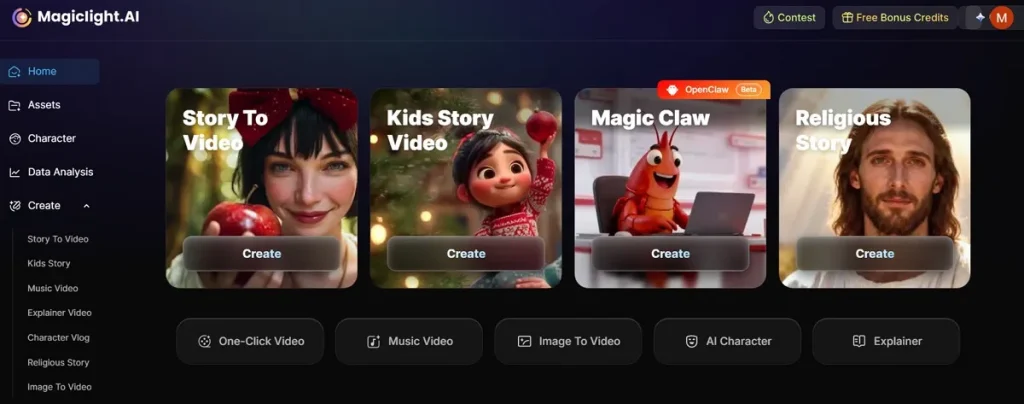
긴 스토리 영상을 만들고 싶어도 길이는 최대 약 50분이에요. 카메라와 스토리 톤을 다루는 디렉터 모드도 8가지예요. MagicLight AI는 스크립트를 직접 쓰지 않아도 전체 이야기를 자동 생성해요. 글로벌 시청자를 위해 11개 언어를 지원하니 더 많은 사람에게 닿을 수 있어요.
AI 영상 생성에 MagicLight AI를 고르는 이유
크리에이터가 이 도구로 AI 영상을 만드는 이유는 이렇습니다.
- One-Click Generation: 모델 14종으로 클릭 한 번에 바로 생성해요. 시간이 줄고, 긴 수작업 편집이 필요 없어요.
- Voice Audio: 보이스오버는 감정과 언어 옵션이 있는 음성 37종이에요. 음악과 효과음도 더해 스토리와 완성도가 올라가요.
- Visual Quality: 720p와 1080p를 지원해 영상을 선명하게 다듬을 수 있어요. 고화질 출력 덕분에 별도 작업 없이도 프로처럼 보여요.
- Audio Control: MagicLight AI는 분위기와 몰입을 위한 배경음악 40곡을 제공해요. 장면에 맞는 음악을 골라 스토리 경험을 살릴 수 있어요.
- Style Variety: 여러 스타일 모델로 영상 룩과 테마를 바꿀 수 있어요. 콘텐츠 톤과 창작 방향에 맞는 스타일을 고르면 돼요.
정리
요약하면, 좋은 스크립트를 쓰는 힘이 크리에이터로 성장하는 가장 확실한 길이에요. 이 AI 비디오 생성 프롬프트 예시 가이드는 생각을 영상으로 바꾸는 법을 보여 줘요. 하지만 도구가 없으면 프롬프트만으로 사실적인 결과를 내기 어려워요. 그래서 부드러운 생성을 위한 믿을 만한 솔루션이 필요해요. MagicLight AI는 프롬프트를 고품질 영상으로 빠르고 효율적으로 바꿔 줘요.
AI 비디오 생성 프롬프트 예시 FAQ
1. MagicLight AI에서 어떤 프롬프트가 가장 잘 먹히나요?
명확하고 구체적인 프롬프트가 정확한 AI 영상을 만드는 데 가장 좋아요. 분위기, 캐릭터, 카메라 스타일을 넣는 것도 추천해요. 구조가 단순한 프롬프트여도 MagicLight AI가 아이디어를 더 잘 읽어요.
2. MagicLight AI는 프롬프트를 어떻게 영상으로 바꾸나요?
AI가 텍스트를 분석해 시각적 스토리 장면으로 나눕니다. 각 장면에는 캐릭터, 배경, 시네마틱 모션이 들어가요. 마지막에 모든 것을 부드럽고 완성된 영상으로 합쳐요.
3. AI 비디오 프롬프트 품질을 높이려면요?
조명과 카메라 스타일처럼 구체적인 지시를 분명히 쓰세요. 예시와 구조를 넣으면 AI가 의도를 더 쉽게 따라와요. 프롬프트를 조금씩 다듬을수록 결과는 더 사실적으로 나와요.