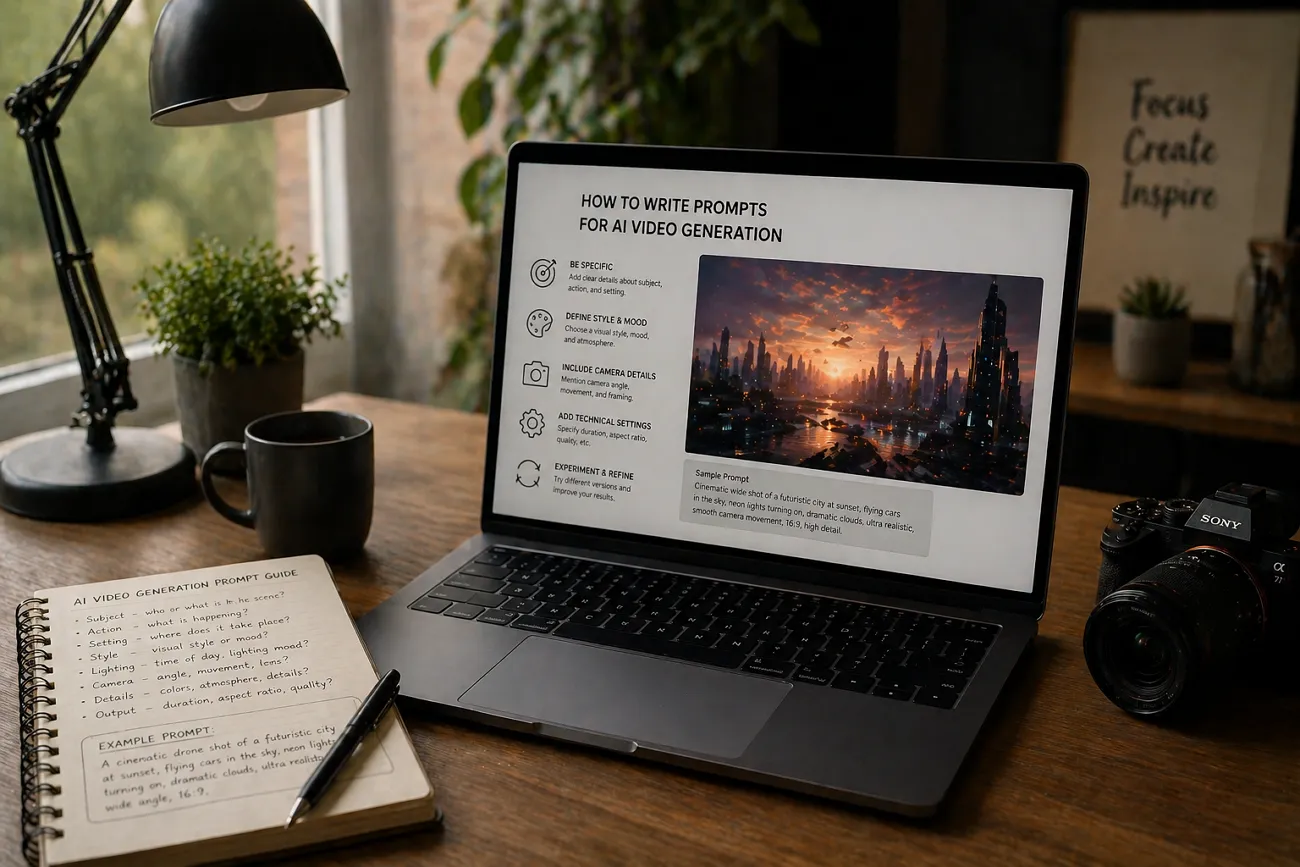
很多人想把簡單點子做成影片,卻不知道從哪下手。於是就會去搜怎麼寫 AI 影片生成提示詞。其實提示詞寫清楚,不用複雜工具也能出片。用過幾次之後,大家還會希望流程更快、更聰明。
需求漲起來,創作者就開始找更現代的工具。MagicLight AI 就是其中之一,能用 AI 做出品質更穩的影片。想把影片做好,這篇會幫你把提示詞寫得更具體、更有畫面。
第 1 部分. 怎麼寫 AI 影片提示詞(分步)
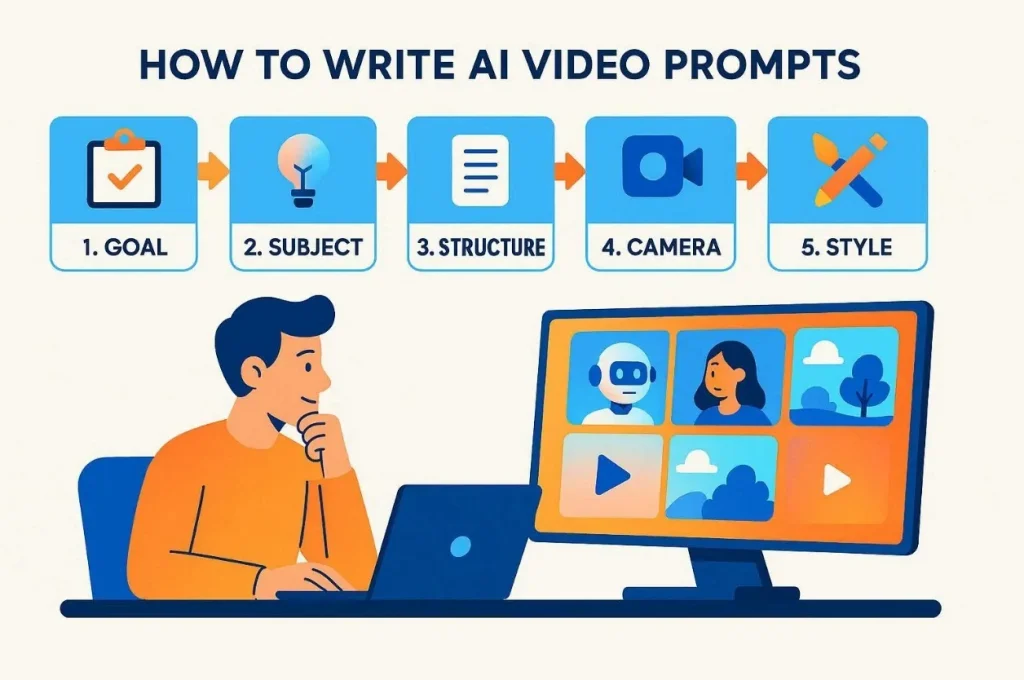
先搞清楚怎麼寫有效的 AI 影片提示詞,後面會輕鬆很多。下面按步驟,把結構清楚的影片提示詞寫出來:
Step 1. 先定影片目標
先寫清影片的主要目的和形式。寫細節前,先想好平台、時長和你希望觀眾看完後做什麼。目標清楚,風格、運鏡和整體方向才不會散。
Step 2. 選好主體和動作
想清楚畫面裡是誰、是什麼,以及正在做什麼。主體盡量簡單、清楚、視覺上好認,AI 才更容易理解。一次只抓一個主要人物或物體,別把場面塞太滿。動作簡單,運動也會更自然、更順。
Step 3. 把結構寫完整
用主體、動作、場景、運鏡和風格組合起來。每一項只描述畫面裡的一個清楚部分。結構清楚,AI 更好理解,成片也更準。比如 MagicLight AI 這類工具,提示詞結構清楚時,畫面會更準、也更統一。
Step 4. 寫清運鏡和機位
把機位、運動方式、遠近和構圖寫清楚。這些會決定觀眾怎麼看動作、怎麼進入故事。你可以讓鏡頭平移或推進,質感會更專業。運鏡路徑清楚,畫面才不會呆、不會悶。
Step 5. 補上風格和視覺細節
最後選電影感風格、情緒、光線和色盤。這些會決定成片的情緒和觀感。再寫白天還是夜晚,光線和場景才會統一。
第 2 部分. 10 條 AI 影片提示詞示例
會寫 AI 影片提示詞,成片會更有創意。這一部分給你 10 條好用的示例:
提示詞 1. 極簡手機展示
把下面這段英文提示詞原樣貼上: Sleek black smartphone rotates slowly on a clean white pedestal display. Soft studio lights highlight edges with reflections on the glossy surface of the floor. A smooth orbiting camera creates a premium cinematic product look for advertising use.
提示詞 2. 前後對比改造
把下面這段英文提示詞原樣貼上: Messy desk instantly changes into a clean, organized workspace using a smooth transition. Static camera captures a transformation effect with a bright and natural daylight lighting scene. Satisfying clean aesthetic used for productivity and motivation, social media clips.
提示詞 3. 咖啡品牌 B-Roll
把下面這段英文提示詞原樣貼上: Freshly brewed coffee pours into a ceramic cup in slow motion. Steam swirls upward above a rustic wooden table with scattered brown beans. Warm morning light comes through a window for a very cozy feeling. The camera drifts gently to show a cinematic and inviting morning vibe.
提示詞 4. 勵志健身短片
把下面這段英文提示詞原樣貼上: An athlete prepares for a workout inside a dark gym with an intense lighting mood. Chalk dust explodes in slow motion while the camera pulls back for a view. Cinematic high contrast style used for strong motivational fitness video content.
提示詞 5. 雨夜獨行
把下面這段英文提示詞原樣貼上: A person walks alone on a rainy neon street with reflections on the ground. The camera follows behind slowly, showing a moody cyberpunk city atmosphere and rain. Soft blue magenta lighting creates an emotional cinematic nighttime storytelling visual scene.
提示詞 6. 沙漠公路旅行
把下面這段英文提示詞原樣貼上: One vintage car drives through an empty desert highway under a golden sunset sky. Dust trails behind the vehicle while the camera slowly rises and shows a wide landscape. Warm and nostalgic cinematic style creates a peaceful travel and freedom adventure feeling.
提示詞 7. 綠植與陽光氛圍
把下面這段英文提示詞原樣貼上: Close-up of indoor houseplants on a windowsill with very soft shifting sunlight. Moving shadows fall on the wall with a gentle and handheld movement. Warm natural tones make this an aesthetic choice for your social reels. This simple scene shows beauty in a quiet and very peaceful way.
提示詞 8. 霓虹合成波城市場景
把下面這段英文提示詞原樣貼上: Retro neon city scrolls sideways with glowing pink and blue buildings. Grid floor and sunset sun create a strong 80s synthwave visual style. Smooth looping camera pan makes a perfect background for aesthetic video content.
提示詞 9. 星系冥想循環
把下面這段英文提示詞原樣貼上: A spinning galaxy made of glowing purple and blue particles floats slowly. Soft lens flares and gentle motion create a calm space atmosphere. Smooth zoom-in and out motion used for meditation background loops.
提示詞 10. SaaS 儀表板介面
把下面這段英文提示詞原樣貼上: A floating holographic dashboard appears above the desk with charts and metrics updates. The camera gently rotates, showing a futuristic interface inside a minimal office environment scene. Cool blue lighting creates a modern software promotional technology product advertisement look.
第 3 部分. 把簡單提示詞做成片,用什麼工具更好
現在你已經清楚怎麼給 AI 影片生成器寫提示詞了。不過,把提示詞做成高品質影片,沒有合適工具還是會慢。MagicLight AI 能把簡單提示詞很快做成完整影片。它的 Smart Script 功能,會把你的短提示詞擴成完整故事,最多大約 12,000 個字元。
MagicLight AI 支援 11 種語言,方便做給全球用戶看的內容。另外還有 9 種故事模型,包括 Gemini 3.1 Pro 和 GPT-4,能生成不同結構的敘事影片。想做長影片,最長大約 50 分鐘。生成時,它會用進階角色鎖定,讓 AI 角色在不同鏡頭裡長得更穩。
核心功能
- Style Models: 提供 Midjourney V7、MagicLight 3.0 等多種視覺風格,方便按賽道和性格設計 AI 角色外形。
- Auto Publishing: 按計畫自動把影片發到選定平台,不用自己手動傳。
- Nano Editing: 支援 Nano 微調,有 50 種姿勢和更細的場景控制。
用 MagicLight AI,把提示詞做成 AI 影片的完整指南
功能看完了,按下面步驟就能生成一條 AI 影片:
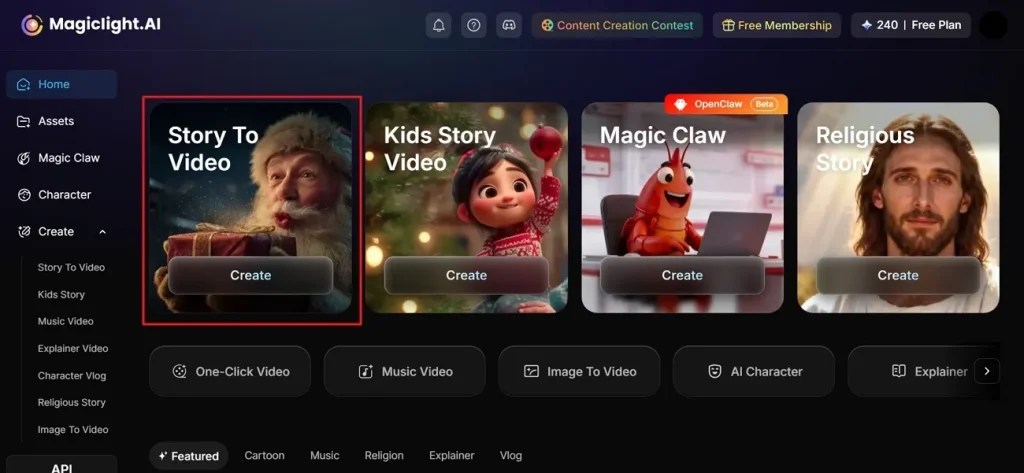
Step 1. 打開 Story to Video
打開 MagicLight AI,在主畫面選擇 Story to Video。
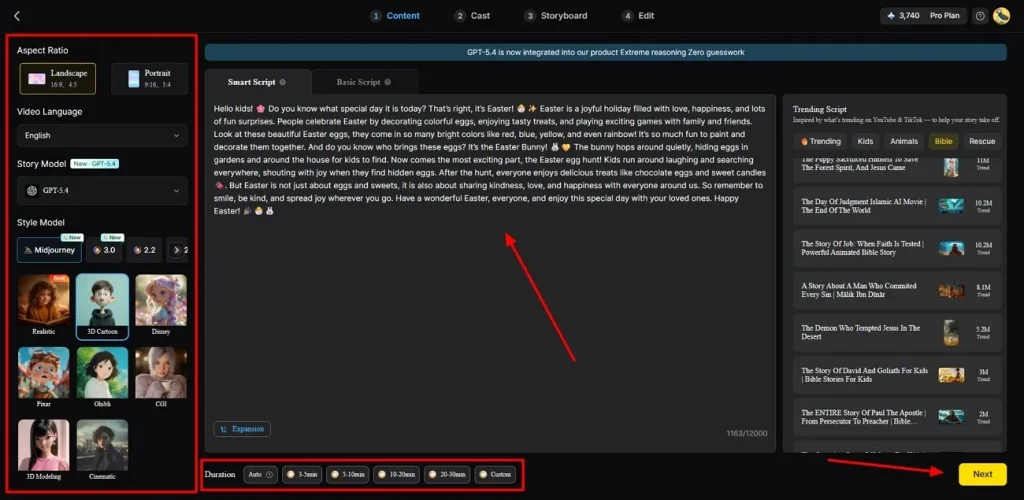
Step 2. 寫提示詞並調整設定
打開後,把想法寫進 Text Box,再選 Video Language。接著調 Aspect Ratio,選 AI Story Model,比如 Gemini 3.1。然後選 Style、設 Duration,點 Next。
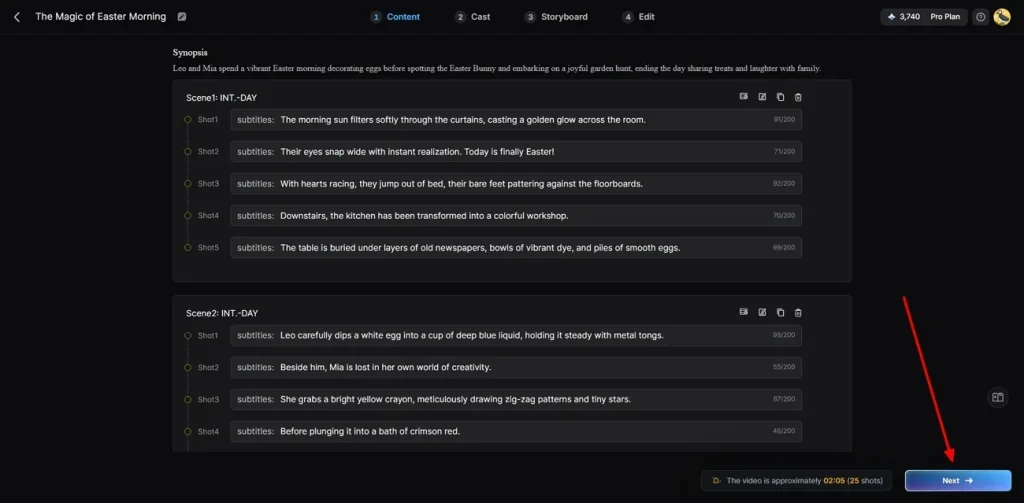
Step 3. 檢查或修改 AI 影片分鏡
下一屏會給你一份 AI 生成的影片摘要,先看一遍。生成前,你還可以改現有場景。確認後點 Next 繼續。
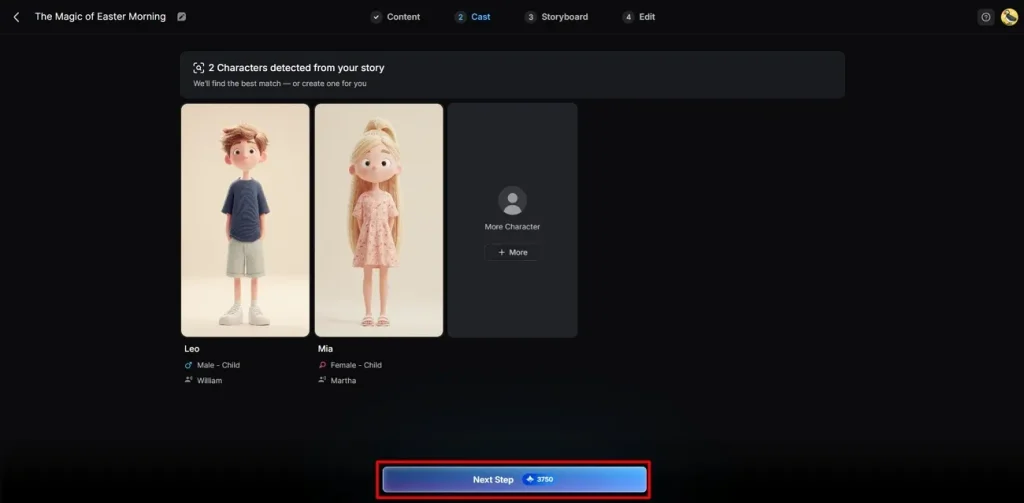
Step 4. 選擇或更換 AI 角色
MagicLight AI 會按影片需求給你不同 AI 角色,選現成的,或點 More Character 新增。選好後點 Next Step。
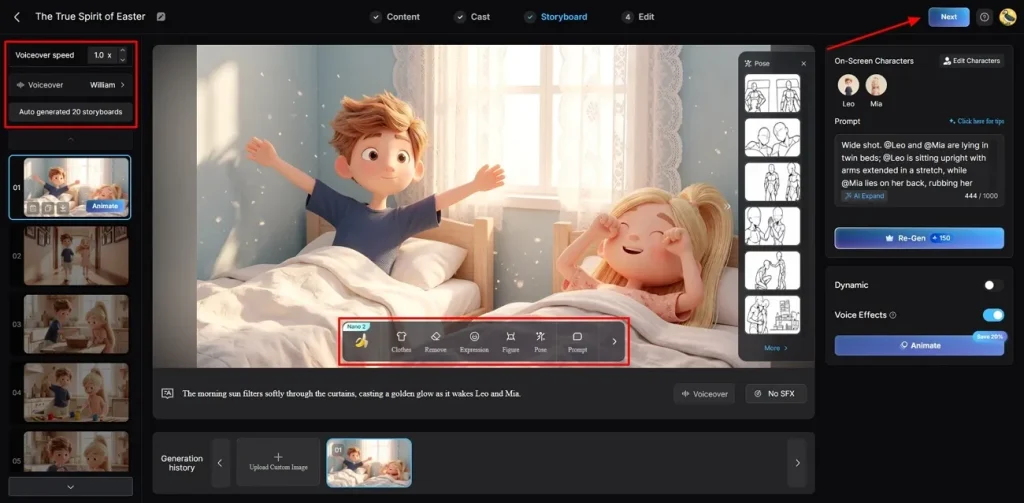
Step 5. 調整角色外形
進入分鏡畫面後,按節奏設 Voiceover Speed。再按需要改 Clothing、Style 和 Body Appearance。看起來對了,點 Next。
Step 6. 加字幕和背景音樂
打開 Subtitle Settings,給影片加清楚字幕。再去 Background Music 選合適的配樂。最後點 Generate,把字幕和音樂加進成片。
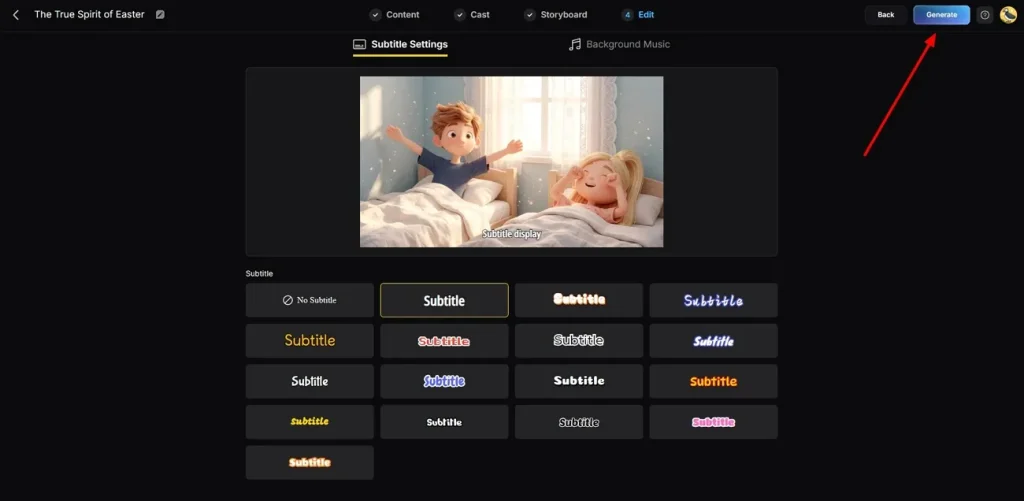
Step 7. 觀看並下載成片
最後預覽 AI 生成的影片,檢查品質和整體效果。滿意後點 Download,儲存到裝置。
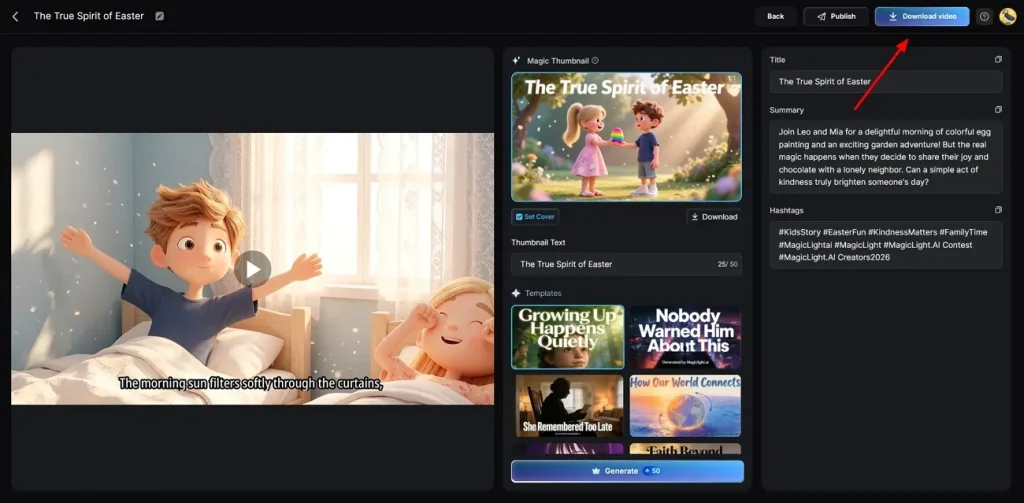
結語
總結一下,提示詞按清楚、簡單的結構寫,會好寫很多。這篇一步步講了怎麼寫 AI 影片生成提示詞。多練幾種寫法,成片品質和創意都會上去。不過,把提示詞做成完整影片,還是需要合適的工具。這時 MagicLight AI 能幫你更有效率地創作、管理和打磨影片。
怎麼寫 AI 影片提示詞:常見問題
1. 什麼是 AI 影片提示詞?
AI 影片提示詞就是一段文字說明,用來指導影片生成。它會寫清主體、動作、場景、運鏡和風格,成片才更準。寫得好,系統更容易做出準確、好看的影片。
2. 新手也能輕鬆寫 AI 影片提示詞嗎?
能。按簡單步驟寫,用清楚的詞和結構,不用會技術也能出更好的結果。再多練、多看示例,提示詞會越寫越好。
3. 好的 AI 影片提示詞長什麼樣?
好提示詞會把主體、動作和具體運鏡寫清楚。你還該寫光線和整體情緒,畫面才會更專業。別寫亂,指令簡單,生成才會順、才會準。
4. MagicLight AI 最吃什麼樣的提示詞?
MagicLight AI 更適合你提供詳細故事和清楚的角色描述。它會用 Smart Assistant,把簡單想法擴成更長、更有電影感的成片。複雜場景也能穩住,主角色在各鏡裡看起來也更一致。