


Social media has given people a platform to share their unique stories online. When making such videos, people often struggle to create the best version, leading to failures and disappointments. This happens due to certain lack of skills in creating videos using professional video editing software.
However, things have changed ever since AI has brought up smart tools for creating videos in no time. These AI-influenced tools help users understand how to create long AI videos without spending much time. This article focuses on this topic while bringing the best option that actually helps users create videos effortlessly.
Part 1. How to Create Long AI Videos: Step-by-Step Guide
Although AI has generously helped people in improving their workflows and output quality, many people still do not know how to create long videos with AI. The first thing they need to know is the right tool that helps them make long videos. Magiclight.AI is the right choice in this department as it helps create videos up to 50 minutes and 12,000 characters of text prompts.
Not only that, the 18 different AI models change the entire game of creative videos, allowing people to convert their short prompts and ideas into detailed video scenes. Its one-click powered feature comes with support for 30 different languages for a global outreach. While offering a variety of editing options, Magiclight.AI still brings the easiest version of video generation for users.
Key Features
- Style Model: You can choose from custom style models to keep visuals consistent across all scenes.
- Lip Sync: Magiclight matches voice with lip movements and expression for natural talking animation.
- Character Customization: While creating AI videos, it also offers to adjust accents, age, and gender to create a unique and personalized character.
Let’s explore the steps below to generate lengthy videos without effort using Magiclight AI:
Step 1. Create a New Project
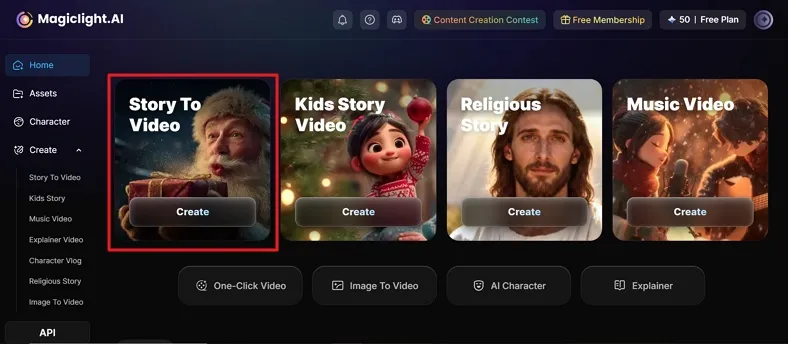
To start off, access Magiclight.AI’s official website and opt for the Story to Video option present on the main interface.
Step 2. Add Prompt and Generate Video
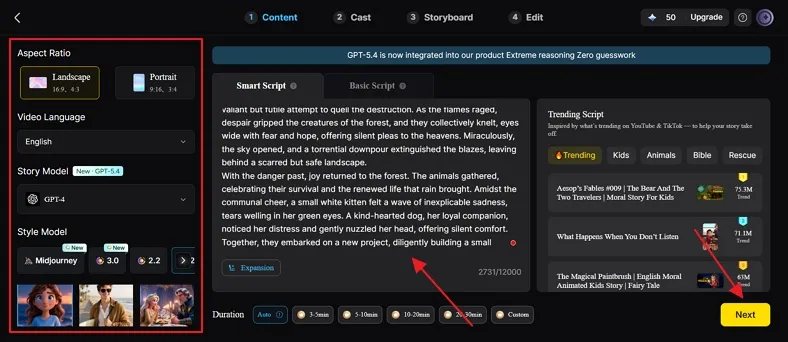
In the following screen, you can add your desired prompt across the Smart Script box and even use the Expansion option to improve it. Following this, define your Aspect Ratio, choose the Video Language, and select an appropriate AI model in the Story Model. After selecting a Style Model and Project Style among the offered ones, click Next to proceed to video generation.
Step 3. Review the Generated Scenes
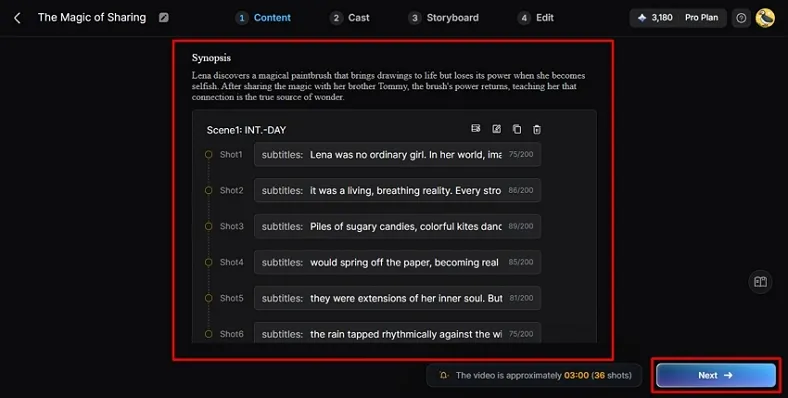
Review the synopsis of the generated scenes on the next screen and click Next once you are satisfied with everything.
Step 4. Choose Characters for Video
The next screen generates characters according to your designed script. You can make changes to your characters and their styles or add more within this window before clicking Next Step, which confirms their selection.
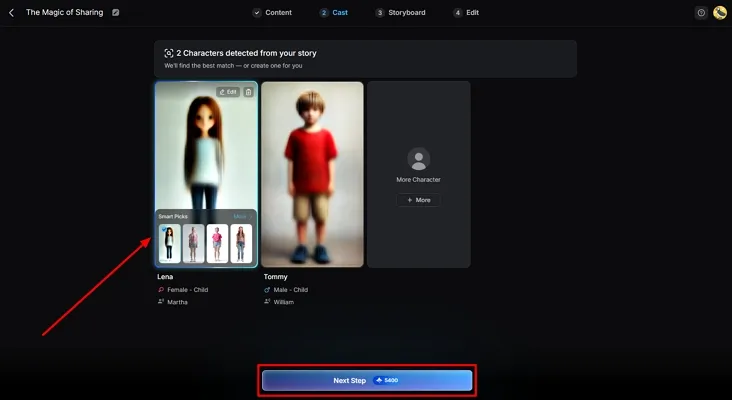
Step 5. Confirm Storyboard and Make Edits Where Needed
After the platform provides all frames generated in the next screen, review and adjust the clothing and other elements with the Controls offered. Once satisfied, click Next to continue towards finalizing the process.
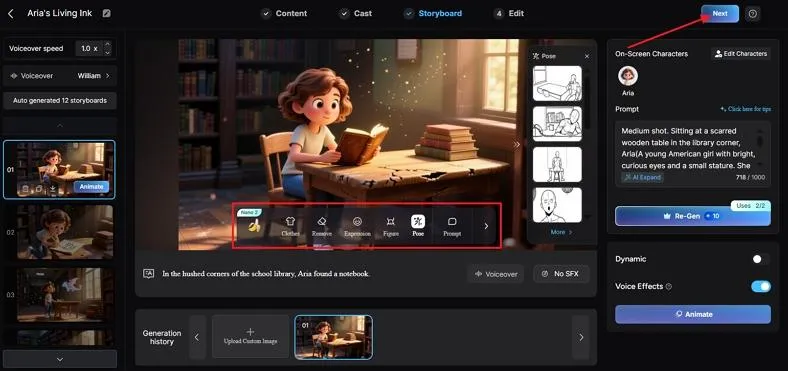
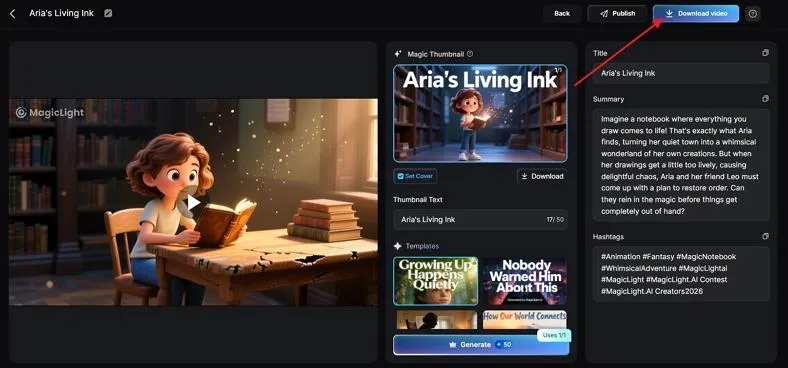
Step 6. Finalize and Download Video Content
With the video generated, preview the cover and thumbnails in the next screen, and click Download Video to save it successfully.
Part 2. Why Choose Magiclight.AI to Create Long AI Videos
While learning how to create a long AI video, Magiclight.AI stands out as a complete solution. The following points explain why this platform is the perfect choice for you:
- Visual Quality: Magiclight also produces clear visuals that look professional and detailed in every frame. As a result, 1080 HD-quality content makes long videos enjoyable and interesting to watch for viewers.
- Rearrange Scenes: You can even rearrange or change scenes to make the video fit your idea. This helps maintain attention and keeps content attractive for the entire audience.
- Custom Duration: It also offers a custom duration feature to set your video length according to need. This lets creators control timing and make long videos suitable for any platform.
- Image to Video: The app even lets you make long videos using images instead of a text prompt. You can upload an image up to 10MB to make a professional video.
- Smart Automation: Magiclight can expand short prompts or rough ideas into full video scenes automatically. Thus, this feature saves time and helps creators turn simple concepts into long and structured videos.
Conclusion
To summarize, making high-quality films used to be a very hard job for many people. With the right tools to share and learn how to create long AI videos, it has gotten very easy. Tools like Magliclight.AI will help you grow your channel fast if you need a quick way to reach your goals without any stress. Therefore, you should try this AI-influenced solution to make your next big movie project.
Frequently Asked Questions
1. Which AI video generators support long-form videos?
Magiclight.AI is known for providing long-form video support of up to 50 minutes in length. From covering idea generation to video generation, you can create professional-rated long-form videos in no time.
2. Can AI create YouTube-length videos easily?
AI has allowed users to create YouTube-length videos with ease. After providing a basic prompt or script, the system sets up the characters and generates a complete video with unique scenes. Tools like Magiclight.AI have made this look extremely simple.
3. How do I keep viewers engaged in long AI videos?
To keep viewers engaged in viewing long AI-generated videos, you need to focus on delivering good stories and unique visuals. For that, let the AI tool know to use clear narrations, high-quality visuals, and proper transitions.
4. What’s the best way to render long AI videos without errors?
When you intend to avoid errors in rendering long AI videos, you need to ensure a stable internet and sufficient system resources. Do save your progress regularly and try to export videos in portions if it is too large.
5. Which AI is best for making long videos?
The choice in tools varies according to user requirement; however, platforms like Magiclight.AI are designed to make long-form videos. Its automated features and attention to detail keeps it in the strong contenders.





![How to Write a Script for a Video 2026 [Full Guide]](https://blog-new.magiclight.ai/wp-2/wp-content/uploads/video-script-writing-setup-300x199.jpg)