


Video creation tools are growing fast, and choosing the right one really matters. Most people use Fliki AI, which converts text into narrated clips while offering stock visuals and music. Sometimes, it produces unrealistic and unnecessary visuals, which push creators toward better options. To address this, a detailed guide with an advanced alternative is provided below to help you decide.
Part 1. What Is Fliki AI?
Fliki AI video generator is a cloud-based AI platform that turns written content into polished videos with natural-sounding voiceovers, visuals, subtitles, and music. Moreover, it supports many input formats, including PPT and images in PNG and JPG. Ideal for creators and marketers, it streamlines the video-making process without needing skills. With this, you can generate videos up to 40 minutes long.
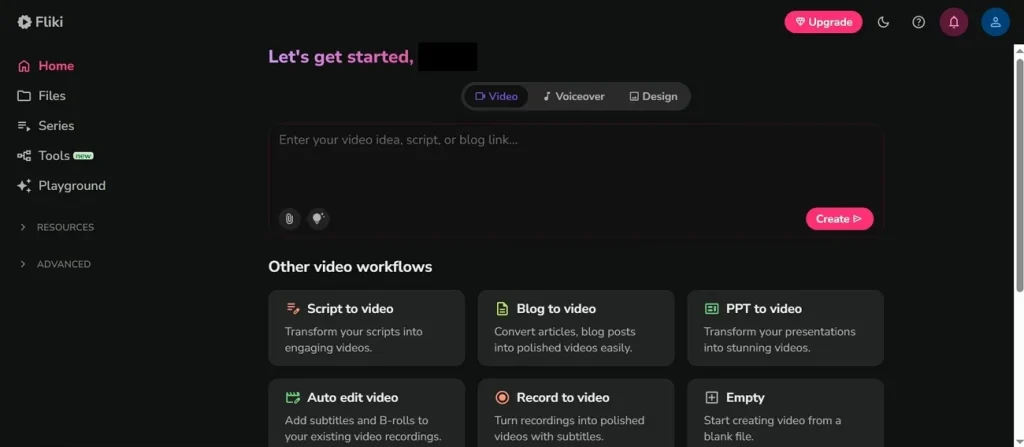
While using this, users can generate an AI video in under 5 minutes. Fliki AI automatically divides content into scenes, matches it with fitting visuals, and adds voiceovers. The tool also adds a realistic AI voiceover from its library of 2000+ voices. Users can generate and share generated content on YouTube, TikTok, Instagram, and Facebook within the tool.
Key Features of Fliki AI
- Language Support: It is capable of supporting 80+ languages, creating videos to clearly convey ideas to the world.
- Subtitle Sync: Fliki provides automatic subtitle creation and precise synchronization with speech to improve comprehension for viewers.
- Scene Editor: Manual control of scene timing and structure to improve storytelling control and flow.
- AI Avatars: Creators can select an avatar that lip-syncs and expresses facial movements to enhance engagement.
- Prompt Enhancement: Fliki improves simple prompts with AI suggestions to produce enhanced scripts and interesting video scenes.
Fliki AI Video Generator Free vs. Paid
This specific section explains the pricing of the Fliki AI tool, which helps you to choose the best one easily:
| Plans | Pricing | Features |
| Free | $0/month | 300 AI voices, 80+ languages, HD 720p exports, basic stock media, AI image generation, watermark included. |
| Standard | $21/month | 1000 AI voices, Full HD 1080p videos, voice cloning, YouTube publishing, integrations, and commercial rights. |
| Premium | $66/month | 2000+ AI voices, 40-minute videos, multiple voice cloning, advanced avatars, brand kits, priority support. |
Part 2. How Fliki AI Video Generator Works
Many creators explore the Fliki AI animation generator for producing quick animated marketing videos. Below are detailed steps showing how the tool converts scripts into engaging visual videos:
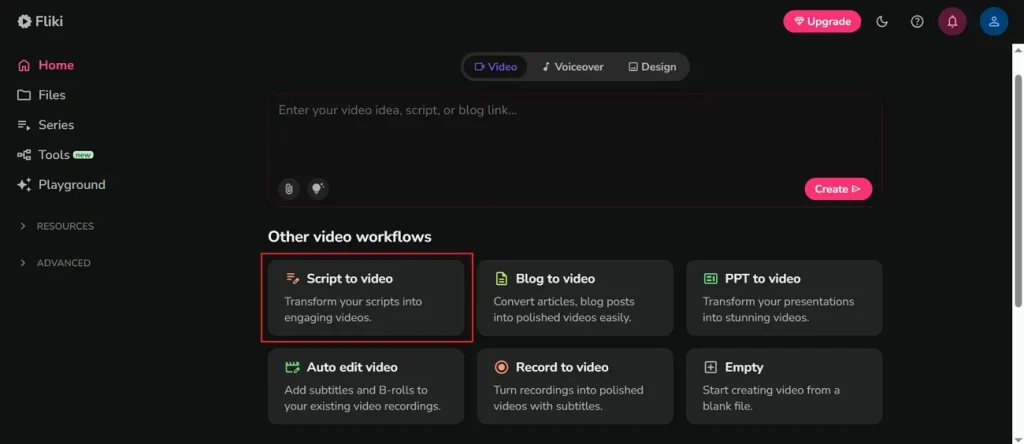
Step 1. Access the official webpage of Fliki AI and choose the Script to Video option from the main screen.
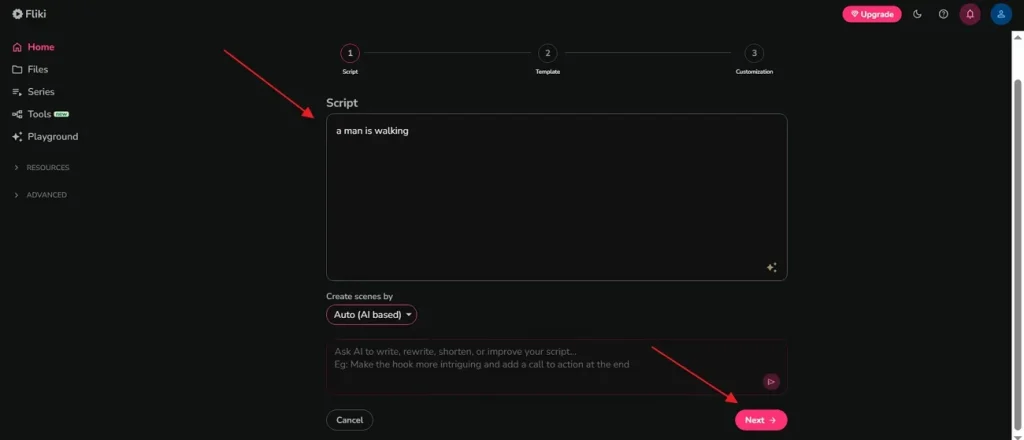
Step 2. After accessing it, describe your idea in the provided Script Box and opt for the Next button.
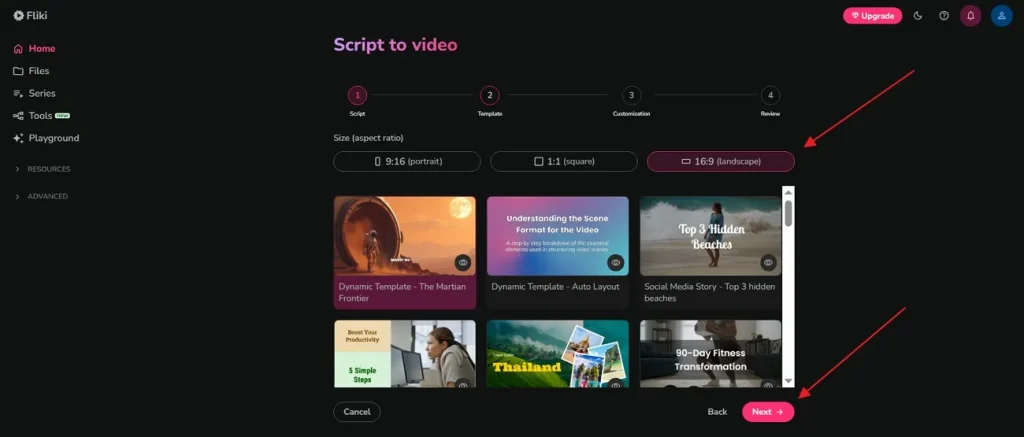
Step 3. Next, select the preferred video Resolution and Templates according to needs, then press Next.
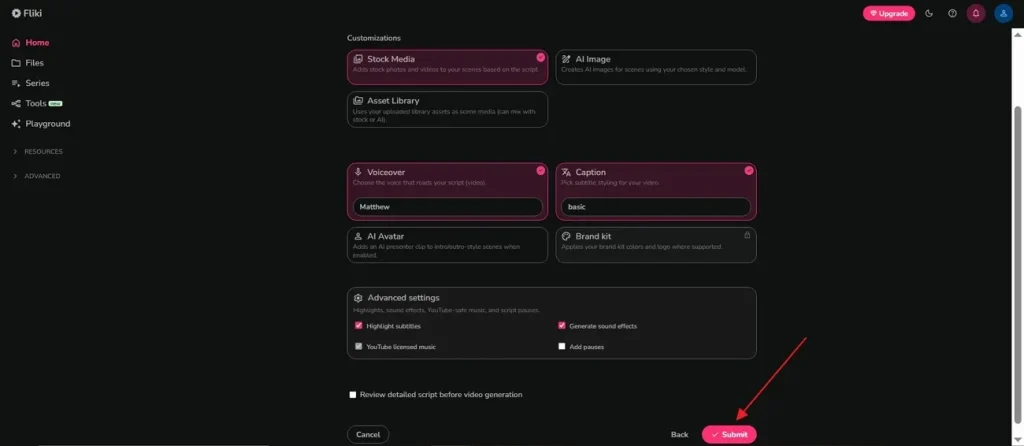
Step 4. In the Customization section, change the settings like Voiceover and Captions according to the video demand. Once all the changes are done, opt for the Submit button to move forward.
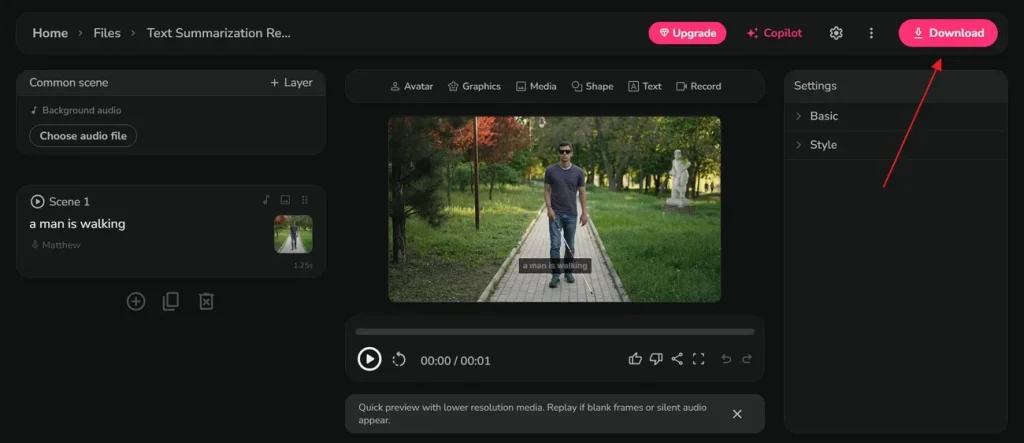
Step 5. At last, when your video is generated, watch it by using the Play icon for clarity. If you are satisfied with the output, opt for the Download button to save it.
Pros and Cons of Fliki AI Video Generator
After knowing how the Fliki AI video generator free works for generating videos, this section provides some of its pros and drawbacks:
Pros
- Support 100+ dialects and regional voice styles to match your specific target audience.
- Natural AI voices improve narration quality for marketing and educational video projects.
Cons
- Supports only 5 MB text files and 1 MB image files for projects.
- Certain AI voices occasionally sound robotic during emotional or complex dialogue delivery.
Part 3. Why Creators Prefer MagicLight AI Over Fliki AI
Although Fliki AI is great for creating AI visuals, some generated videos still appear generic, reducing creativity for modern creators. Due to such restrictions, users often explore a professional Fliki AI alternative for better results. To address these limitations, MagicLight AI provides smarter video-generation tools with cinematic visuals and improved customization controls. This dedicated platform supports long-form video creation up to 50 minutes for detailed storytelling projects.
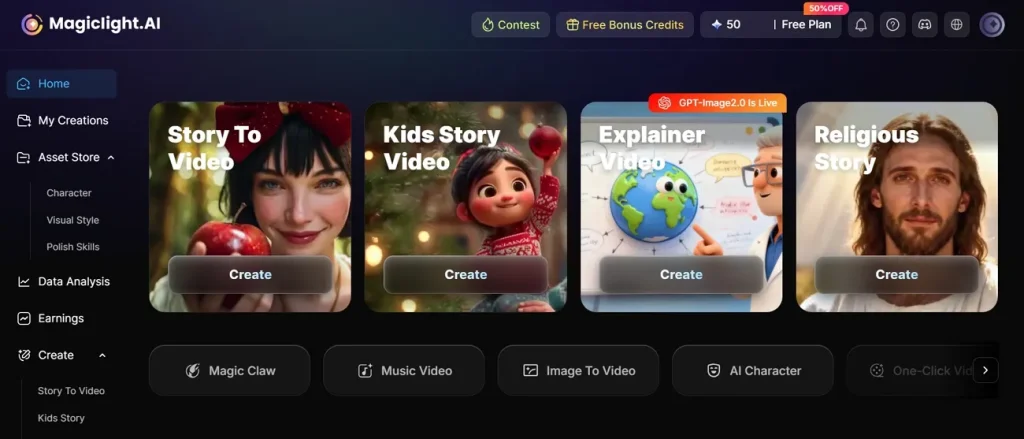
It has Nano adjustments feature that enables micro-level scene control, including poses, clothing, expressions, and movements. With this tool, you can access 37 AI voiceovers with cloning support for realistic narration in multiple styles. MagicLight AI also supports 11 languages for global storytelling and localized video production across different regions. This platform supports 12 advanced story models, including GPT-5.5 and Gemini 3, for generating cinematic video.
Key Features
- Avatar System: AI avatars with expressions and lip-sync enhance storytelling and audience engagement effectively.
- Director Mode: Different 8 director modes allow controlling camera movement and storytelling direction with complete scene flow.
- Animation Convert: Converts storyboard into animation using 16 different rendering models for enhanced visual storytelling.
- Script Length: Supports up to 12000 characters of script input for long and detailed video storytelling creation.
- Character Consistency: Maintains consistent characters across scenes to ensure smooth storytelling without visual identity breaks.
Detailed Comparison of MagicLight AI Versus Fliki AI Video Tools
Choosing the right video creation tool requires understanding your video needs. Thus, below is a detailed comparison table of Fliki AI text-to-video and MagicLight AI based on performance and key specs:
| Feature | Fliki AI | MagicLight AI |
| Video Duration | Up to 40 minutes | Up to 50 minutes |
| Story Control | Basic editing tools | Advanced storyboard control |
| Character Consistency | Limited consistency | Strong cross-scene consistency |
| Voice Library | 2000+ standard voices | 37 high-quality cloned voices |
| Script Capacity | Standard input length | Up to 12000-character scripts |
| Scene Editing | Basic scene adjustments | Nano-level scene refinement |
| Avatar Quality | Basic AI avatars | Expressive character avatars |
| Character Design | Limited customization | Advanced character builder |
Conclusion
To conclude, video creation is evolving rapidly and staying competitive means using tools that evolve with it. Modern creators need more powerful tools to scale video production. Fliki AI works well for basic content but struggles with advanced storytelling demands. Because of this gap, users require a more flexible and cinematic video solution. Eventually, MagicLight AI stands out with stronger customization and long-form video capabilities.
FAQs on Fliki AI
1. Can Fliki AI convert text to video?
Yes, Fliki AI can easily convert written text into engaging video content. The software automatically selects fitting stock footage based on your specific text. It then adds clear subtitles and lifelike voiceovers to finish the project.
2. Does Fliki AI support animations?
Fliki AI supports basic animations through automated scene transitions and effects. It uses stock visuals and AI tools to create smooth video movement. Alternatively, MagicLight AI offers more advanced cinematic animation control and storytelling features.
3. What are the limitations of the Fliki AI free plan?
The free plan includes a watermark on all exported videos and limited credits. Users also get restricted voice options and lower video quality exports only. For unlimited creation times, creators often choose MagicLight AI for their work.
4. Is Fliki AI good for YouTube videos?
Fliki AI is good for creating short YouTube videos and simple explainers. However, MagicLight AI is better for long stories up to 50 minutes. This app keeps characters looking exactly the same across every single scene.
5. What are the best Fliki AI alternatives?
There are many alternatives, but MagicLight AI is the strongest option available. It offers better storytelling, animation control, and long-form video generation features. Creators prefer it for more professional and creative video production results.





![How to Write a Script for a Video 2026 [Full Guide]](https://blog-new.magiclight.ai/wp-2/wp-content/uploads/video-script-writing-setup-300x199.jpg)