


In 2026, many creators want one simple place to turn quick ideas into strong visual content with AI. Tools like OpenArt AI promise to handle images, characters, and short videos so you stay on the main story. Credit limits and the learning curve can still slow your everyday creative process.
This review explains what the platform does well, where it feels restrictive, and how safe it is to use. You will also see a faster AI option for content creation and a clear comparison to help you choose.
Part 1. What Is OpenArt AI?
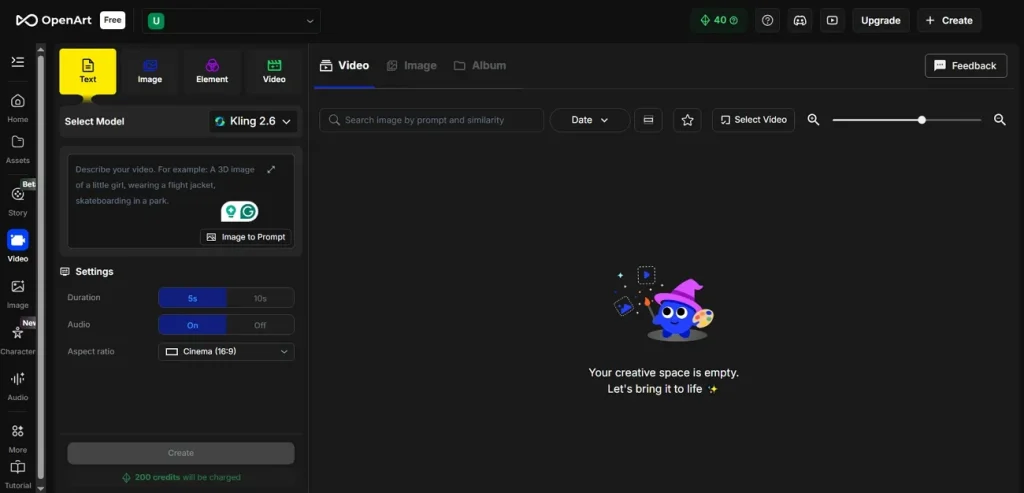
OpenArt AI is an online studio that helps people turn simple ideas into visual stories. It lets regular users create clips and longer videos without needing to learn complex editing skills. You can write prompts, upload images, and let the tool handle movement and visual style.
The platform supports text-to-video, so short lines of text become full, moving scenes quickly. It also supports image to video, turning still frames into shots with motion, depth, and camera moves.
Key Features of OpenArt AI
- Multiple Video Models: You can choose advanced motion engines, including Kling 3.0 and Seedance 2.0, within a single workspace. Different models help match cinematic, fast social clips, or stylized content needs very precisely.
- Longer Video Creation: Scene blocks chain together to build 3 to 5-minute videos. This helps turn short concepts into full-story videos, ready for platforms and campaigns.
- 3D World-building: A single image or prompt can become a full, explorable 3D world. You can walk through that world, frame shots, and capture scenes for later use in a video.
- Reusable Creative Spaces: Worlds and scenes are saved so you can adjust and shoot new content anytime. This makes it easier to keep consistent settings and style across many different projects.
Pros
- Integrated lip sync makes talking characters match voices very closely.
- Upscale tools sharpen soft video outputs without leaving the platform.
- Supports high resolutions, including 4K exports on supported video models.
- Easy export for website banners and backgrounds from generated video clips.
Cons
- Some models lock advanced settings behind higher-priced credit tiers.
- Exports can show artifacts on faces during fast or complex motion.
- Aspect ratio changes sometimes require extra runs or manual reframing work.
- Heavy 3D world videos can drain credits much faster than expected.
Part 2. How to Use OpenArt.AI?
Now you know what it is and what it offers, many users might wonder how to use it in real projects. So, follow the steps below to get started with the OpenArt AI video generator and move from idea to finished clip:
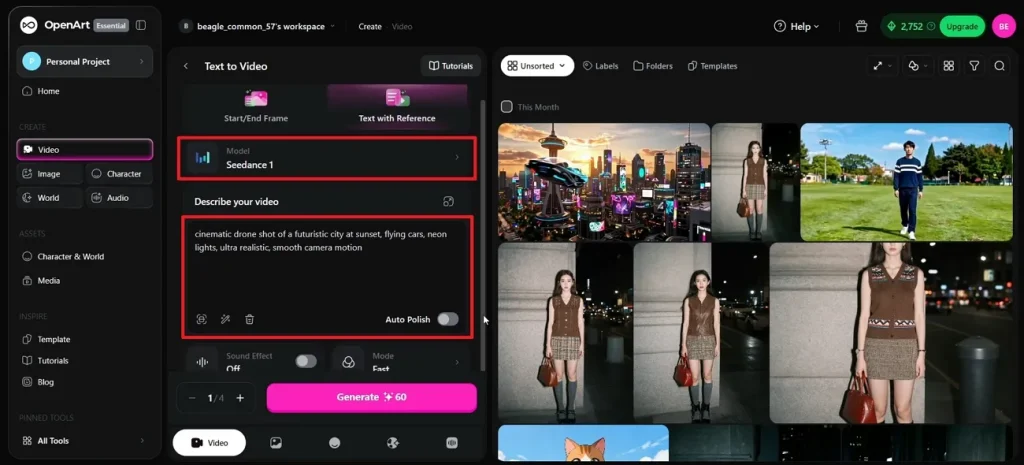
Step 1. Once you enter the main interface, choose the “Text to Video” mode. Next, enter the prompt in the text box and select an AI video model, such as Seedance 2.0. Now, click the “Enhance Prompt” button to further improve the prompt.
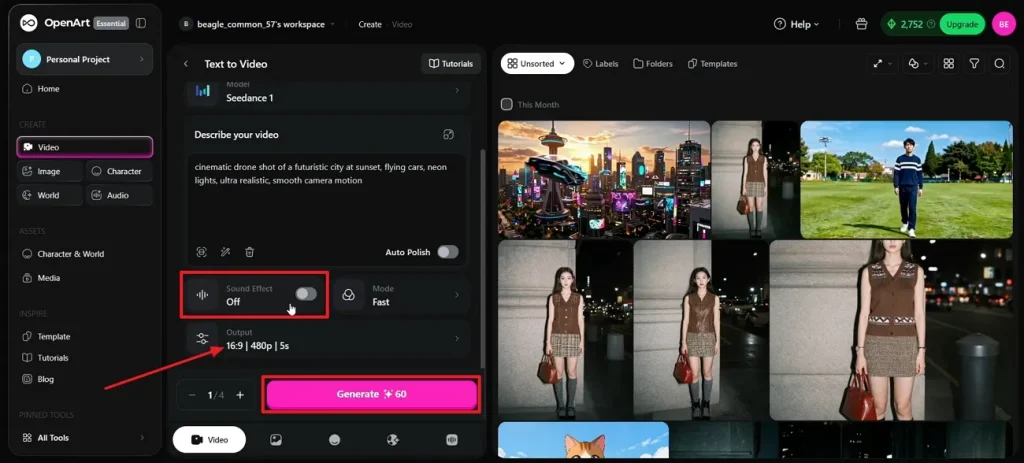
Step 2. Next, enable the “Sound Effect” option and select an appropriate resolution, length, and aspect ratio. Once done, press the “Generate” button.
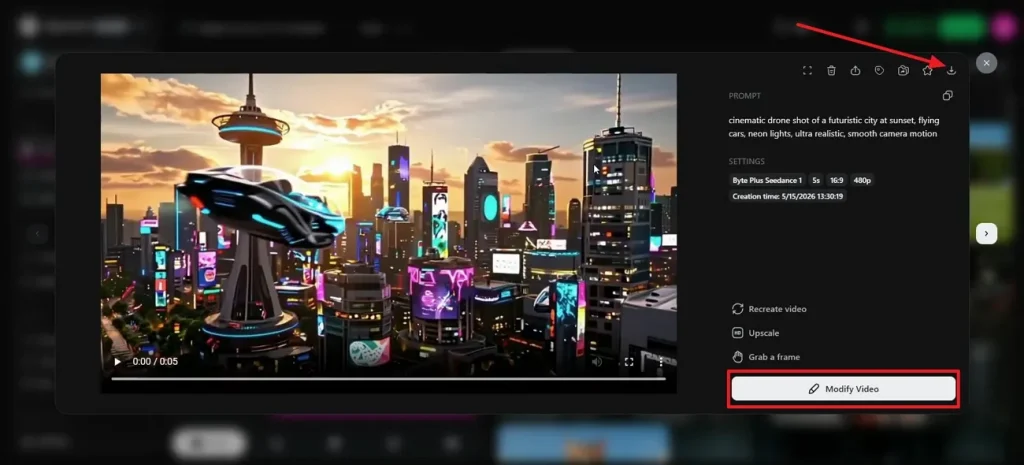
Step 3. After the video is generated, play the video. If any amendments are required, press the “Modify Video” button. Once done, press the “Download” icon to save the final video.
Is OpenArt AI Safe to Use?
Many creators search “Is OpenArt AI safe?” before trusting it for real projects. The platform adds an IP Safety Check that scans your images for copyright and likeness risks before publishing. It uses this tool to label results as a warning, so you can fix issues before using them commercially. You should still avoid uploading sensitive personal content and review licensing for big commercial projects.
Part 3. Why Magiclight.AI Is Better for Fast AI Content Creation?
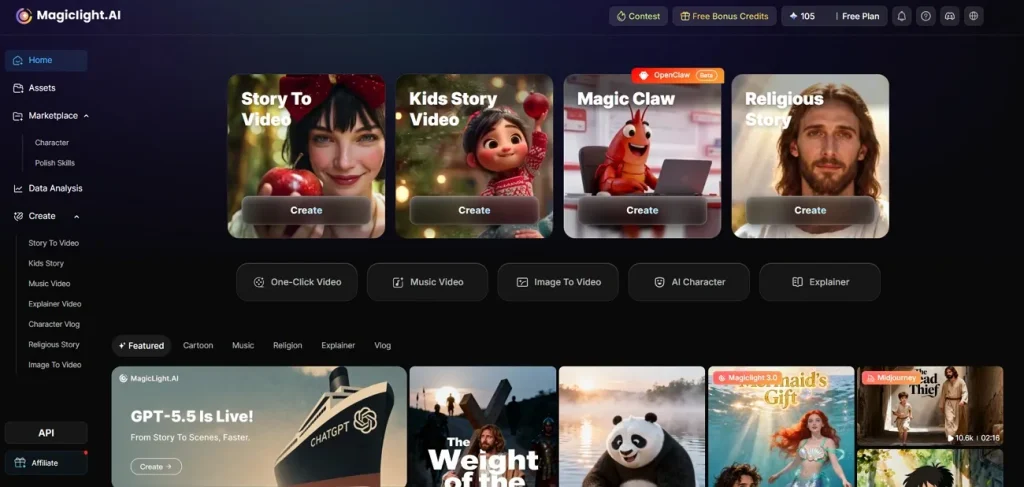
Many creators try OpenArt AI and still feel slow, limited, or stuck managing complex visual workflows. This is where Magiclight.AI comes in, giving a faster pipeline from idea to finished video. Its image-to-video tools turn single designs into smooth, story-ready shots with rich motion control.
Advanced video engines like Veo 4 and Gemini 3 Flash focus on sharp detail and stable movement. The Story to Video feature reads your idea or script and auto-builds scenes, characters, and timing. With one place for prompts, storyboards, voices, and export, it keeps content production fast and very focused.
Key Features
- Long AI Videos Creation: Build extended videos from one idea, reaching up to around fifty minutes.
- Guided Production Flow: Follow a clear path from first concept through script, generation, review, and export.
- Stable AI Characters: Keep faces, outfits, and body shapes steady across every scene in your video.
- Structured Story Builder: Grow short prompts into full stories with defined openings, middles, and endings.
Comparing OpenArt AI and Magiclight.AI
After reading this OpenArt AI review, some people still want a direct, side‑by‑side comparison. So, look at the table below to see which platform better fits your current video creation workflow:
| Feature | OpenArt AI | Magiclight.AI |
| Supported Languages | 15 distinct languages | 11 distinct languages support |
| Video Models Available | 7 integrated video models | 19 AI video models |
| Max Video Length | About 3 to 5-minute videos | Up to about 50-minute videos |
| Output Video Format | Standard HD exports for social platforms | 1080p, long‑form exports tuned for YouTube episodes |
| Workflow Style | Flexible sandbox for experiments | Guided flow from script to final export |
| Pricing | 40 free credits, Essential plan starting from $14/seat/month | Free usage, Standard plan starting from $12/month |
Conclusion
To conclude, OpenArt AI gives you a flexible space to test ideas, build characters, and create short visual stories. After that, Magiclight.AI steps in as the faster option for long, structured videos from scripts or prompts. So, if your priority is speed, length, and guided storytelling, Magiclight.AI is the more focused tool.
FAQs on OpenArt AI
1. Is OpenArt AI safe for creators?
OpenArt adds an IP Safety Check that flags copyright, brand, and likeness risks before publishing. It still makes sense to avoid sensitive personal data and double-check terms for commercial work.
2. Can OpenArt AI generate videos?
Yes, OpenArt AI can create videos from text or images using several built-in video models. If you mainly want faster, longer videos, Magiclight.AI is usually the better dedicated choice.
3. What is the OpenArt consistent character feature?
It lets you lock a character’s face and style, then reuse them across images and videos. You can pose characters, place them in scenes, and keep them recognizable in every shot.
4. Does OpenArt AI support anime art styles?
Yes, OpenArt includes anime-style generators and tools for building consistent anime characters. You can pick styles, tweak details like hair and eyes, then refine outputs as needed.
5. Does OpenArt AI work on mobile devices?
There is an OpenArt video-generation app available on iOS in the App Store. For long videos and quick production on mobile, many creators prefer using Magiclight.AI instead.


![How to Write a Script for a Video 2026 [Full Guide]](https://blog-new.magiclight.ai/wp-2/wp-content/uploads/video-script-writing-setup-300x199.jpg)