


Most of the time, you have a brilliant concept for a new character or complex scene, but you are stuck waiting for desktop software to render. In this case, you can rely on AI tools to handle heavy graphics and prompt generation directly in your browser.
To that end, tools like SeaArt AI come to the list, but you wonder whether it's worth using in 2026. As a quick answer to this, review this detailed guide and explore the perks and pitfalls of SeaArt AI.
Part 1. What Is SeaArt AI?
SeaArt AI is an AI-powered online community platform that lets you create images and videos in one place. The tool can be accessed as an application and includes features such as text-to-image generation and image editing. In addition, the tool hosts nearly a million community-contributed and official AI models, such as FLUX, Stable Diffusion variants, and custom styles.
Key Features of SeaArt AI
To further uncover this SeaArt AI review, let’s explore its key aspects in detail:
- Text-to-Image & Image-to-Image: The tool lets you open an image or a URL as the source to create images, videos, songs, or characters. In this regard, it features ControlNet & LoRA Integration for precise controls over the character pose, composition, and art styles. Users can choose from up to 4 output options for creating an image or a 5-10 second video.
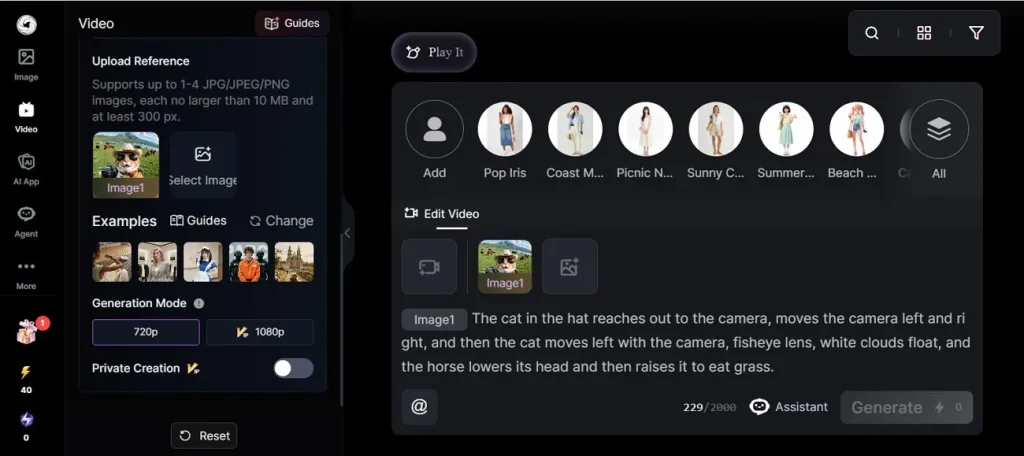
- Model Training: In addition to the image or URL, you can upload “Works” from their database for training. Hence, this allows users to create consistent characters and achieve repeatable aesthetics. The tool also has a Negative Prompt option and can enable Fixed Seed settings.
- AI Audio: Users can also use the Text-to-Speech tool to customize tones and character voices for story narration. Nonetheless, the tool is very cluttered as there are too many options and advertising popups can baffle, making users seek SeaArt AI alternative free options.
- Story Creation: From using Flow Agent to Quick Short options, the tool can generate or upscale an image and apply custom LoRAs. Instead of opening multiple different tools one by one, beginners and experts can complete an entire project in just one click.
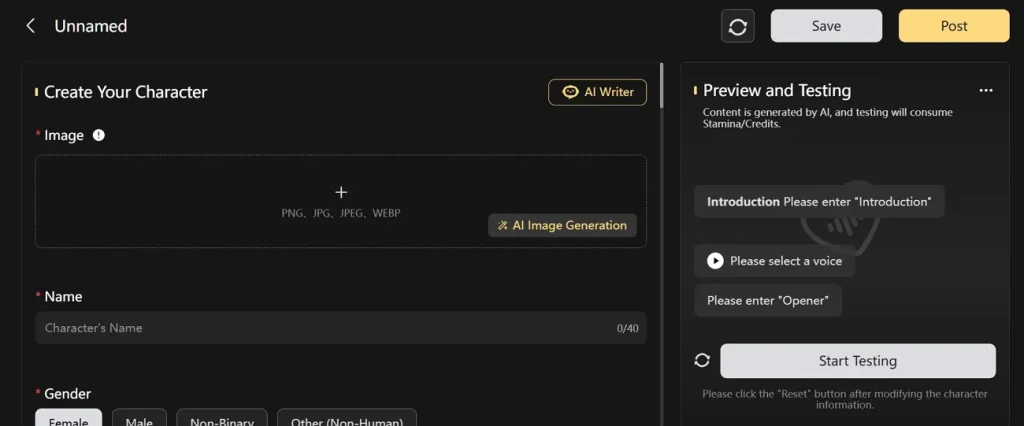
- AI Characters: The tool allows you to design characters to communicate with by using the "Reply Me" option. Users can choose between Advanced and Quick Modes to select character settings or use an image as a reference. In terms of settings, you can set Introduction, name, gender, or import an image in JPG/JPEG, PNG, or WEBP format.
- AI Editing Tools: Users can either add 1-8-second videos or select the Edit option on the created content. Through this, they can choose character styles or add the sample videos or images within the clips to make changes.
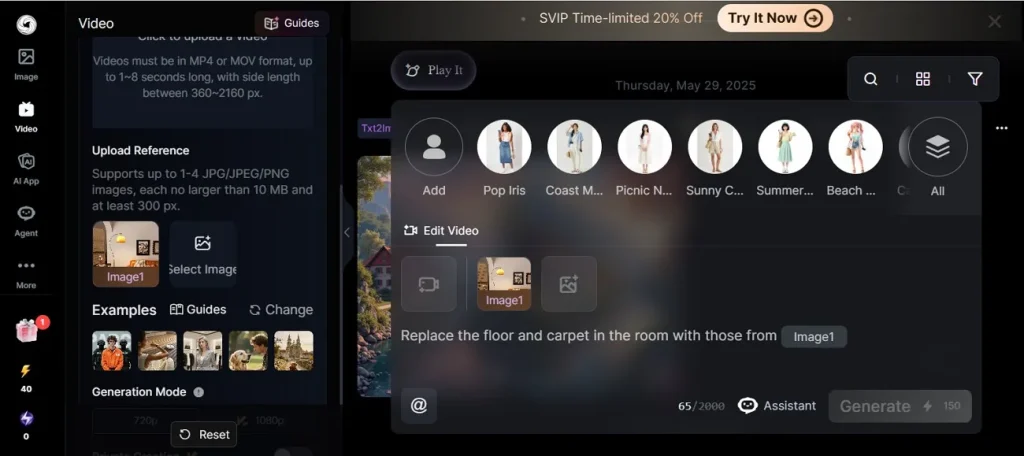
However, the process is tied to the Pro version, as free credits are limited to 1 image or video creation. There, users can swap faces, remove background, upscale, and in-paint/out-paint for personalization.
Is SeaArt AI Free? How To Use It?
Whether you want to use the SeaArt AI face swap or upscale tool, pricing concerns are common to all users. The tool uses a freemium model, and on your first sign-up, you get enough 150-200 free credits to create 1 AI image or video. Once it ends, users have to pay, and the following table lists its monthly and yearly charges:
| Plans | Pricing | Daily Stamina Allowance |
| Monthly | Beginner: $5.99 Standard: $25.49 Professional: $50.99 Master: $127.49 | 300 1800 4000 12000 |
| Yearly | Beginner: $4.79 Standard: $20.99 Professional: $38.99 Master: $89.99 |
Beyond price, you might wonder, “Is SeaArt AI safe?” and how I can use it. If so, let’s take the image/text-to-video tool as an example and see how much it works:
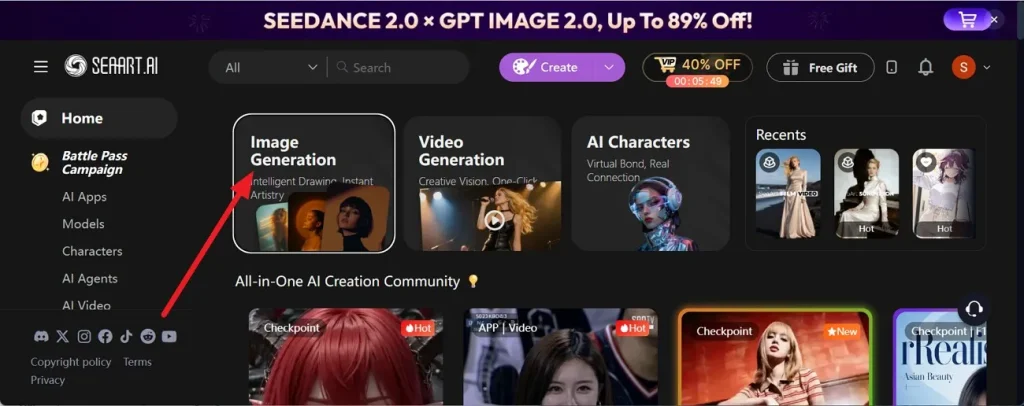
Step 1. On the main interface, pick the Image Generation tool to continue content creation.
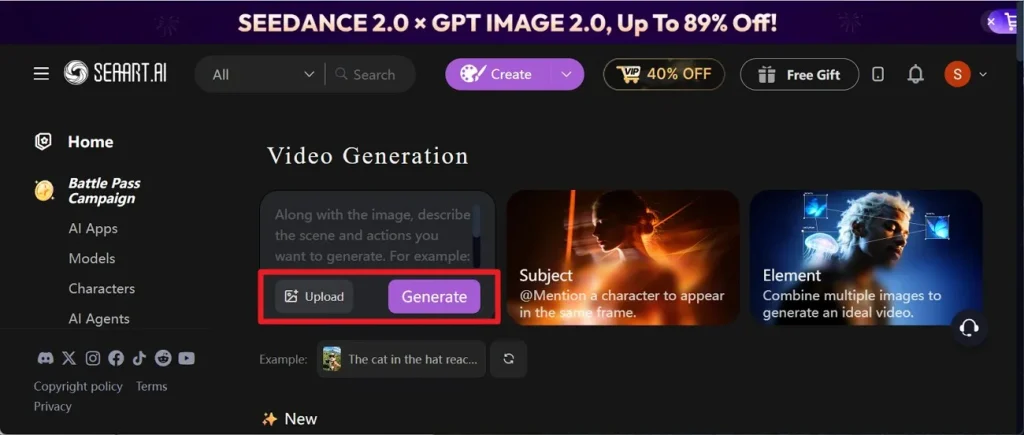
Step 2. After that, tap the Upload option, then add the detailed prompt to select the Generate button.
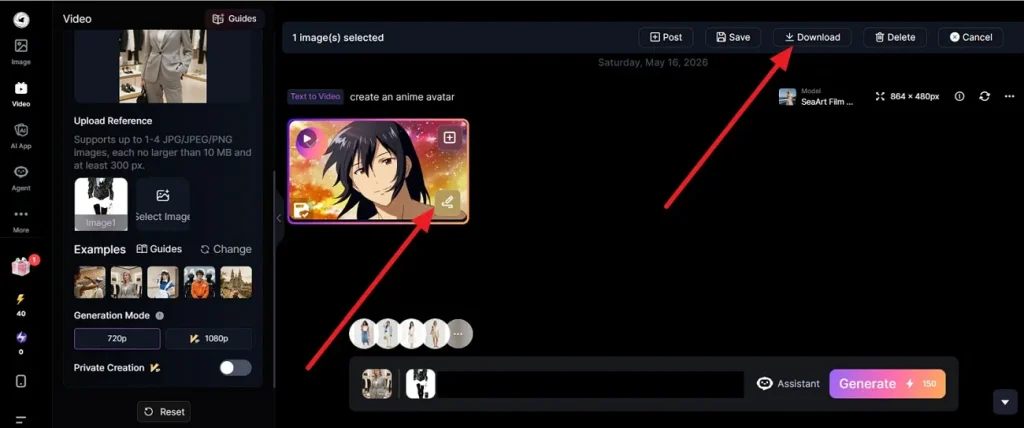
Step 3. When the video is created, select Edit for further changes or choose Download.
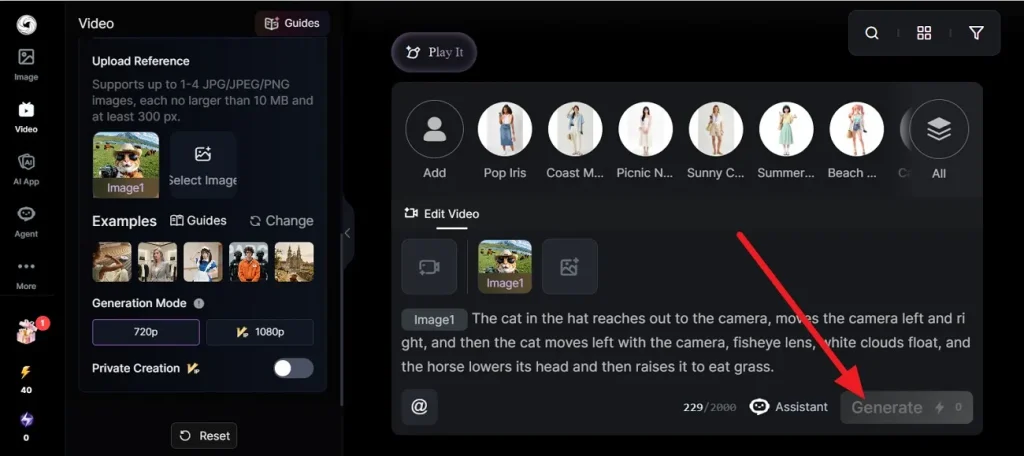
Step 4. For editing, you can sample images or video within the prompt and press Generate to get final, edited results.
SeaArt AI Review [Pros & Cons To Know]
Those who have used the SeaArt AI video generator or any other tool have shared mixed reviews. Keeping that aside, go through the mentioned pros and cons to wonder if it's worth buying:
Pros
- Over a million free community styles and models available.
- Options for upscaling, background removal, and editing images.
- Handles text, images, video, audio, and chat characters together.
- Gives free daily renewal stamina to generate artwork.
Cons
- Top professional features require high monthly subscription fees.
- Free tier versions include visible stamps on your images.
- Expert settings like ComfyUI are hard for new users to navigate.
- Heavy video and high-res tasks quickly drain daily credits.
- Limited options and video duration are available for Story and video generation.
Part 2. Why Creators Prefer MagicLight AI Over SeaArt AI?
Since the SeaArt AI image generator takes time and the edit is manual, prompt & image import tasks, materials seek a simple, automated solution. In this case, MagicLight AI comes with Story to Video, which takes a simple prompt and creates diversified video content. Just by typing the detailed prompt, users can have AI-generated outcomes in seconds and avail 240-300 free credits.
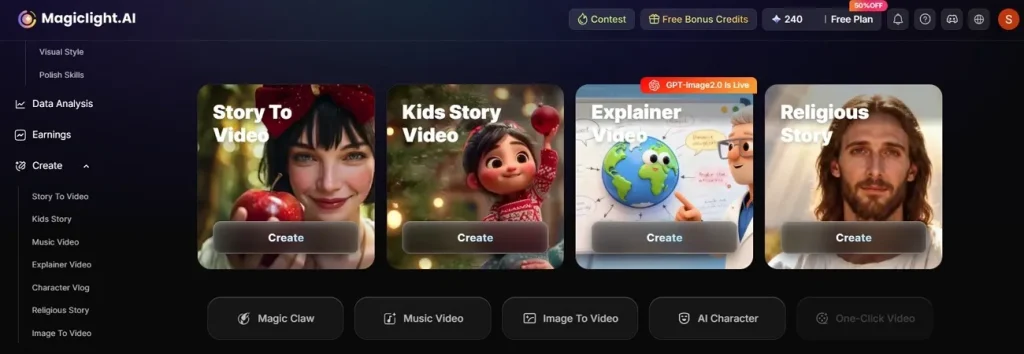
Furthermore, the tool functions on multiple video AI models, including Seedance 2.0 Fast, Kling, Hailuo 2.3 Fast, VEO 3.1, etc. Unlike SeaArt, the 11Labs and Minimax speech 2.8 audio and Suno music models help create compelling sounds in the videos. To meet image needs, Midjourney, MagicLight 3.0, 2.2, and 2.0 make 3D animation and realistic image creation seamless.
Key Features
If you want to make a sound choice in this SeaArt AI review, review and compare the MagicLight AI features:
- Story & Character Production: The tool supports story creation, allowing you to generate long-form videos up to roughly 50 minutes long. In addition, you can choose from 9 AI models, pick 11 languages, and add a prompt of up to 1200 words. It can automatically write full story structures and narratives for your videos.
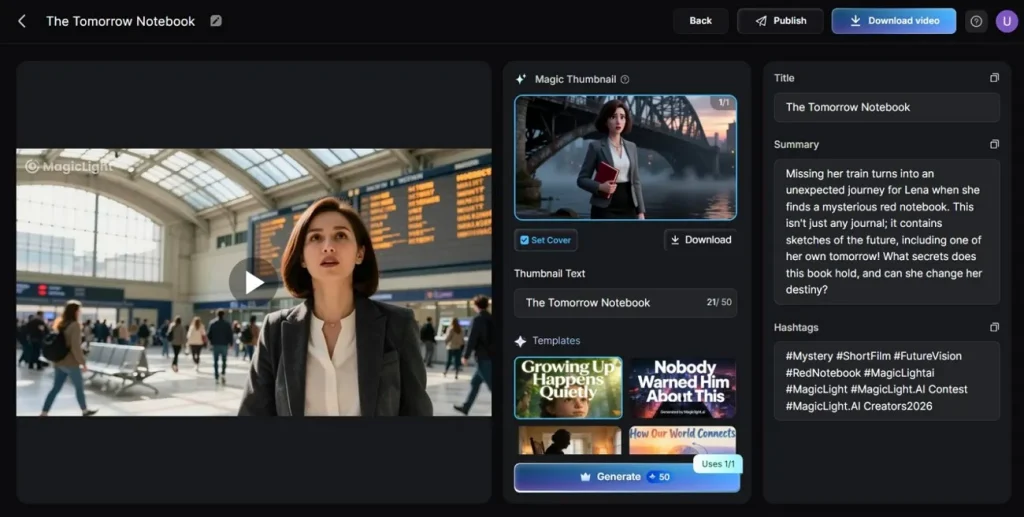
Users can also create kids' stories and choose from 7 different templates, like rainbow or friends. The video duration lasts up to 10 minutes, and you can also enable character generation. By choosing 14 models for video creation or 16 for animation stories, you can get consistent consistent characters, depicted in the story. In terms of stories, you can also make religious stories of up to 10 minutes and choose from 9 models and 37 voiceovers.
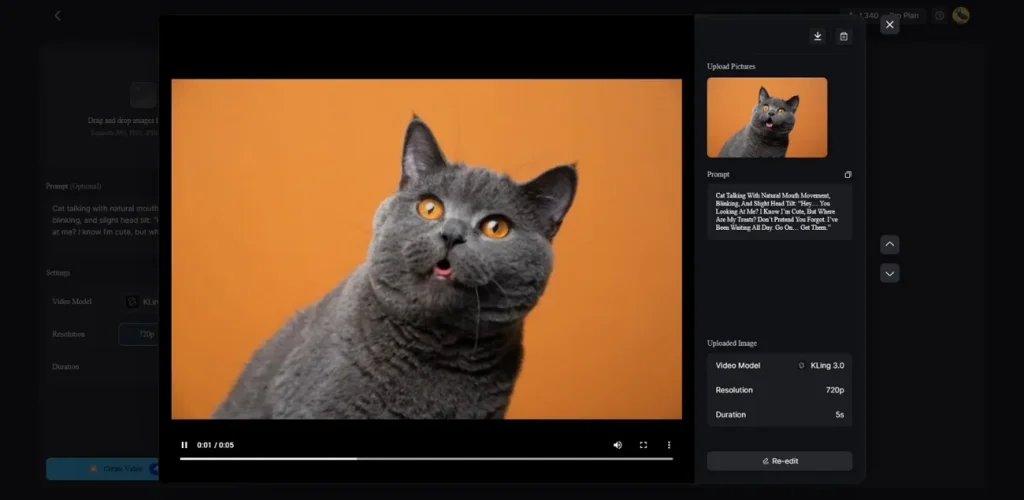
- Image to Video: To turn images into a video, you can pick 19 different models and create up to 15 seconds of video. Users can add up to 19 reference images at once in JPG, PNG, or JPEG, up to a 10 MB file limit. Just by adding a 1500-word prompt, you can get a high-quality edit video that you can re-edit or save at 720p.
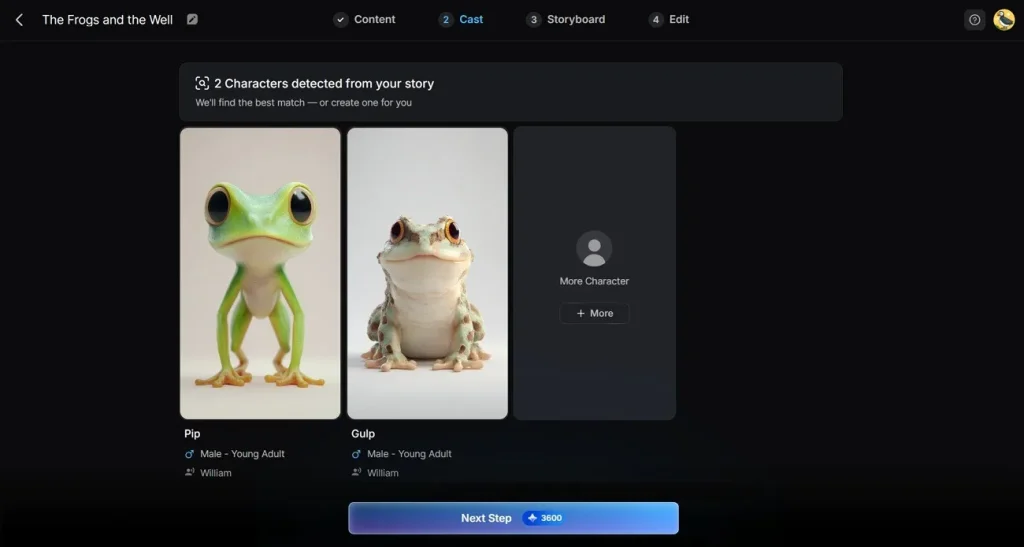
- AI Character Creation: Other than extracting the consistent characters from the story, users can generate characters with MagicLight AI. Unlike SeaArt AI, you get the option to name the characters in 50 characters as it's created by adding a 1000-word prompt. In this case, you can use models like MagicLight 2.0, Midjourney V7, MagicLight 2.2, and MagicLight 3.0, which can be re-edited.
- Voice & Audio Options/Finishing Touches: This tool offers 7 different AI voices that you can filter by accent, gender, and age. It also has voice cloning capabilities and 40 background music tracks. Apart from that, it produces video covers automatically, has 21 cover templates, 16 subtitle styles, and exports video at 720p or 1080p.
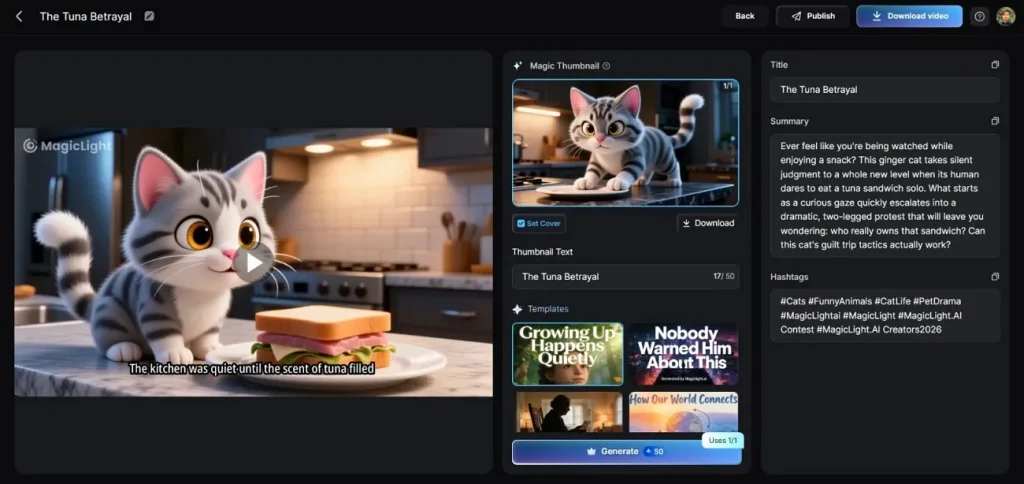
SeaArt Vs MagicLight AI: Feature Comparison Table
Since the MagicLight AI outshines the SeaArt AI video tools, make the final decision via the mentioned table:
| Metric | MagicLight AI | SeaArt AI |
| Max Video Duration | Up to ~50 minutes (Story to Video) | Short clips: 5, 10, or 15 seconds per generation |
| Long-Form Script Support | Up to 12,000 words | Short prompts/sentences optimized for brief clips |
| Workflow Scope | End-to-End (Concept > Storyboard > Voiced Video > Publisher) | Asset-focused Creation (Prompt/Image > Animated Clip) |
| Native Audio Integration | Built-in AI music generation, 40 background tracks, 37 voices, and voice cloning | AI Lip-Sync tool; supports importing short external audio (3-30s) |
| Model Infrastructure | (Kling, Veo, GPT-5, Claude) managed under targeted project templates | (980k+ community image models, ControlNet, Kling 3.0, Veo 3) |
Conclusion
If you want to make long videos with better AI models and easy edit options, SeaArt AI is not the right choice. Instead, you can use MagicLight AI to create long videos in different styles and choose from 19 different models to create videos of 15 seconds to 50 minutes.
FAQs on SeaArt AI
1. Is SeaArt AI safe?
Yes, it is a legitimate and standard platform, though you should avoid uploading highly confidential images. Since your public creations can be viewed or used by others in the community, you can use MagicLight AI instead.
2. Is SeaArt AI free to use?
Yes, it offers a generous free tier, but they can create only 1 image or video. Therefore, you can use MagicLight AI, which gives you 240-300 free credits and advantageous plans.
3. What is SeaArt AI image generator?
It is an online, community-driven AI tool that uses text prompts or uploaded images to effortlessly create high-quality digital art.
4. What are SeaArt AI alternatives?
MagicLight AI is an alternative that focuses on converting ideas and stories into complete videos. It ensures consistent characters, automated scripting, and multi-platform scheduling.
5. Is SeaArt AI good for beginners?
Yes, it is highly beginner-friendly, but MagicLight AI is an even simpler alternative for beginners because of its AI-induced system with easy-to-process features.





![How to Write a Script for a Video 2026 [Full Guide]](https://blog-new.magiclight.ai/wp-2/wp-content/uploads/video-script-writing-setup-300x199.jpg)